.CR2 文件扩展名

Canon Raw 2 Image

开发者 Canon
受欢迎程度
4.0  |  312 
 
🔍使用File Helper直接在您的网络浏览器中打开 .CR2 文件在线查看

什么是 CR2 文件?

A CR2 file is a digital photo saved in the Canon Raw 2 format. Various Canon digital cameras, including the EOS 1D Mark IV and EOS 450D, save photos in the CR2 format. Notably, CR2 files contain a losslessly-compressed copy of the image data a camera's Charged Coupled Device (CCD) captured. Thus, CR2 files often have large file sizes (and contain high-quality images).

更多信息

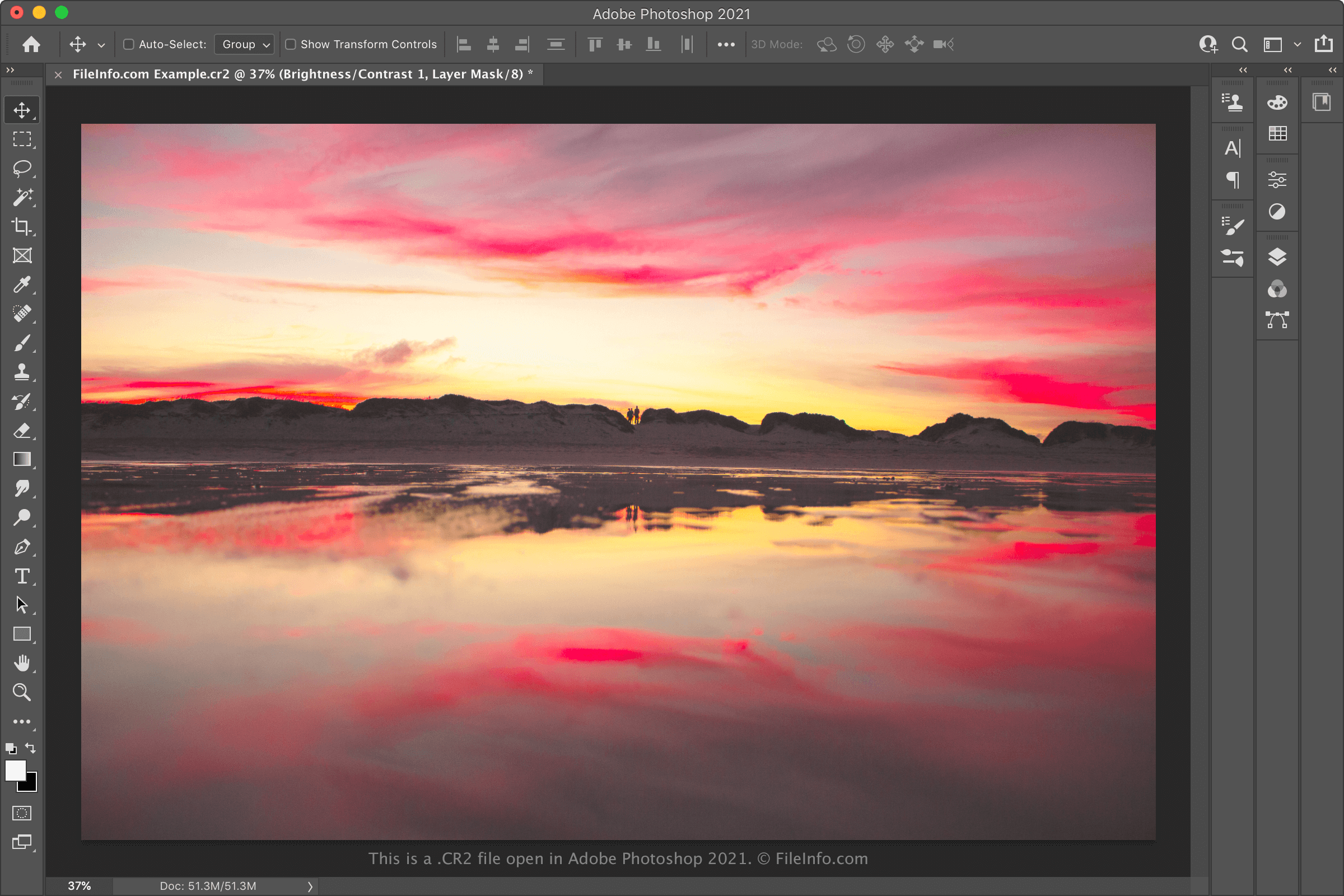
在 Adobe Photoshop 中打开的 .cr2 文件截图
在 Adobe Photoshop 中打开的 CR2 文件

Typically, professional-grade digital cameras save photos as camera raw files. Camera raw files contain an unprocessed copy of all the data a camera captured when taking a photo. Retaining all this data allows photographers to, among other things, edit their photos more precisely and print them at higher quality. (In contrast, non-professional cameras usually process and compress photos before storing them as .JPG files.)

Each manufacturer's digital cameras save photos in their own particular camera raw formats. Most Canon cameras released between 2004 and 2018 save photos in the CR2 format (extended from TIFF). This format replaced Canon's previous camera raw format, .CRW, with the release of the EOS 20D. It has itself been replaced by the .CR3 format, with the release of the EOS M50.

When to use (and not use) CR2 files

Professional and hobbyist photographers often import CR2 files into Canon photo-editing software and other photo editors, like Adobe Photoshop. They then use these programs to edit and/or print the photos their CR2 files contain. So, if you're looking to edit or print a high-quality photo, you may want to keep your photo saved in the CR2 format and open it with a professional image editor.

On the other hand, if you want to share the photo a CR2 file contains, you'll likely want to convert it to JPG or .PNG. Doing so will reduce the file's size considerably, making it easier to share. Just be aware that converting a CR2 file will discard some of the camera raw data the file contains. Thus, you may want to create a copy of your CR2 file before converting it, if you plan to edit or print your photo in the future.

如何打开 CR2 文件

You can open CR2 files with any of the following image viewers and editors:

If you're looking to edit the image a CR2 file contains, opening it in Adobe Photoshop is likely your best bet. Photoshop contains a comprehensive suite of image-editing tools and can export CR2 files in many common image formats.

如何转换 CR2 文件

Various image editors and viewers, including Adobe Photoshop, Apple Preview, and IrfanView, can convert CR2 files to other formats.

For example, Adobe Photoshop can convert CR2 files to the following formats:

  • .JPG - JPEG image
  • .PNG - Portable Network Graphic
  • .TIFF - Tagged Image File Format
  • .BMP - Bitmap image
  • .GIF - Graphical Interchange Format
  • .PDF - Portable Document Format
  • .PSD - Photoshop Document

Apple Preview can convert CR2 files to the following formats:

  • .JPG - JPEG image
  • .PNG - Portable Network Graphic
  • .TIFF - Tagged Image File Format
  • .HEIC - High Efficiency Image Format
  • .PDF - Portable Document Format

可打开 CR2 文件的程序

Mac
操作系统自带
操作系统自带
Linux
免费
MATE with Atril Document Viewer
免费
免费
Web
操作系统自带
iOS
操作系统自带
Chrome OS

Poser Character Rigging File

开发者 Bondware
受欢迎程度
3.2  |  21 
 

3D character data file used by Poser, a 3D human modeling program; includes information about the figure's joints and bones, including where and how much they bend; may also contain information about morphs that are built into the figure; may be imported by various third-party programs.

更多信息

注: Poser was originally developed by Smith Micro, but was sold to Bondware in June 2019.

可打开或引用 CR2 文件的程序

Mac
分类: 3D 图像
更新时间: 2020-04-15

验证者 FileInfo.com

FileInfo.com 团队 独立研究了本页面列出的所有文件格式和软件程序。 我们的目标是达到 100% 的准确率,并且仅发布我们已验证过的文件类型信息。

如果您想为此页面提出新增或更新建议,请告诉我们