

.SRT Extensão de arquivo
Arquivo de legendas SubRip
| Desenvolvedor | Brain, T.V. Zuggy, mrSHADOW, Yakov, ai4spam, Blood |
| Popularidade |
3,8 | 789 Votos |
O que é um arquivo SRT?
Um arquivo SRT contém texto de legendas e informações de tempo no formato de arquivo SubRip, um dos formatos mais comuns para fornecer legendas para vídeos, incluindo vídeos online. Muitos reprodutores de mídia, incluindo VideoLAN VLC media player e MPlayer, e sites de transmissão de vídeo online, como o YouTube, são compatíveis com legendas SRT. Os usuários também podem abrir e editar arquivos SRT com editores de legendas e de texto, pois eles armazenam texto simples.
Mais informações
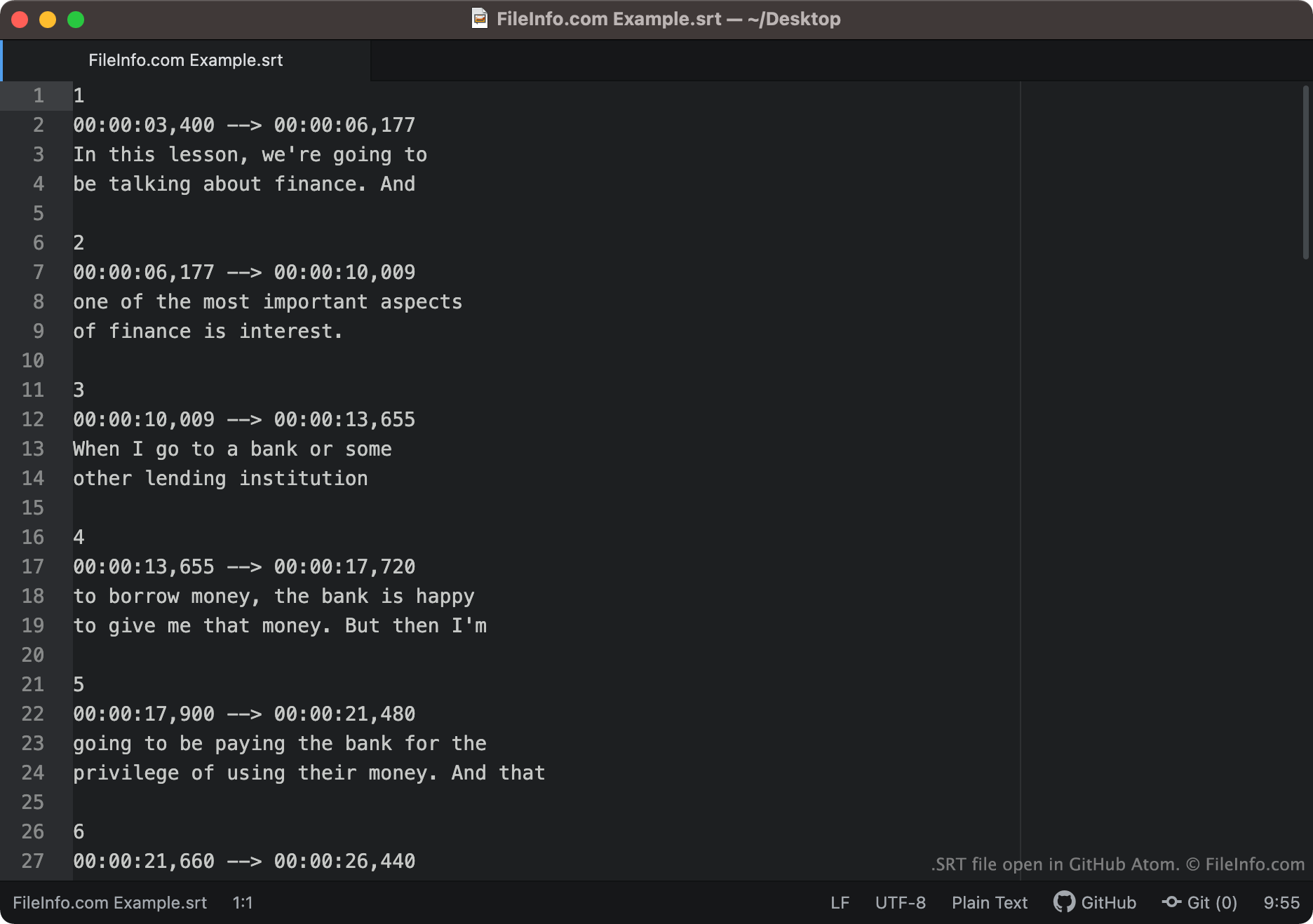
O texto das legendas e as informações de tempo salvos no formato SubRip aparecem de maneira semelhante ao exemplo a seguir:
1
00:00:03,400 -> 00:00:06,177
In this lesson, we're going to
be talking about finance. And
2
00:00:06,177 -> 00:00:10,009
one of the most important aspects
of finance is interest.
Os reprodutores de mídia carregam cada segmento de um arquivo SRT em ordem, mostrando o texto de cada segmento durante o período ao qual esse texto está associado. Os códigos de tempo nos arquivos SRT são escritos no formato HH:MM:SS,MIL. Assim, a primeira linha do texto mostrado acima apareceria na tela aos 3,004 segundos e desapareceria aos 6,00177 segundos.
As coordenadas de exibição podem aparecer depois do código de tempo final de cada segmento. Se um segmento não contiver coordenadas de exibição, seu texto aparecerá na parte central inferior da tela.
Nomes de arquivo .SRT comuns
[moviename].eng.srt - Os nomes de arquivos de legendas geralmente incluem uma referência ao idioma das legendas incluídas. Por exemplo, um arquivo SRT cujo nome inclui .eng provavelmente contém legendas em inglês, enquanto um arquivo SRT cujo nome inclui .ger provavelmente contém legendas em alemão.
Como abrir um arquivo SRT
Você pode abrir arquivos SRT de várias maneiras. A maneira mais comum é adicionar legendas a vídeos em reprodutores de mídia usando arquivos SRT. Exemplos de reprodutores de mídia compatíveis com arquivos SRT incluem:
- VideoLAN VLC media player (multiplataforma)
- MPlayer (multiplataforma)
- CyberLink PowerDVD (Windows)
Por exemplo, para usar um arquivo SRT como faixa de legendas no VLC media player:
- Abra o VLC media player e comece a reproduzir o vídeo com o qual deseja usar seu arquivo SRT.
- Na barra de menus do VLC Media Player, selecione .
- Navegue até seu arquivo SRT e abra-o.
Você também pode abrir arquivos SRT com um editor de legendas ou de texto. Por exemplo, você pode abrir e editar um arquivo SRT com o Aegisub ou qualquer editor de texto (incluindo o Microsoft Notepad ou o Apple TextEdit).
Como verificar se as legendas SRT estão formatadas corretamente
Você pode verificar se as legendas de um arquivo SRT estão formatadas corretamente enviando o arquivo SRT para o Subtitle Validator online. Para enviá-lo, selecione o botão "Choose File" e selecione o arquivo SRT.