

.SRT Estensione file
File di sottotitoli SubRip
| Sviluppatore | Brain, T.V. Zuggy, mrSHADOW, Yakov, ai4spam, Blood |
| Popolarità |
3,8 | 789 Voti |
Che cos'è un file SRT?
Un file SRT contiene testo per sottotitoli e informazioni sulla temporizzazione nel formato di file SubRip, uno dei formati più comuni per fornire sottotitoli per i video, inclusi quelli online. Molti lettori multimediali, tra cui VideoLAN VLC media player e MPlayer, e i siti di streaming video online, come YouTube, supportano i sottotitoli SRT. Gli utenti possono anche aprire e modificare i file SRT con editor di sottotitoli e di testo, poiché contengono testo normale.
Maggiori informazioni
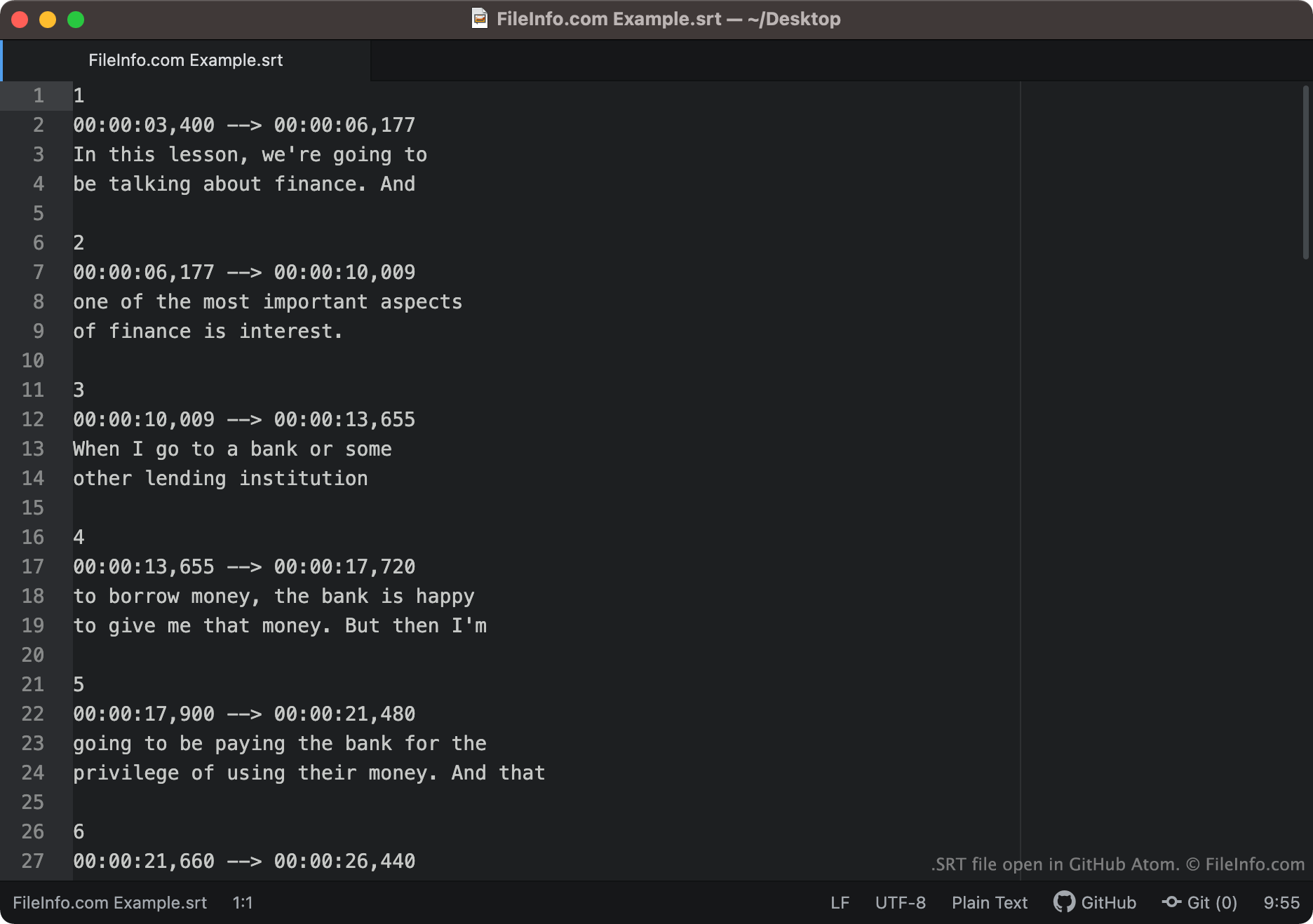
Il testo dei sottotitoli e le informazioni sulla temporizzazione salvati nel formato SubRip hanno un aspetto simile al seguente:
1
00:00:03,400 -> 00:00:06,177
In this lesson, we're going to
be talking about finance. And
2
00:00:06,177 -> 00:00:10,009
one of the most important aspects
of finance is interest.
I lettori multimediali caricano ogni segmento di un file SRT in ordine, mostrando il testo di ciascun segmento durante l'intervallo di tempo a cui è associato. I codici temporali nei file SRT sono scritti nel formato HH:MM:SS,MIL. Pertanto, la prima riga di testo mostrata sopra apparirebbe sullo schermo al secondo 3.004 e scomparirebbe al secondo 6.00177.
Le coordinate di visualizzazione possono comparire dopo il codice temporale di fine di ogni segmento. Se un segmento non contiene coordinate di visualizzazione, il testo apparirà al centro nella parte inferiore dello schermo.
Nomi file .SRT comuni
[moviename].eng.srt - I nomi dei file dei sottotitoli includono spesso un riferimento alla lingua dei sottotitoli contenuti. Ad esempio, un file SRT il cui nome include .eng probabilmente contiene sottotitoli in inglese, mentre un file SRT il cui nome include .ger probabilmente contiene sottotitoli in tedesco.
Come aprire un file SRT
È possibile aprire i file SRT in diversi modi. Il modo più comune consiste nell'aggiungere sottotitoli ai video nei lettori multimediali tramite file SRT. Ecco alcuni esempi di lettori multimediali che supportano i file SRT:
- VideoLAN VLC media player (multipiattaforma)
- MPlayer (multipiattaforma)
- CyberLink PowerDVD (Windows)
Ad esempio, per usare un file SRT come traccia dei sottotitoli in VLC media player:
- Apri VLC media player e avvia la riproduzione del video con cui vuoi usare il file SRT.
- Dalla barra dei menu di VLC Media Player, seleziona .
- Individua e apri il file SRT.
Puoi anche aprire i file SRT con un editor di sottotitoli o di testo. Ad esempio, puoi aprire e modificare un file SRT con Aegisub o qualsiasi editor di testo, incluso Microsoft Notepad o Apple TextEdit.
Come verificare che i sottotitoli SRT siano formattati correttamente
Puoi verificare che i sottotitoli in un file SRT siano formattati correttamente caricando il file SRT su Subtitle Validator online. Per caricarlo, seleziona il pulsante "Choose File" e seleziona il file SRT.