

.SMI Estensione file
File di sottotitoli SAMI
| Sviluppatore | Microsoft |
| Popolarità |
2,8 | 13 Voti |
Un file SMI è un file di sottotitoli in testo normale scritto nel formato SAMI (Synchronized Accessible Media Interchange). Contiene il testo dei sottotitoli, informazioni sulla temporizzazione e informazioni sullo stile. I file SMI possono essere utilizzati per mostrare i sottotitoli in vari lettori multimediali.
Maggiori informazioni
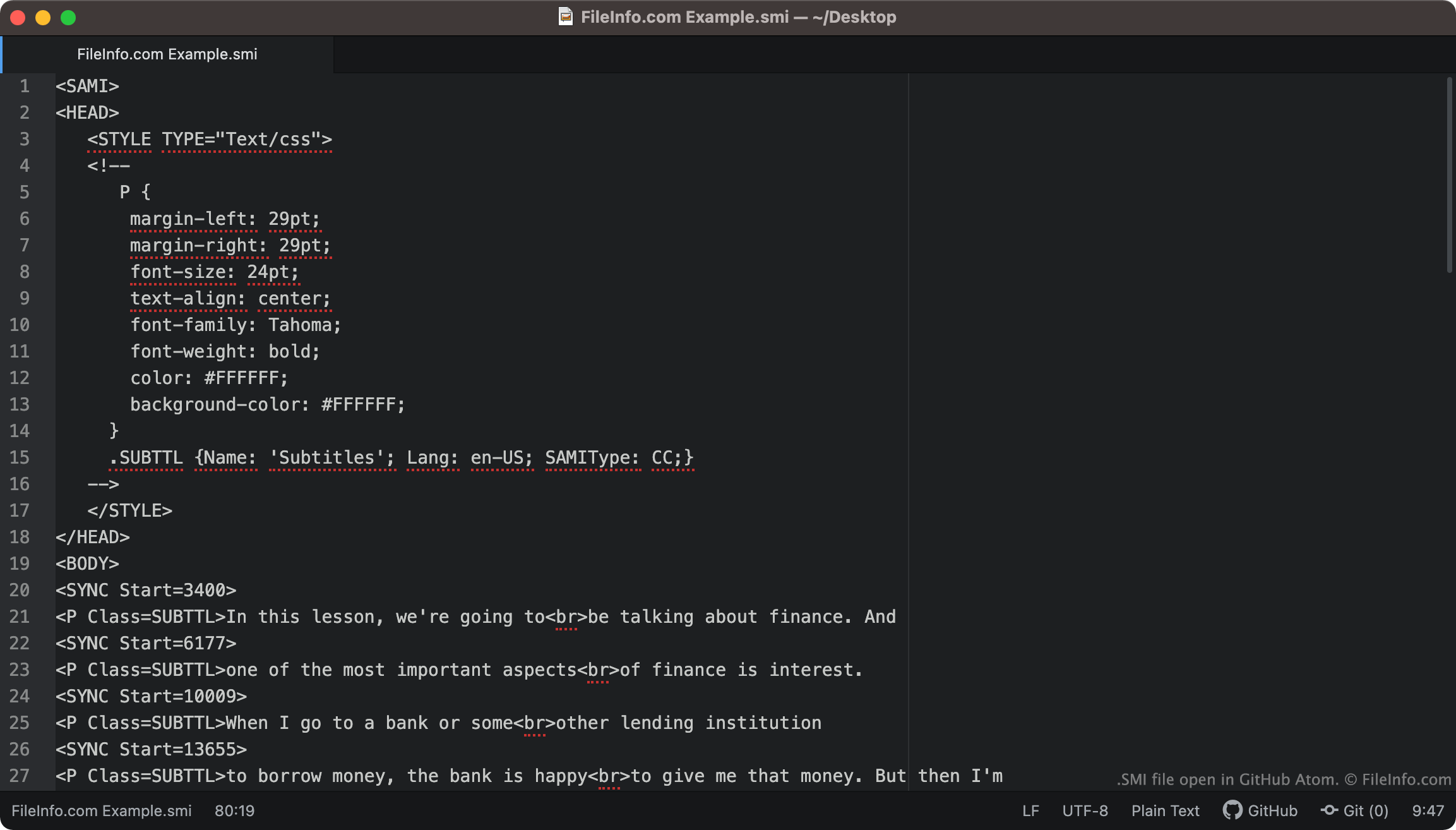
I file SMI includono sempre <SAMI> come prima riga di testo. Il file procede quindi definendo il margine, il carattere, l'allineamento del testo e il colore dei sottotitoli.
I sottotitoli inclusi nel file iniziano dal tag <BODY>. Ogni riga di testo dei sottotitoli è associata a un tag <SYNC Start=>, che specifica quando quella riga di testo appare sullo schermo. In genere, i valori di inizio SYNC sono espressi in millisecondi (quindi una riga di testo associata a <SYNC Start=3400> apparirà 3400 ms dall'inizio di un video).
NOTA: Il formato SAMI è stato sviluppato da Microsoft come estensione di HTML.
Come posso convertire i sottotitoli SMI in sottotitoli SRT?
Il formato di sottotitoli .SRT è più comune del formato SMI. Pertanto, potresti voler convertire i tuoi sottotitoli SMI nel formato SRT.
SubtitleTools.com offre un convertitore chiamato Convert Subtitles to Srt, che puoi utilizzare per convertire i file SMI nel formato SRT. Anche MConverter.eu consente agli utenti di convertire i file SMI nel formato SRT.
Come aprire un file SMI
Puoi utilizzare un file SMI come traccia di sottotitoli nei seguenti lettori multimediali:
- VideoLAN VLC media player (multipiattaforma)
- MPlayer (multipiattaforma)
- Microsoft Windows Media Player (Windows)
Ad esempio, per utilizzare un file SMI come traccia di sottotitoli in VLC media player:
- Apri VLC media player e inizia a riprodurre il video con cui vuoi utilizzare il file SMI.
- Dalla barra dei menu di VLC Media Player, seleziona .
- Individua e apri il file SMI.
Se devi modificare i sottotitoli contenuti in un file SMI, puoi aprire e modificare il file in qualsiasi editor di testo, come Microsoft Notepad (Windows), Apple TextEdit (Mac) o GitHub Atom (multipiattaforma).