.SMI ファイル拡張子

Self-Mounting Disk Image

開発元 Apple
人気度
3.3  |  28 
 

SMIファイルとは?

An SMI file is a disk image file created by Aladdin ShrinkWrap or Apple Disk Copy in Mac OS Classic (Mac OS 9 or earlier). It contains a disk image that mounts as a disk on the Desktop when opened.

詳細情報

SMI files were designed to enable floppy disks and CDs to be available as digital downloads. The files could be double-clicked, which would then load a virtual disk on the Desktop of the computer.

When Mac OS X replaced Mac OS Classic, the "DiskImageMounter" utility was bundled with Mac OS X to mount disk images. Self-mounting images became less popular as SMI files were replaced by .DMG files in Mac OS X.

File Viewer Plusで400種類以上のファイル形式を開けます。無料ダウンロード

SMIファイルを開くプログラム

Mac
Apple Disk Copy
Aladdin ShrinkWrap

SMIL Presentation

開発元 不明
人気度
3.0  |  9 
 

Audiovisual presentation created using the Synchronized Multimedia Integration Language (SMIL); used for multimedia presentations and slide shows; typically contains references to a sequence of media files as well as text and other data.

詳細情報

SMIL files often use the .SMIL extension to avoid confusion with the Mac OS 9 SMI disk image extension. The .smi extension is commonly seen on Windows computers.

SMIファイルを開くプログラム

カテゴリ: ビデオ
更新日: 2020-08-06

SAMI Subtitles File

開発元 Microsoft
人気度
2.8  |  13 
 

An SMI file is a plain text subtitles file written in the SAMI (Synchronized Accessible Media Interchange) format. It contains subtitle text, timing information, and styling information. SMI files can be used to show subtitles in a variety of media players.

詳細情報

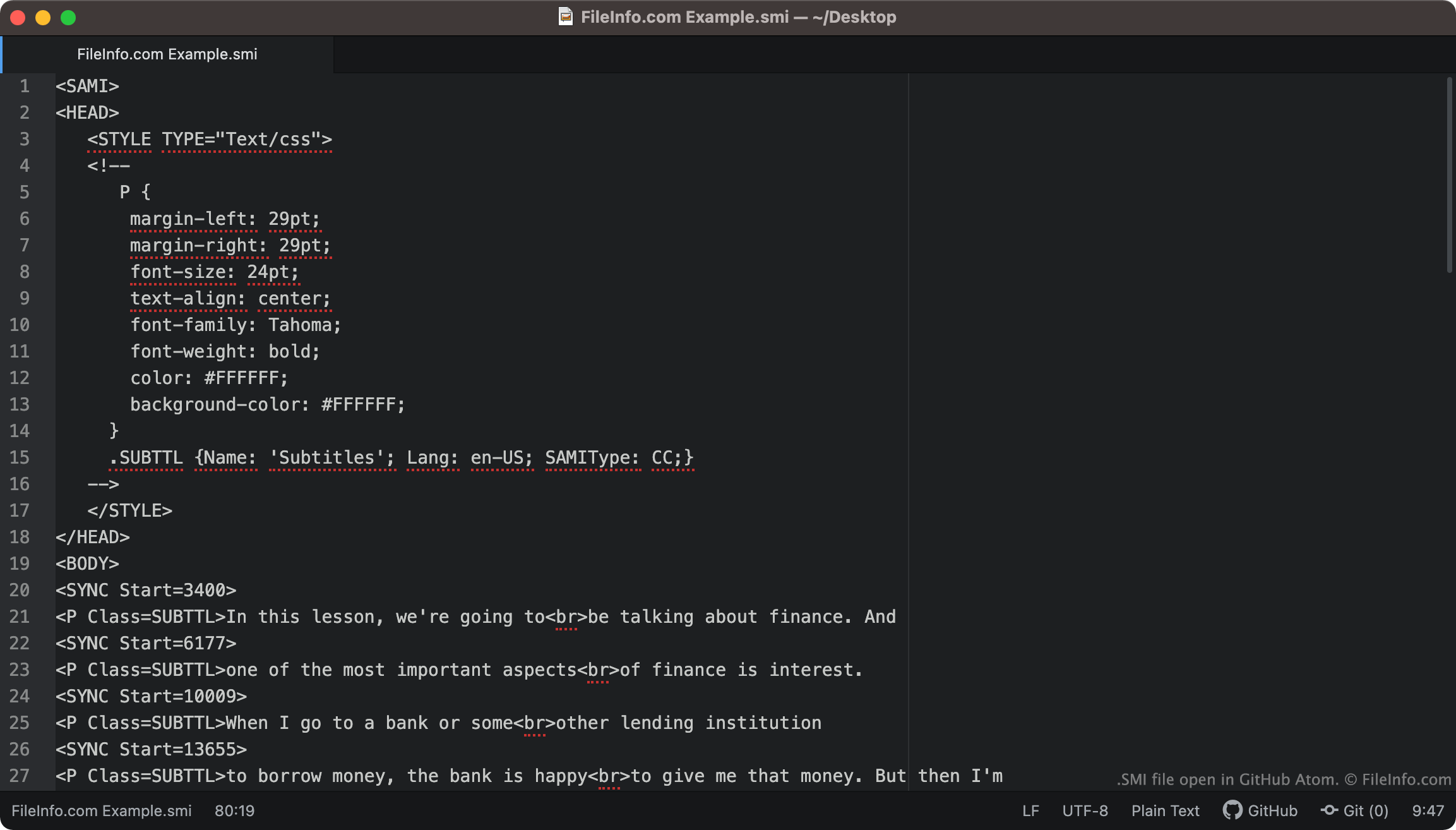
GitHub Atomで開いた.smiファイルのスクリーンショット
GitHub Atomで開いたSMIファイル

SMI files always include <SAMI> as their first line of text. The file then goes on to define its subtitles' margin, font, text alignment, and color.

The file's included subtitles begin at the <BODY> tag. Each line of subtitle text is paired with a <SYNC Start=> tag, which specifies when that line of text appears on-screen. Typically, SYNC Start times are written in milliseconds (so a line of text paired with <SYNC Start=3400> will appear 3400 ms into a video).

注: The SAMI format was developed by Microsoft, as an extension of HTML.

How do I convert SMI subtitles to SRT subtitles?

The .SRT subtitle format is more common than the SMI format. Therefore, you might want to convert your SMI subtitles to the SRT format.

SubtitleTools.com has a converter, called Convert Subtitles to Srt, that you can use to convert SMI files to the SRT format. MConverter.eu also allows users to convert SMI files to the SRT format.

SMIファイルの開き方

You can use an SMI file as a subtitles track in the following media players:

For example, to use an SMI file as a subtitle track in VLC media player:

  1. Open VLC media player and begin playing the video you want to use your SMI file with.
  2. From the VLC Media Player menu bar, select Subtitles → Add Subtitle File ....
  3. Navigate to and open your SMI file.

If you need to edit the subtitles an SMI file contains, you can open and edit the file in any text editor, such as Microsoft Notepad (Windows), Apple TextEdit (Mac), or GitHub Atom (cross-platform).

SMIファイルを開くプログラム

カテゴリ: ビデオ
更新日: 2021-10-15

検証者 FileInfo.com

FileInfo.comチーム は、このページに掲載されているすべてのファイル形式とソフトウェアについて独自に調査しました。 私たちの目標は100%の正確性であり、検証済みのファイルタイプに関する情報のみを公開しています。

このページへの追加や更新をご提案いただける場合は、お知らせください。