

.SMI Dateiendung
SAMI-Untertiteldatei
| Entwickler | Microsoft |
| Beliebtheit |
2,8 | 13 Stimmen |
Eine SMI-Datei ist eine Nur-Text-Untertiteldatei im SAMI-Format (Synchronized Accessible Media Interchange). Sie enthält Untertiteltext, Zeitangaben und Formatierungsinformationen. SMI-Dateien können verwendet werden, um Untertitel in verschiedenen Mediaplayern anzuzeigen.
Weitere Informationen
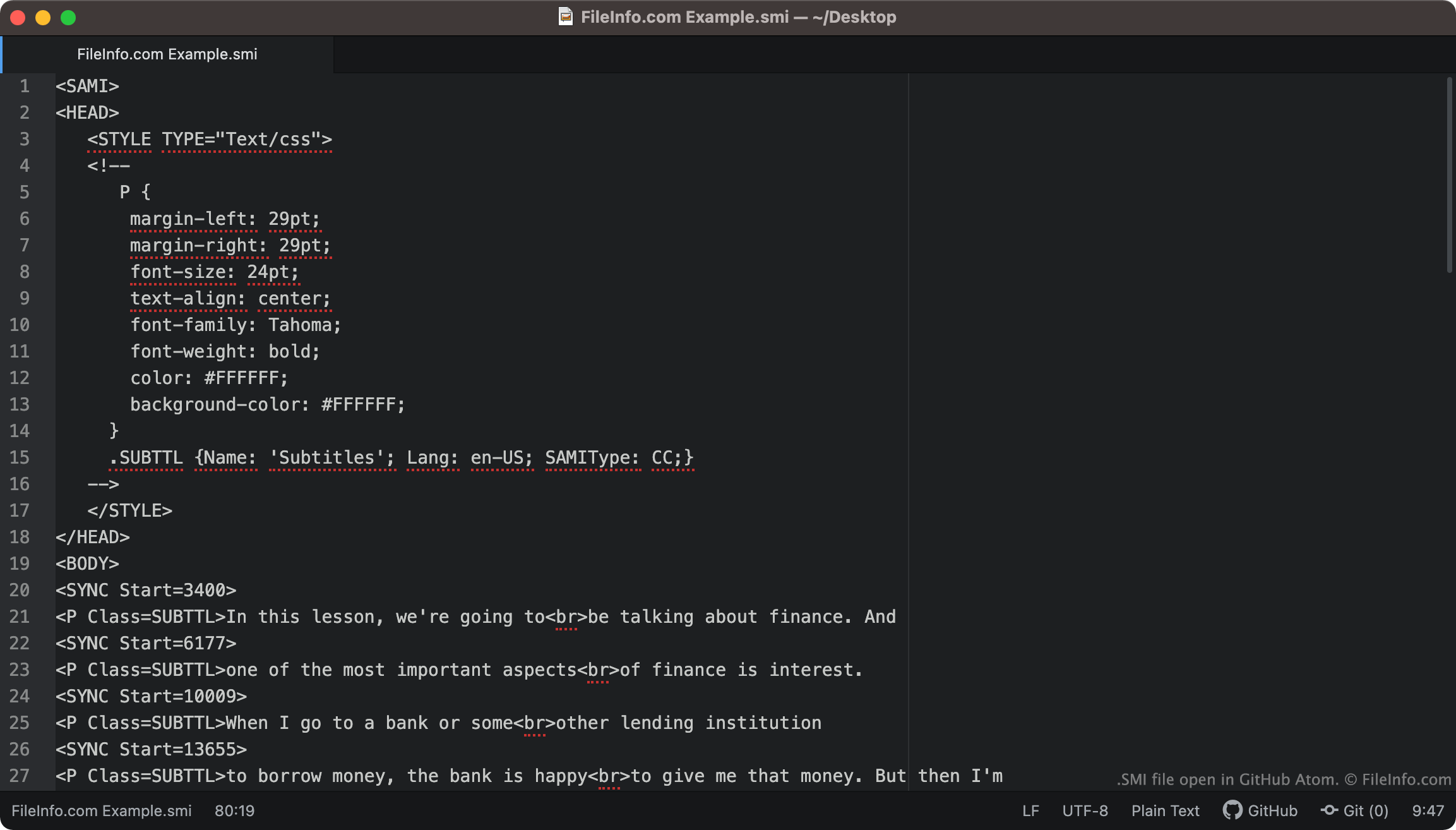
SMI-Dateien enthalten immer <SAMI> als erste Textzeile. Anschließend definiert die Datei den Rand, die Schriftart, die Textausrichtung und die Farbe ihrer Untertitel.
Die in der Datei enthaltenen Untertitel beginnen beim Tag <BODY>. Jede Untertiteltextzeile ist mit einem <SYNC Start=>-Tag verknüpft, der angibt, wann diese Textzeile auf dem Bildschirm erscheint. Normalerweise werden SYNC-Startzeiten in Millisekunden angegeben (eine Textzeile mit <SYNC Start=3400> wird also 3400 ms nach Beginn eines Videos angezeigt).
HINWEIS: Das SAMI-Format wurde von Microsoft als Erweiterung von HTML entwickelt.
Wie konvertiere ich SMI-Untertitel in SRT-Untertitel?
Das .SRT-Untertitelformat ist weiter verbreitet als das SMI-Format. Daher möchten Sie Ihre SMI-Untertitel möglicherweise in das SRT-Format konvertieren.
SubtitleTools.com bietet einen Konverter namens Convert Subtitles to Srt, mit dem Sie SMI-Dateien in das SRT-Format konvertieren können. MConverter.eu ermöglicht es Benutzern ebenfalls, SMI-Dateien in das SRT-Format zu konvertieren.
So öffnen Sie eine SMI-Datei
Sie können eine SMI-Datei in den folgenden Mediaplayern als Untertitelspur verwenden:
- VideoLAN VLC media player (plattformübergreifend)
- MPlayer (plattformübergreifend)
- Microsoft Windows Media Player (Windows)
Um beispielsweise eine SMI-Datei in VLC media player als Untertitelspur zu verwenden:
- Öffnen Sie VLC media player und starten Sie die Wiedergabe des Videos, mit dem Sie Ihre SMI-Datei verwenden möchten.
- Wählen Sie in der Menüleiste von VLC Media Player aus.
- Navigieren Sie zu Ihrer SMI-Datei und öffnen Sie sie.
Wenn Sie die in einer SMI-Datei enthaltenen Untertitel bearbeiten müssen, können Sie die Datei in jedem Texteditor öffnen und bearbeiten, beispielsweise in Microsoft Notepad (Windows), Apple TextEdit (Mac) oder GitHub Atom (plattformübergreifend).