

.SRT Dateiendung
SubRip-Untertiteldatei
| Entwickler | Brain, T.V. Zuggy, mrSHADOW, Yakov, ai4spam, Blood |
| Beliebtheit |
3,8 | 789 Stimmen |
Was ist eine SRT-Datei?
Eine SRT-Datei enthält Untertiteltext und Zeitinformationen im SubRip-Dateiformat, einem der häufigsten Formate für die Bereitstellung von Untertiteln für Videos, einschließlich Onlinevideos. Viele Mediaplayer, darunter VideoLAN VLC media player und MPlayer, sowie Onlin video-Streaming-Websites wie YouTube unterstützen SRT-Untertitel. Da SRT-Dateien unformatierten Text speichern, können Benutzer sie auch mit Untertitel- und Texteditoren öffnen und bearbeiten.
Weitere Informationen
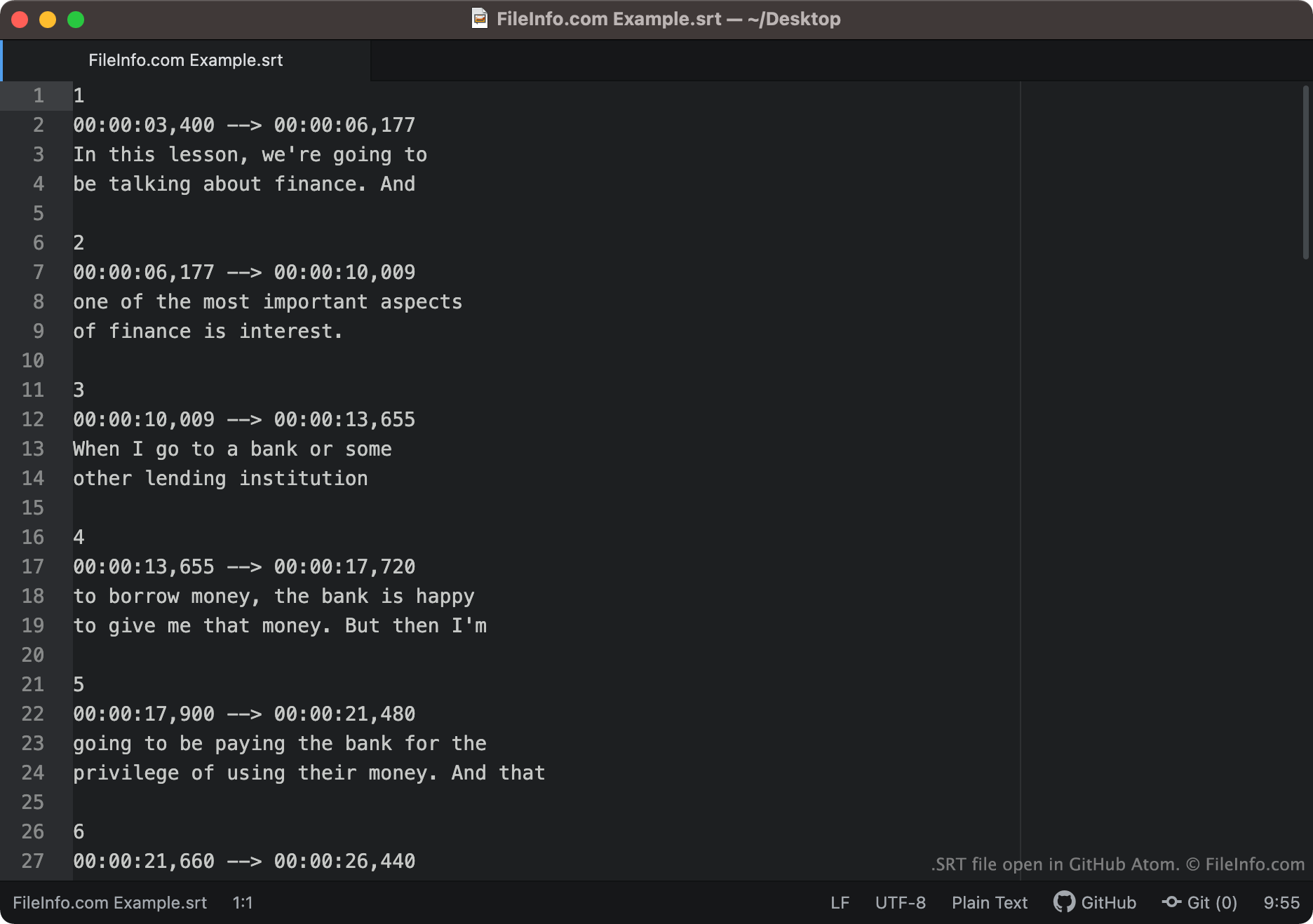
Im SubRip-Format gespeicherter Untertiteltext und Zeitinformationen sehen ähnlich wie folgt aus:
1
00:00:03,400 -> 00:00:06,177
In dieser Lektion werden wir über
Finanzen sprechen. Und
2
00:00:06,177 -> 00:00:10,009
einer der wichtigsten Aspekte
von Finanzen sind Zinsen.
Mediaplayer laden jedes Segment einer SRT-Datei der Reihe nach und zeigen den Text jedes Segments während der Zeit an, der dieser Text zugeordnet ist. Zeitcodes in SRT-Dateien werden im Format HH:MM:SS,MIL geschrieben. Daher würde die erste oben gezeigte Textzeile bei 3,004 Sekunden auf dem Bildschirm erscheinen und bei 6,00177 Sekunden ausgeblendet werden.
Nach dem Endzeitcode jedes Segments können Anzeigekoordinaten stehen. Wenn ein Segment keine Anzeigekoordinaten enthält, erscheint sein Text unten in der Mitte des Bildschirms.
Häufige .SRT-Dateinamen
[moviename].eng.srt - Untertiteldateinamen enthalten oft einen Hinweis auf die Sprache der enthaltenen Untertitel. Beispielsweise enthält eine SRT-Datei, deren Name .eng enthält, wahrscheinlich englische Untertitel, während eine SRT-Datei, deren Name .ger enthält, wahrscheinlich deutsche Untertitel enthält.
So öffnen Sie eine SRT-Datei
Sie können SRT-Dateien auf verschiedene Arten öffnen. Am häufigsten werden SRT-Dateien verwendet, um Untertitel in Mediaplayern zu Videos hinzuzufügen. Beispiele für Mediaplayer, die SRT-Dateien unterstützen, sind:
- VideoLAN VLC media player (plattformübergreifend)
- MPlayer (plattformübergreifend)
- CyberLink PowerDVD (Windows)
Um beispielsweise eine SRT-Datei als Untertitelspur im VLC media player zu verwenden:
- Öffnen Sie den VLC media player und starten Sie die Wiedergabe des Videos, für das Sie Ihre SRT-Datei verwenden möchten.
- Wählen Sie in der Menüleiste des VLC Media Players aus.
- Wechseln Sie zu Ihrer SRT-Datei und öffnen Sie sie.
Sie können SRT-Dateien auch mit einem Untertitel- oder Texteditor öffnen. Beispielsweise können Sie eine SRT-Datei mit Aegisub oder einem beliebigen Texteditor öffnen und bearbeiten (darunter Microsoft Notepad oder Apple TextEdit).
So überprüfen Sie, ob SRT-Untertitel korrekt formatiert sind
Sie können überprüfen, ob die Untertitel in einer SRT-Datei korrekt formatiert sind, indem Sie die SRT-Datei zu Subtitle Validator online hochladen. Um sie hochzuladen, wählen Sie die Schaltfläche "Choose File" aus und wählen Sie die SRT-Datei aus.