

.SRT 파일 확장자
SubRip 자막 파일
| 개발사 | Brain, T.V. Zuggy, mrSHADOW, Yakov, ai4spam, Blood |
| 인기도 |
3.8 | 789 표 |
SRT 파일이란 무엇인가요?
SRT 파일에는 동영상에 자막을 제공하는 데 사용되는 가장 일반적인 형식 중 하나인 SubRip 파일 형식의 자막 텍스트와 타이밍 정보가 포함되어 있습니다. 여기에는 온라인 동영상도 포함됩니다. VideoLAN VLC media player와 MPlayer를 비롯한 많은 미디어 플레이어와 YouTube 같은 온라인 동영상 스트리밍 사이트는 SRT 자막을 지원합니다. SRT 파일은 일반 텍스트로 저장되므로 자막 편집기와 텍스트 편집기로 열고 편집할 수도 있습니다.
추가 정보
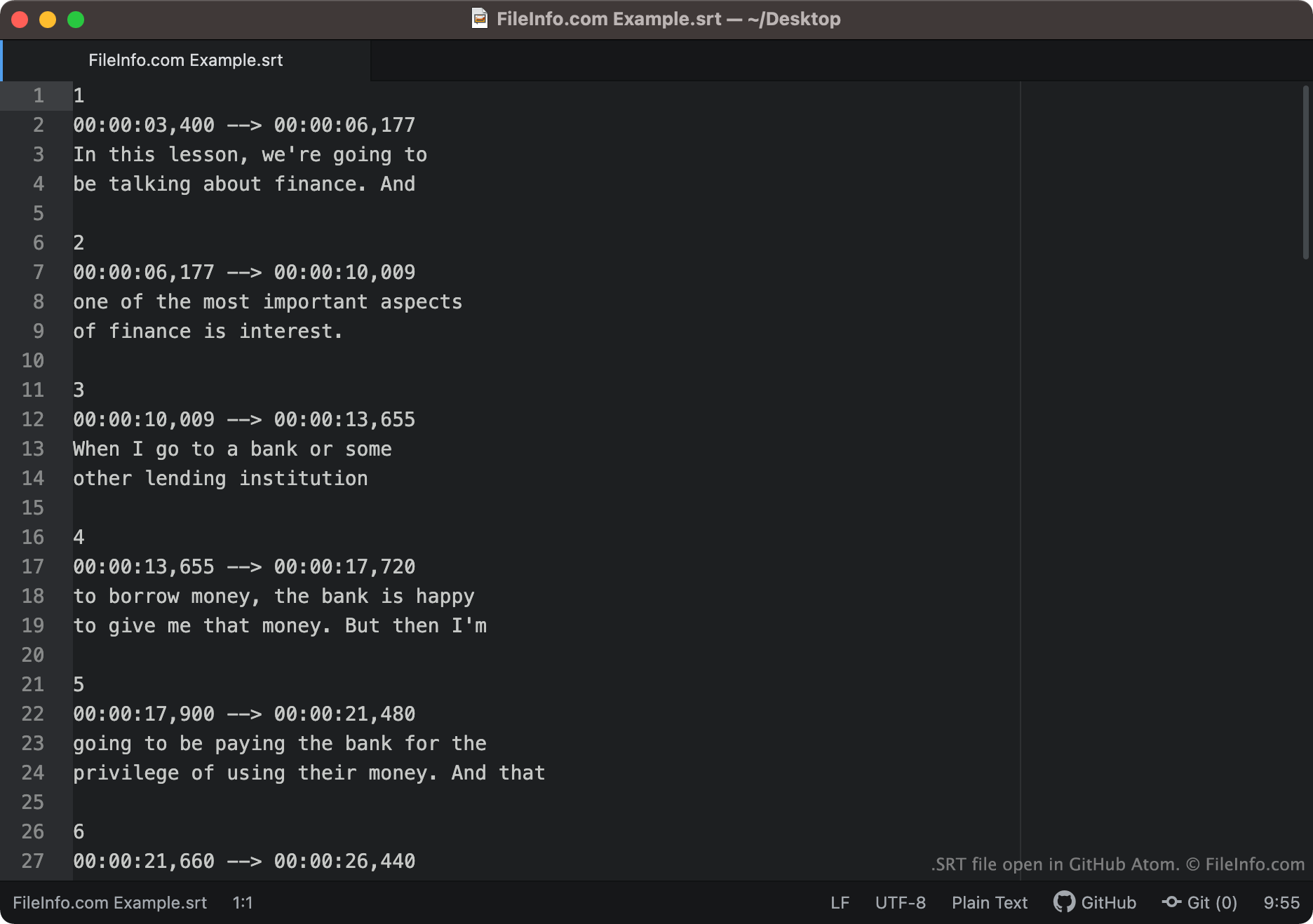
SubRip 형식으로 저장된 자막 텍스트와 타이밍 정보는 다음과 비슷하게 표시됩니다.
1
00:00:03,400 -> 00:00:06,177
In this lesson, we're going to
be talking about finance. And
2
00:00:06,177 -> 00:00:10,009
one of the most important aspects
of finance is interest.
미디어 플레이어는 SRT 파일의 각 세그먼트를 순서대로 불러와 해당 텍스트가 연결된 시간 동안 각 세그먼트의 텍스트를 표시합니다. SRT 파일의 타임코드는 HH:MM:SS,MIL 형식으로 작성됩니다. 따라서 위에 표시된 첫 번째 텍스트 줄은 화면에 3.004초에 나타나 6.00177초에 사라집니다.
각 세그먼트의 종료 타임코드 뒤에 화면 좌표가 표시될 수 있습니다. 세그먼트에 화면 좌표가 없으면 해당 텍스트는 화면 하단 중앙에 표시됩니다.
일반적인 .SRT 파일 이름
[moviename].eng.srt - 자막 파일 이름에는 포함된 자막의 언어를 나타내는 정보가 포함되는 경우가 많습니다. 예를 들어 이름에 .eng가 포함된 SRT 파일에는 영어 자막이 포함되어 있을 가능성이 높고, 이름에 .ger가 포함된 SRT 파일에는 독일어 자막이 포함되어 있을 가능성이 높습니다.
SRT 파일을 여는 방법
SRT 파일을 여는 방법은 여러 가지가 있습니다. 가장 일반적인 방법은 SRT 파일을 사용해 미디어 플레이어에서 동영상에 자막을 추가하는 것입니다. SRT 파일을 지원하는 미디어 플레이어의 예는 다음과 같습니다.
- VideoLAN VLC media player (다중 플랫폼)
- MPlayer (다중 플랫폼)
- CyberLink PowerDVD (Windows)
예를 들어 VLC media player에서 SRT 파일을 자막 트랙으로 사용하려면 다음 단계를 따르세요.
- VLC media player를 열고 SRT 파일을 사용할 동영상 재생을 시작합니다.
- VLC Media Player 메뉴 모음에서 을 선택합니다.
- SRT 파일이 있는 위치로 이동하여 엽니다.
자막 편집기나 텍스트 편집기로 SRT 파일을 열 수도 있습니다. 예를 들어 Aegisub 또는 모든 텍스트 편집기(Microsoft Notepad나 Apple TextEdit 포함)를 사용해 SRT 파일을 열고 편집할 수 있습니다.
SRT 자막이 올바르게 형식 지정되었는지 확인하는 방법
SRT 파일을 온라인 Subtitle Validator에 업로드하면 SRT 파일의 자막이 올바르게 형식 지정되었는지 확인할 수 있습니다. 업로드하려면 "Choose File" 버튼을 선택한 다음 SRT 파일을 선택합니다.