.SMI 파일 확장자

Self-Mounting Disk Image

개발사 Apple
인기도
3.3  |  28 투표
 

SMI 파일이란 무엇인가요?

An SMI file is a disk image file created by Aladdin ShrinkWrap or Apple Disk Copy in Mac OS Classic (Mac OS 9 or earlier). It contains a disk image that mounts as a disk on the Desktop when opened.

추가 정보

SMI files were designed to enable floppy disks and CDs to be available as digital downloads. The files could be double-clicked, which would then load a virtual disk on the Desktop of the computer.

When Mac OS X replaced Mac OS Classic, the "DiskImageMounter" utility was bundled with Mac OS X to mount disk images. Self-mounting images became less popular as SMI files were replaced by .DMG files in Mac OS X.

File Viewer Plus(으)로 400개 이상의 파일 형식을 여세요.무료 다운로드

SMI 파일을 여는 프로그램

Mac
OS에 포함됨
Apple Disk Copy
Aladdin ShrinkWrap

SMIL Presentation

개발사 해당 없음
인기도
3.0  |  9 투표
 

Audiovisual presentation created using the Synchronized Multimedia Integration Language (SMIL); used for multimedia presentations and slide shows; typically contains references to a sequence of media files as well as text and other data.

추가 정보

SMIL files often use the .SMIL extension to avoid confusion with the Mac OS 9 SMI disk image extension. The .smi extension is commonly seen on Windows computers.

SMI 파일을 여는 프로그램

카테고리: 비디오
업데이트: 2020-08-06

SAMI Subtitles File

개발사 Microsoft
인기도
2.8  |  13 투표
 

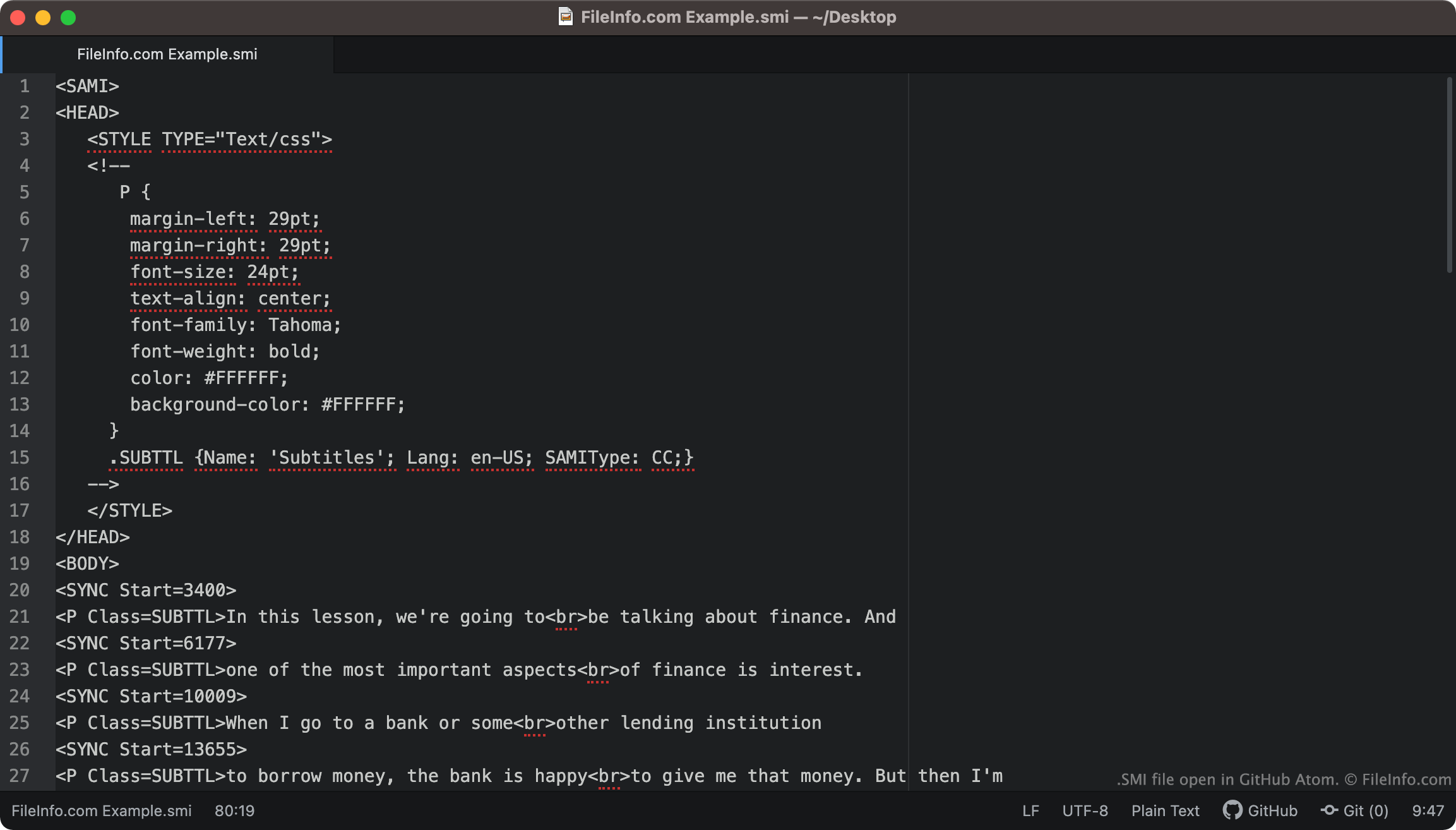
An SMI file is a plain text subtitles file written in the SAMI (Synchronized Accessible Media Interchange) format. It contains subtitle text, timing information, and styling information. SMI files can be used to show subtitles in a variety of media players.

추가 정보

GitHub Atom에서 열린 .smi 파일의 스크린샷
GitHub Atom에서 열린 SMI 파일

SMI files always include <SAMI> as their first line of text. The file then goes on to define its subtitles' margin, font, text alignment, and color.

The file's included subtitles begin at the <BODY> tag. Each line of subtitle text is paired with a <SYNC Start=> tag, which specifies when that line of text appears on-screen. Typically, SYNC Start times are written in milliseconds (so a line of text paired with <SYNC Start=3400> will appear 3400 ms into a video).

참고: The SAMI format was developed by Microsoft, as an extension of HTML.

How do I convert SMI subtitles to SRT subtitles?

The .SRT subtitle format is more common than the SMI format. Therefore, you might want to convert your SMI subtitles to the SRT format.

SubtitleTools.com has a converter, called Convert Subtitles to Srt, that you can use to convert SMI files to the SRT format. MConverter.eu also allows users to convert SMI files to the SRT format.

SMI 파일을 여는 방법

You can use an SMI file as a subtitles track in the following media players:

For example, to use an SMI file as a subtitle track in VLC media player:

  1. Open VLC media player and begin playing the video you want to use your SMI file with.
  2. From the VLC Media Player menu bar, select Subtitles → Add Subtitle File ....
  3. Navigate to and open your SMI file.

If you need to edit the subtitles an SMI file contains, you can open and edit the file in any text editor, such as Microsoft Notepad (Windows), Apple TextEdit (Mac), or GitHub Atom (cross-platform).

SMI 파일을 여는 프로그램

카테고리: 비디오
업데이트: 2021-10-15

검증자 FileInfo.com

FileInfo.com 팀 이 페이지에 나열된 모든 파일 형식과 소프트웨어 프로그램을 독자적으로 조사했습니다. 저희의 목표는 100% 정확성이며, 검증한 파일 유형에 대한 정보만 게시합니다.

이 페이지에 추가하거나 업데이트할 내용을 제안하고 싶으시면 알려 주세요.