

.SMI Extension de fichier
Fichier de sous-titres SAMI
| Développeur | Microsoft |
| Popularité |
2,8 | 13 Votes |
Un fichier SMI est un fichier de sous-titres en texte brut écrit au format SAMI (Synchronized Accessible Media Interchange). Il contient le texte des sous-titres, des informations de synchronisation et des informations de style. Les fichiers SMI peuvent être utilisés pour afficher des sous-titres dans différents lecteurs multimédias.
Plus d'informations
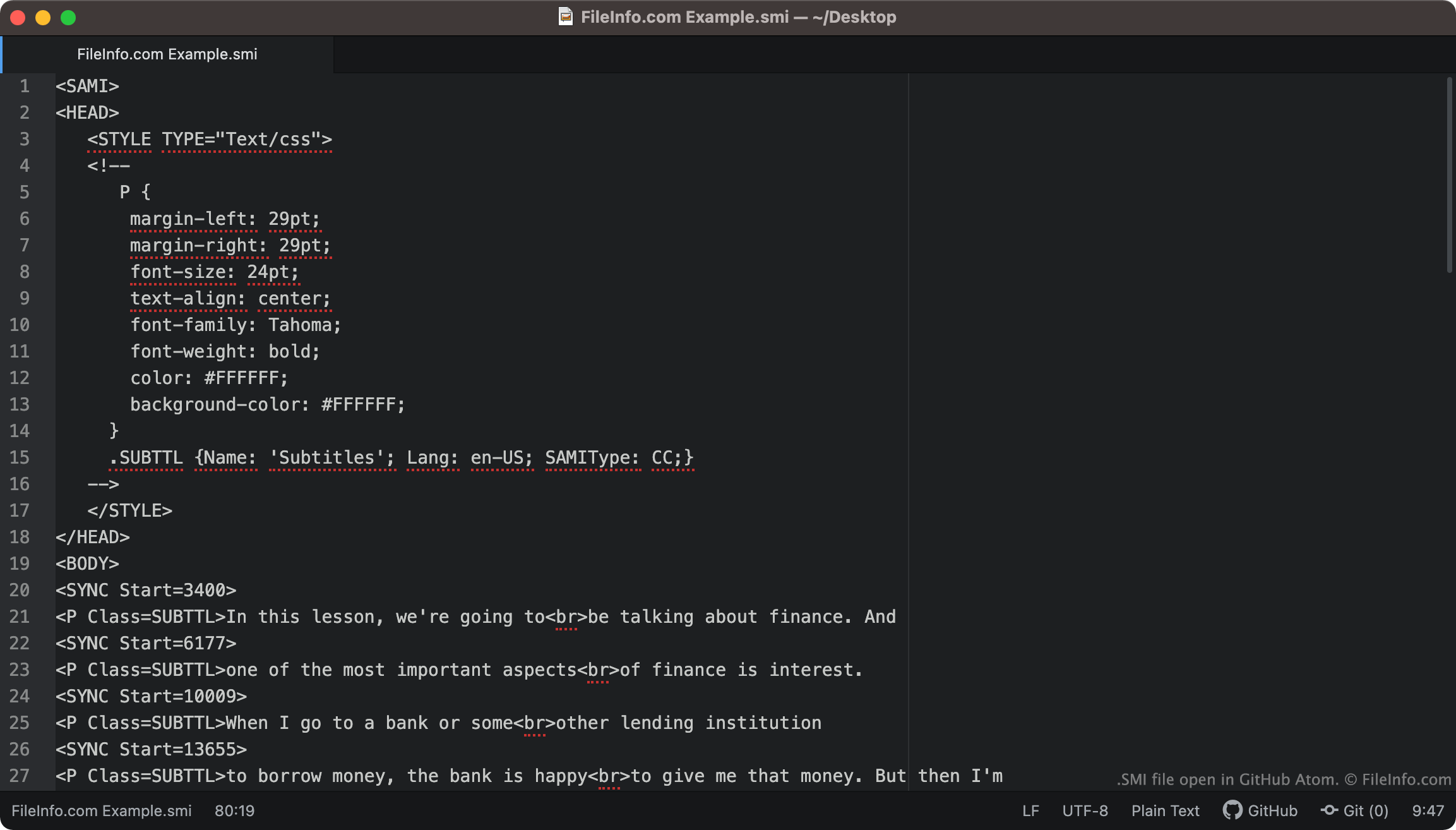
Les fichiers SMI incluent toujours <SAMI> comme première ligne de texte. Le fichier définit ensuite les marges, la police, l'alignement du texte et la couleur de ses sous-titres.
Les sous-titres inclus dans le fichier commencent à la balise <BODY>. Chaque ligne de texte des sous-titres est associée à une balise <SYNC Start=>, qui indique quand cette ligne de texte apparaît à l'écran. Généralement, les heures de début SYNC sont écrites en millisecondes (ainsi, une ligne de texte associée à <SYNC Start=3400> apparaîtra 3 400 ms après le début d'une vidéo).
REMARQUE : Le format SAMI a été développé par Microsoft comme extension de HTML.
Comment convertir des sous-titres SMI en sous-titres SRT ?
Le format de sous-titres .SRT est plus courant que le format SMI. Vous pourriez donc vouloir convertir vos sous-titres SMI au format SRT.
SubtitleTools.com propose un convertisseur appelé Convert Subtitles to Srt, que vous pouvez utiliser pour convertir des fichiers SMI au format SRT. MConverter.eu permet également aux utilisateurs de convertir des fichiers SMI au format SRT.
Comment ouvrir un fichier SMI
Vous pouvez utiliser un fichier SMI comme piste de sous-titres dans les lecteurs multimédias suivants :
- VideoLAN VLC media player (multiplateforme)
- MPlayer (multiplateforme)
- Microsoft Windows Media Player (Windows)
Par exemple, pour utiliser un fichier SMI comme piste de sous-titres dans VLC media player :
- Ouvrez VLC media player et commencez à lire la vidéo avec laquelle vous souhaitez utiliser votre fichier SMI.
- Dans la barre de menus de VLC Media Player, sélectionnez .
- Accédez à votre fichier SMI et ouvrez-le.
Si vous devez modifier les sous-titres contenus dans un fichier SMI, vous pouvez ouvrir et modifier le fichier dans n'importe quel éditeur de texte, tel que Microsoft Notepad (Windows), Apple TextEdit (Mac) ou GitHub Atom (multiplateforme).