

.SMI Extensão de arquivo
Arquivo de legendas SAMI
| Desenvolvedor | Microsoft |
| Popularidade |
2,8 | 13 Votos |
Um arquivo SMI é um arquivo de legendas em texto simples escrito no formato SAMI (Synchronized Accessible Media Interchange). Ele contém texto de legendas, informações de sincronização e informações de estilo. Os arquivos SMI podem ser usados para exibir legendas em diversos reprodutores de mídia.
Mais informações
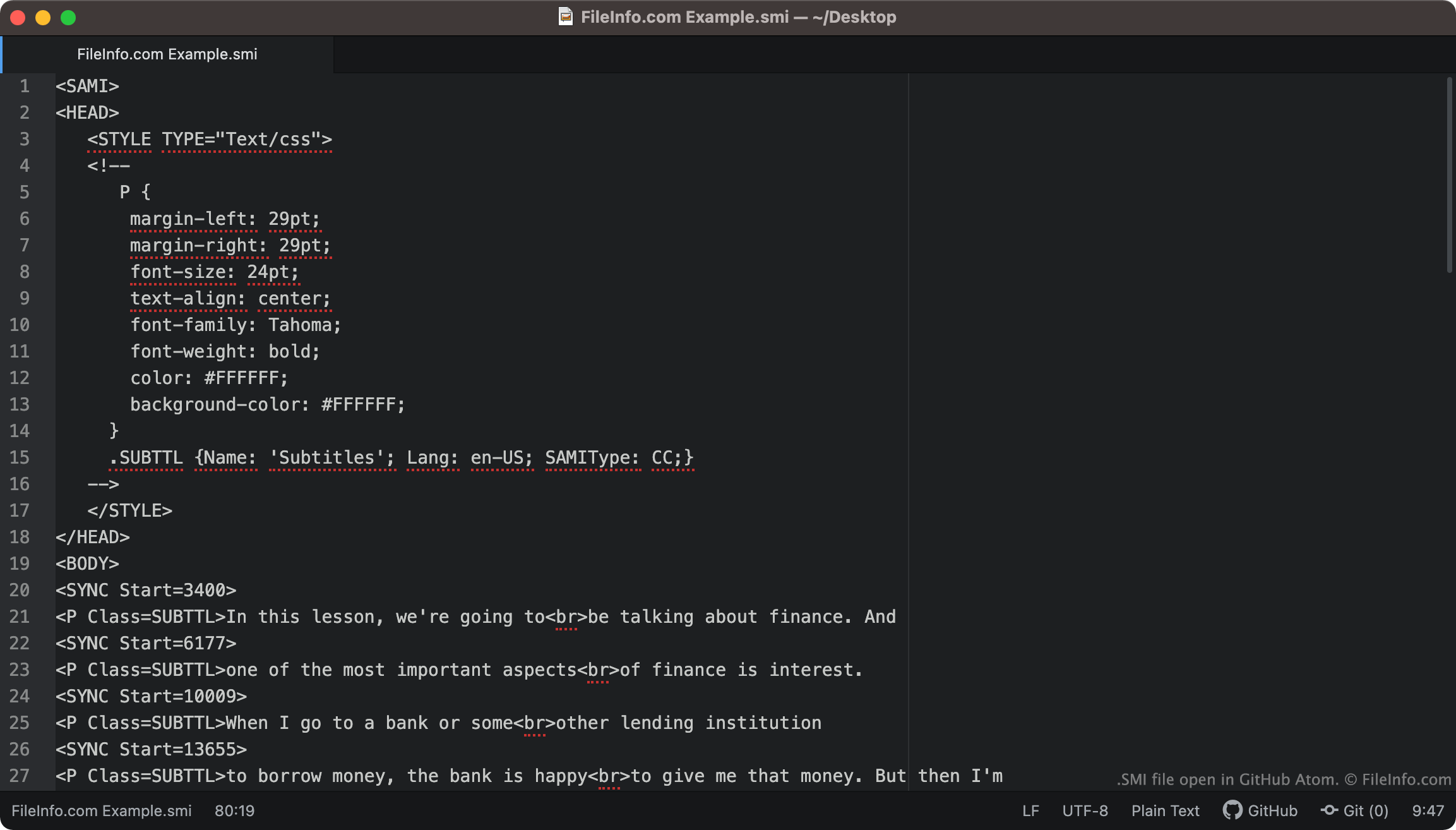
Os arquivos SMI sempre incluem <SAMI> como sua primeira linha de texto. Em seguida, o arquivo define a margem, a fonte, o alinhamento do texto e a cor das legendas.
As legendas incluídas no arquivo começam na tag <BODY>. Cada linha de texto da legenda é associada a uma tag <SYNC Start=>, que especifica quando essa linha de texto aparece na tela. Normalmente, os tempos de início de SYNC são escritos em milissegundos (portanto, uma linha de texto associada a <SYNC Start=3400> aparecerá 3400 ms após o início de um vídeo).
NOTA: O formato SAMI foi desenvolvido pela Microsoft como uma extensão do HTML.
Como converter legendas SMI em legendas SRT?
O formato de legendas .SRT é mais comum que o formato SMI. Por isso, talvez você queira converter suas legendas SMI para o formato SRT.
O SubtitleTools.com oferece um conversor chamado Convert Subtitles to Srt, que você pode usar para converter arquivos SMI para o formato SRT. O MConverter.eu também permite que os usuários convertam arquivos SMI para o formato SRT.
Como abrir um arquivo SMI
Você pode usar um arquivo SMI como faixa de legendas nos seguintes reprodutores de mídia:
- VideoLAN VLC media player (multiplataforma)
- MPlayer (multiplataforma)
- Microsoft Windows Media Player (Windows)
Por exemplo, para usar um arquivo SMI como faixa de legendas no VLC media player:
- Abra o VLC media player e comece a reproduzir o vídeo com o qual você deseja usar seu arquivo SMI.
- Na barra de menus do VLC Media Player, selecione .
- Navegue até o arquivo SMI e abra-o.
Se precisar editar as legendas contidas em um arquivo SMI, você pode abrir e editar o arquivo em qualquer editor de texto, como o Microsoft Notepad (Windows), o Apple TextEdit (Mac) ou o GitHub Atom (multiplataforma).