

.SMI Bestandsextensie
SAMI-ondertitelbestand
| Ontwikkelaar | Microsoft |
| Populariteit |
2,8 | 13 stemmen |
Een SMI-bestand is een ondertitelbestand met platte tekst, geschreven in de SAMI-indeling (Synchronized Accessible Media Interchange). Het bevat ondertitelingstekst, timinginformatie en opmaakgegevens. SMI-bestanden kunnen worden gebruikt om ondertitels weer te geven in verschillende mediaspelers.
Meer informatie
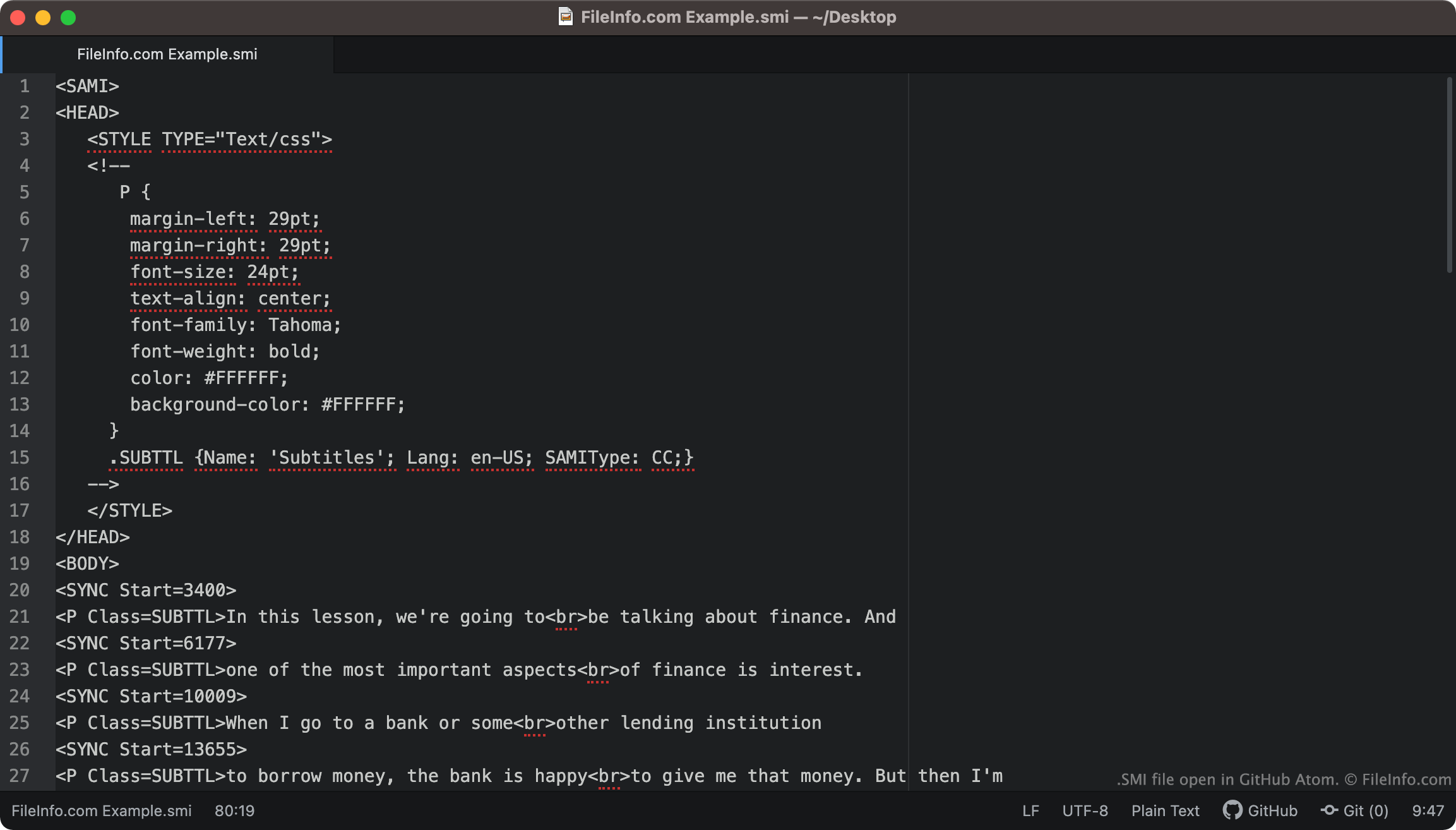
SMI-bestanden bevatten altijd <SAMI> als hun eerste tekstregel. Vervolgens definieert het bestand de marges, het lettertype, de tekstuitlijning en de kleur van de ondertitels.
De ondertitels in het bestand beginnen bij de tag <BODY>. Elke regel ondertitelingstekst wordt gekoppeld aan een tag <SYNC Start=>, die aangeeft wanneer die tekstregel op het scherm verschijnt. SYNC Start-tijden worden meestal in milliseconden geschreven (een tekstregel die is gekoppeld aan <SYNC Start=3400> verschijnt dus 3400 ms na het begin van een video).
OPMERKING: De SAMI-indeling is ontwikkeld door Microsoft als uitbreiding van HTML.
Hoe converteer ik SMI-ondertitels naar SRT-ondertitels?
De .SRT-ondertitelindeling komt vaker voor dan de SMI-indeling. Daarom wil je je SMI-ondertitels misschien converteren naar de SRT-indeling.
SubtitleTools.com heeft een converter met de naam Convert Subtitles to Srt, die je kunt gebruiken om SMI-bestanden naar de SRT-indeling te converteren. Met MConverter.eu kun je SMI-bestanden ook naar de SRT-indeling converteren.
Een SMI-bestand openen
Je kunt een SMI-bestand als ondertiteltrack gebruiken in de volgende mediaspelers:
- VideoLAN VLC media player (platformonafhankelijk)
- MPlayer (platformonafhankelijk)
- Microsoft Windows Media Player (Windows)
Je kunt een SMI-bestand bijvoorbeeld als ondertiteltrack gebruiken in VLC media player:
- Open VLC media player en begin de video af te spelen waarvoor je je SMI-bestand wilt gebruiken.
- Selecteer in de menubalk van VLC Media Player .
- Ga naar je SMI-bestand en open het.
Als je de ondertitels in een SMI-bestand moet bewerken, kun je het bestand openen en bewerken in elke teksteditor, zoals Microsoft Notepad (Windows), Apple TextEdit (Mac) of GitHub Atom (platformonafhankelijk).