.SUB Rozszerzenie pliku

MicroDVD Subtitle File

Deweloper Tiamat Software
Popularność
3.9  |  77 Głosów
 

Czym jest plik SUB?

A SUB file is a MicroDVD subtitle file, which is meant to be used to play subtitles over an accompanying video file. It includes subtitle text and cue points for when each subtitle should be displayed. SUB files can be used as subtitle files in a variety of media players.

Więcej informacji

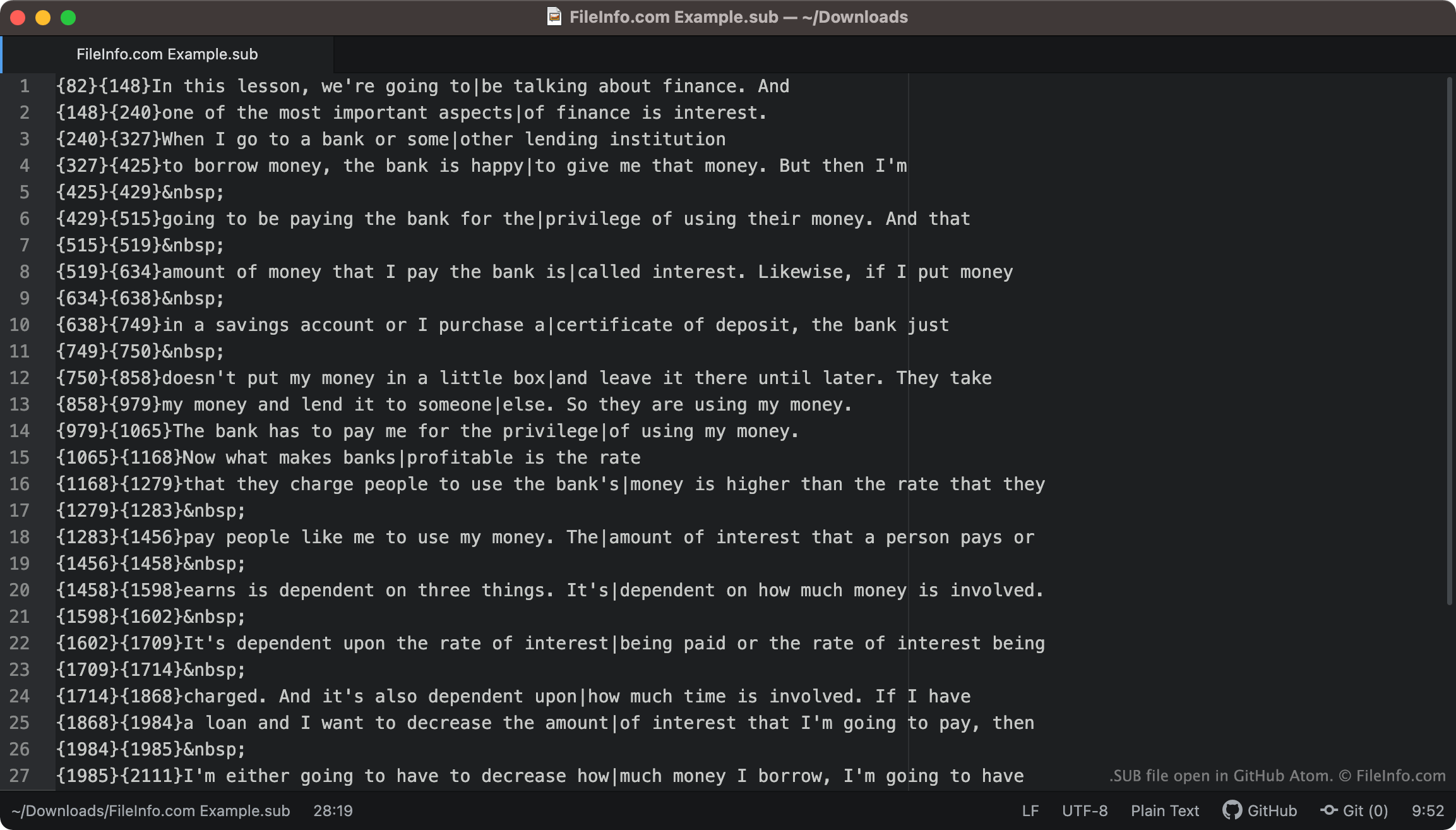
Zrzut ekranu pliku .sub w GitHub Atom
Plik SUB otwarty w GitHub Atom

MicroDVD Player is a media player that was developed by Tiamat Software. Subtitles saved for use with MicroDVD videos were saved as SUB files.

SUB files are text files that contain text that controls when subtitles appear, how long they appear, and how subtitle text is formatted. For example, if the first line of a SUB file were to read {0}{90}You might not believe this, but ..., and the movie the SUB file is meant to be used with plays at 30 frames per second, the subtitle text "You might not believe this, but ..." will appear for the first three seconds of the movie. Lines of text can also include control codes, which specify that text should appear in certain fonts, colors, and styles.

How do I convert SUB subtitles to SRT subtitles?

The .SRT subtitle format is more common than the SUB format. Therefore, you might want to convert your SUB subtitles to the SRT format. SubtitleTools.com has a converter, called Convert Subtitles to Srt, that you can use to convert SUB files to the SRT format. MConverter.eu also allows users to convert SUB files to the SRT format.

Jak otworzyć plik SUB

You can use a SUB file as a subtitles track in the following media players:

For example, to use a SUB file as a subtitle track in VLC media player:

  1. Open VLC media player and begin playing the video you want to use your SUB file with.
  2. From the VLC Media Player menu bar, select Subtitles → Add Subtitle File ....
  3. Navigate to and open your SUB file.

If you need to edit the subtitles a SUB file contains, you can open and edit the file in Aegisub (multiplatform) or any text editor, such as Microsoft Notepad (Windows) or Apple TextEdit (Mac).

Otwórz ponad 400 formatów plików za pomocą File Viewer Plus.Bezpłatne pobieranie

Programy otwierające pliki SUB

Windows
Bezpłatna wersja próbna
Bezpłatny
Bezpłatny
Mac
Bezpłatny
Bezpłatny
Linux
Bezpłatny
Bezpłatny
Bezpłatny
Bezpłatny
iOS
Android
Kategoria: Wideo
Zaktualizowano: 2023-01-11

CloneCD Subchannel File

Deweloper SlySoft
Popularność
3.8  |  40 Głosów
 

A SUB file is a disk image file saved in the CloneCD Subchannel format. It contains multiplexed audio data extracted from a disc. To create a usable disk image, SUB files must be combined with an .IMG and .CCD file. Related CloneCD IMG, CCD, and SUB files typically have the same filenames.

Więcej informacji

SlySoft CloneCD was a CD and DVD burning application that could be used to make exact copies of music, video, and data discs, regardless of Digital Rights Management (DRM) restrictions. When CloneCD created a disk image from a disc, it saved the disk image data across a number of files. The disk image's main data was saved in an IMG file, its control data was saved in a CCD file, and its subchannel data was saved in a SUB file.

When creating a new disc using CloneCD, users needed to supply the IMG, CCD, and SUB files CloneCD created from the original disc. While CloneCD is now discontinued, other disc-burning applications can still be used to combine CloneCD IMG, CCD, and SUB files into usable discs.

Jak otworzyć plik SUB

You can use a SUB file and its corresponding IMG and CCD files to create discs in several Windows programs, including:

Linux users can use the program ccd2iso to transform a CloneCD disc image into an .ISO file.

Programy otwierające pliki SUB

Windows
SlySoft CloneCD
SlySoft Virtual CloneDrive
Sysprogs WinCDEmu
Bezpłatna wersja próbna
Linux
Bezpłatny

SubTerra Level File

Deweloper Crystal Shard
Popularność
3.4  |  14 Głosów
 

Game level for SubTerra, a 2D puzzle game that requires players to use thoughtful planning to collect gems and complete each level; contains level layout information as well as objects and events included in the the level.

Programy otwierające lub odwołujące się do plików SUB

Windows
Crystal Shard SubTerra
Kategoria: Gra
Zaktualizowano: 2008-03-11

VobSub Subtitles File

Deweloper The VobSub Team
Popularność
3.5  |  4 Głosów
 

A SUB file is a subtitles file created and used by VobSub, a program that allows users to extract subtitles from DVDs. It contains a series of images that are meant to serve as a movie's subtitles. SUB files are always paired with accompanying .IDX files.

Więcej informacji

VobSub is a free program that allows users to extract and play the subtitles stored on DVDs. When VobSub extracts subtitles from a DVD, it creates two subtitles files: a SUB file and an IDX file. The SUB file contains images that are shown as subtitle text. The IDX file contains metadata that tells a media player what color the subtitle text should appear in, where the subtitles should appear on-screen, and when and in what order to show the images the SUB file contains.

Using VobSub's DirectVobSub component or a media player that supports the SUB / IDX subtitle format, users can play back DVD-format subtitles alongside the movie they were meant to be used with. This can be useful if, for example, you acquire an .MP4 copy of a movie and want to watch the movie with subtitles. If you can locate a SUB and IDX file for the movie, you can load and play them as subtitles. SUB and IDX files can also be used to embed subtitles in .MKV files.

Jak otworzyć plik SUB

You can use DirectVobSub (Windows) or VideoLAN VLC media player (cross-platform) to play the subtitles a SUB file contains alongside a movie. Remember, you must possess the SUB file's accompanying IDX file to play the subtitles it contains.

To use a SUB file as a subtitles file in VLC media player:

  1. Make sure your SUB and IDX file are stored in the same directory.
  2. Begin playing the movie you want to use your SUB file with.
  3. From VLC's menu bar, select Subtitles → Add Subtitle File...
  4. Navigate to and open your SUB file.

Jak przekonwertować plik SUB

The .SRT subtitle format is more common than the SUB format. Therefore, you might want to convert your SUB subtitles to the SRT format so you can use them more easily. SubtitleTools.com has a SUB / IDX to SRT converter, called Convert Sub/Idx to Srt, that you can use to convert SUB-based subtitles to the SRT format. Note that you must possess the SUB file's accompanying IDX file to convert its subtitles to the SRT format.

Programy otwierające pliki SUB

Windows
Bezpłatny
Bezpłatny
Mac
Bezpłatny
Linux
Bezpłatny
Android
Kategoria: Wideo
Zaktualizowano: 2022-04-27

Zweryfikowane przez FileInfo.com

Zespół FileInfo.com niezależnie zbadał wszystkie formaty plików i programy wymienione na tej stronie. Naszym celem jest 100% dokładność i publikujemy wyłącznie informacje o zweryfikowanych typach plików.

Jeśli chcesz zaproponować dodatki lub aktualizacje tej strony, daj nam znać.