.PROT 파일 확장자

2개의 파일 유형.prot 확장자를 사용합니다.

XEASY Atom List

개발사 ETH Zurich
인기도
2.3  |  3 투표
 

PROT 파일이란 무엇인가요?

A PROT file is an atom list created and used by XEASY, a Nuclear Magnetic Resonance (NMR) spectrum analysis application. It is a plain text file that describes an atom's nuclear magnetic resonance. PROT files are meant to be opened and viewed in XEASY, using the Load atoms option.

추가 정보

Scientists and researchers can use XEASY to perform a 3D spectrum analysis of macromolecules, using NMR. One of the measurements XEASY records is a macromolecule's atom list. The atom list contains the name and frequencies of a macromolecule's resonances, and it is saved as a PROT file.

Each PROT file contains several rows of numerical and text values. Each row corresponds to an individual atom, and contains identifying information about that atom. In order, each atom's row includes:

  • The atom's unique ID number
  • The atom's mean chemical shift in part per million
  • The deviation of the atom's assigned peaks from the mean value
  • The atom's name
  • The atom's fragment number
  • The atom's reference lineshapes

To create an atom list in XEASY, scientists use the program's Write atoms (chem.shift) [wc] command. This produces a PROT file for the current macromolecule.

PROT 파일을 여는 방법

You can open a PROT file in XEASY (Linux), using the program's Load atoms (chem.shift) [lc] command.

If you do not have access to XEASY, you can also open a PROT file in any text editor, to view the atom list it contains.

File Viewer Plus(으)로 400개 이상의 파일 형식을 여세요.무료 다운로드

PROT 파일을 여는 프로그램

Windows
OS에 포함됨
Mac
OS에 포함됨
Linux
ETH Zurich XEASY
무료
카테고리: 데이터
업데이트: 2021-08-27

SnapGene Protein File

개발사 GSL Biotech
인기도
2.0  |  1 투표
 

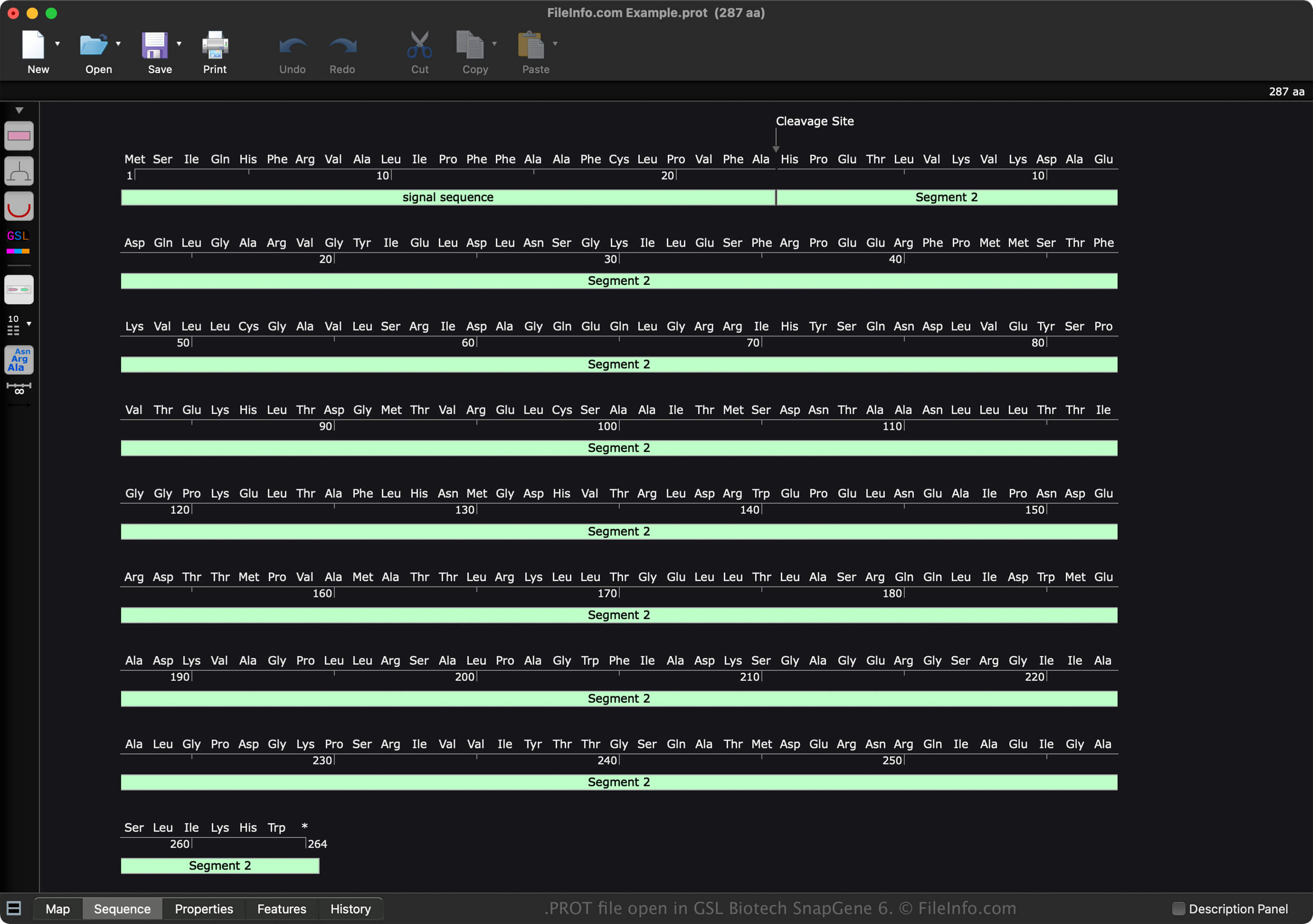
A PROT file is a data file created by GSL Biotech SnapGene, a molecular biology analysis application. It contains a protein sequence and its properties, such as molecular weight and absorbance. PROT files include metadata, such as the creator, a description of the sequence, a history of changes, and comments.

추가 정보

GSL Biotech SnapGene 6에서 열린 .prot 파일의 스크린샷
GSL Biotech SnapGene 6에서 열린 PROT 파일

SnapGene is a molecular biology application that documents, designs, and simulates various types of sequences, including DNA, RNA, and protein. When you save a sequence with SnapGene, the software creates a file to store the contents. Snap Gene saves each type of sequence in a different file format:

  • DNA sequence - .DNA file
  • RNA sequence - .RNA file
  • Protein sequence - PROT file

To create a PROT file with SnapGene, follow these steps:

  1. Select File → New Protein File...
  2. Choose the "RNA" sequence type
  3. Create the sequence
  4. Name the file
  5. Select OK

After creating the PROT file, you can save it by selecting File → Save or Save As.... Then, after saving the file, you can close it and re-open it to modify the sequence further.

PROT 파일을 여는 방법

You can open a PROT file with GSL Biotech SnapGene (multiplatform). To open a PROT file with SnapGene, select File → Open Files....

You can also open a PROT file with SnapGene Viewer (multiplatform). However, it does not provide the same advanced capabilities that SnapGene offers.

PROT 파일을 변환하는 방법

GSL Biotech SnapGene can convert PROT files to various file types, including the following formats:

  • .SEQ - DNA Sequence Text File
  • .FA - FASTA Sequence File
  • .EMBL - EMBL Sequence Data File
  • .GBK - GenBank Data File
  • .TXT - Plain Text File
  • .JPG - JPEG Image
  • .PNG - Portable Network Graphic
  • .EMF - Enhanced Windows Metafile
  • .SVG - Scalable Vector Graphics File
  • .PDF - Portable Document Format

PROT 파일을 여는 프로그램

카테고리: 데이터
업데이트: 2022-11-11

검증자 FileInfo.com

FileInfo.com 팀 이 페이지에 나열된 모든 파일 형식과 소프트웨어 프로그램을 독자적으로 조사했습니다. 저희의 목표는 100% 정확성이며, 검증한 파일 유형에 대한 정보만 게시합니다.

이 페이지에 추가하거나 업데이트할 내용을 제안하고 싶으시면 알려 주세요.