

.PDF 파일 확장자
PDF 파일
| 개발사 | Adobe |
| 인기도 |
4.0 | 4927 표 |
PDF 파일이란 무엇인가요?
PDF 파일은 다양한 장치와 운영 체제에서 원래 레이아웃과 서식을 유지하는 널리 사용되는 문서 유형입니다. 보고서, 계약서, 설명서 또는 양식과 같은 문서를 공유할 때 자주 사용되며, 모든 사용자가 콘텐츠를 동일하게 볼 수 있도록 합니다. PDF 파일에는 텍스트, 이미지, 주석 및 대화형 요소(예: 버튼과 확인란)까지 포함할 수 있으며, 일반적으로 Word .DOCX 문서, Excel .XLSX 스프레드시트 및 이미지와 같은 다른 파일 형식에서 만듭니다.
추가 정보
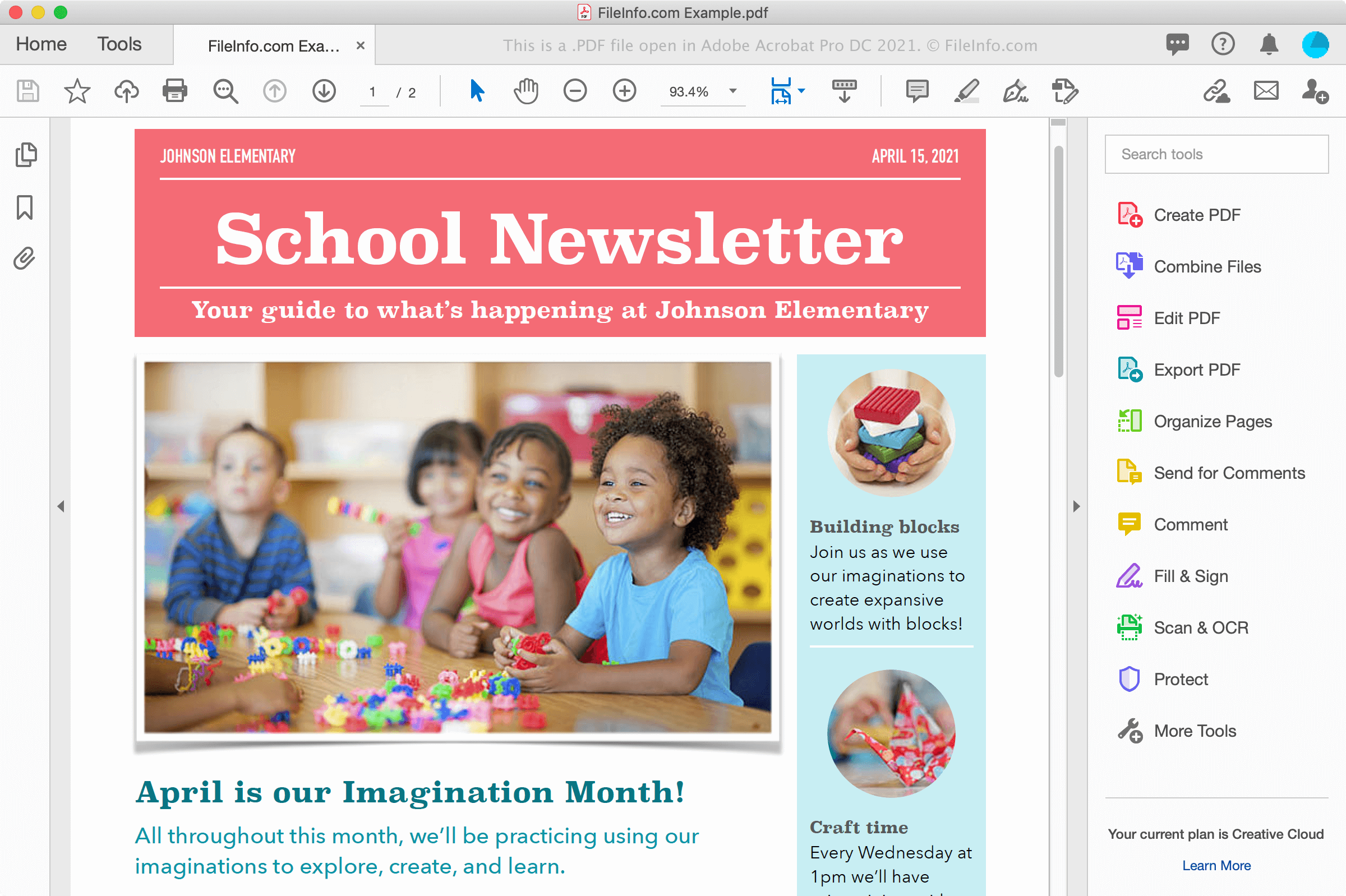
웹 사이트에서 문서를 다운로드하거나 동료 또는 친구에게서 이메일 첨부 파일로 문서를 받는 등 다양한 방법으로 PDF 파일을 접할 수 있습니다. PDF 파일은 여러 플랫폼에서 글꼴과 서식도 전자적으로 보존하며, 종이에 인쇄했을 때와 화면에서 동일하게 표시됩니다.
PDF 파일 만들기
워드 프로세서, 이미지 편집기 및 Adobe Acrobat과 같은 PDF 파일 유틸리티를 비롯한 다양한 프로그램으로 PDF 파일을 만들 수 있습니다. Windows와 macOS의 인쇄 대화 상자를 사용하여 문서에서 PDF 파일을 만들 수도 있습니다.
예를 들어 Windows에서는 를 선택하거나 프린터 아이콘을 클릭하여 애플리케이션에서 인쇄 대화 상자를 열 수 있습니다. 그런 다음 인쇄 대화 상자의 사용 가능한 프린터 목록에서 를 선택하고 를 클릭하여 PDF 파일을 만듭니다. macOS에서는 애플리케이션의 메뉴에서 를 선택한 다음, 창의 PDF 드롭다운 메뉴에서 를 선택할 수 있습니다.
참고: 자세한 내용은 PDF 정의를 참조하십시오.
PDF 파일을 여는 방법
Adobe Acrobat ReaderAdobe Acrobat Reader(다중 플랫폼) 및 Adobe Acrobat(다중 플랫폼)과 같이 특히 많이 사용되는 프로그램을 비롯한 다양한 애플리케이션으로 PDF 파일을 열고 볼 수 있으며, 이러한 프로그램으로 PDF 파일을 편집할 수도 있습니다. Nitro Pro(Windows)와 Smile PDFpenPro(macOS)는 PDF 보기 및 편집 기능을 제공하는 다른 애플리케이션입니다.
PDF 파일을 보는 다른 방법으로는 Microsoft Word(Windows 및 macOS), Apple Preview(macOS에 기본 포함), Foxit Reader 및 웹 브라우저가 있습니다. 웹 브라우저로는 Google Chrome(다중 플랫폼) 및 주석 기능을 포함하는 Microsoft Edge(다중 플랫폼) 등이 있습니다.
모바일 장치에서는 Adobe Reader(Android 및 iOS), Apple Books(iOS), Apple Pages(iOS), Google Play Books(Android) 및 Chrome과 Safari 같은 웹 브라우저로 PDF 파일을 볼 수 있습니다.
PDF 파일을 변환하는 방법
Adobe Acrobat, Microsoft Word, Apple Preview 및 Nitro Pro를 비롯한 여러 애플리케이션으로 PDF 파일을 다른 형식으로 변환할 수 있습니다.
Adobe Acrobat은 PDF 파일을 다음 형식으로 변환할 수 있습니다.
- .DOCX - Word 문서
- .XLSX - Excel 스프레드시트
- .PPTX - PowerPoint 프레젠테이션
- .JPEG - JPEG 이미지
- .PNG - PNG 이미지
- .TIFF - TIFF 이미지
- .HTML - HTML 웹 페이지
Adobe는 PDF를 Word, PDF를 Excel, PDF를 PowerPoint 및 PDF를 JPG로 변환하는 무료 온라인 변환기도 제공합니다.