

.PDF Dateiendung
Datei im Portable Document Format
| Entwickler | Adobe |
| Beliebtheit |
4,0 | 4927 Stimmen |
Was ist eine PDF-Datei?
Eine PDF-Datei ist ein weit verbreitetes Dokumentformat, das das ursprüngliche Layout und die Formatierung auf verschiedenen Geräten und Betriebssystemen beibehält. Es wird häufig zum Teilen von Dokumenten wie Berichten, Verträgen, Handbüchern oder Formularen verwendet und stellt sicher, dass der Inhalt für alle Benutzer gleich aussieht. PDF-Dateien können Text, Bilder, Anmerkungen und sogar interaktive Elemente (z. B. Schaltflächen und Kontrollkästchen) enthalten. Benutzer erstellen sie normalerweise aus anderen Dateiformaten, etwa aus Word .DOCX-Dokumenten, Excel .XLSX-Tabellen und Bildern.
Weitere Informationen
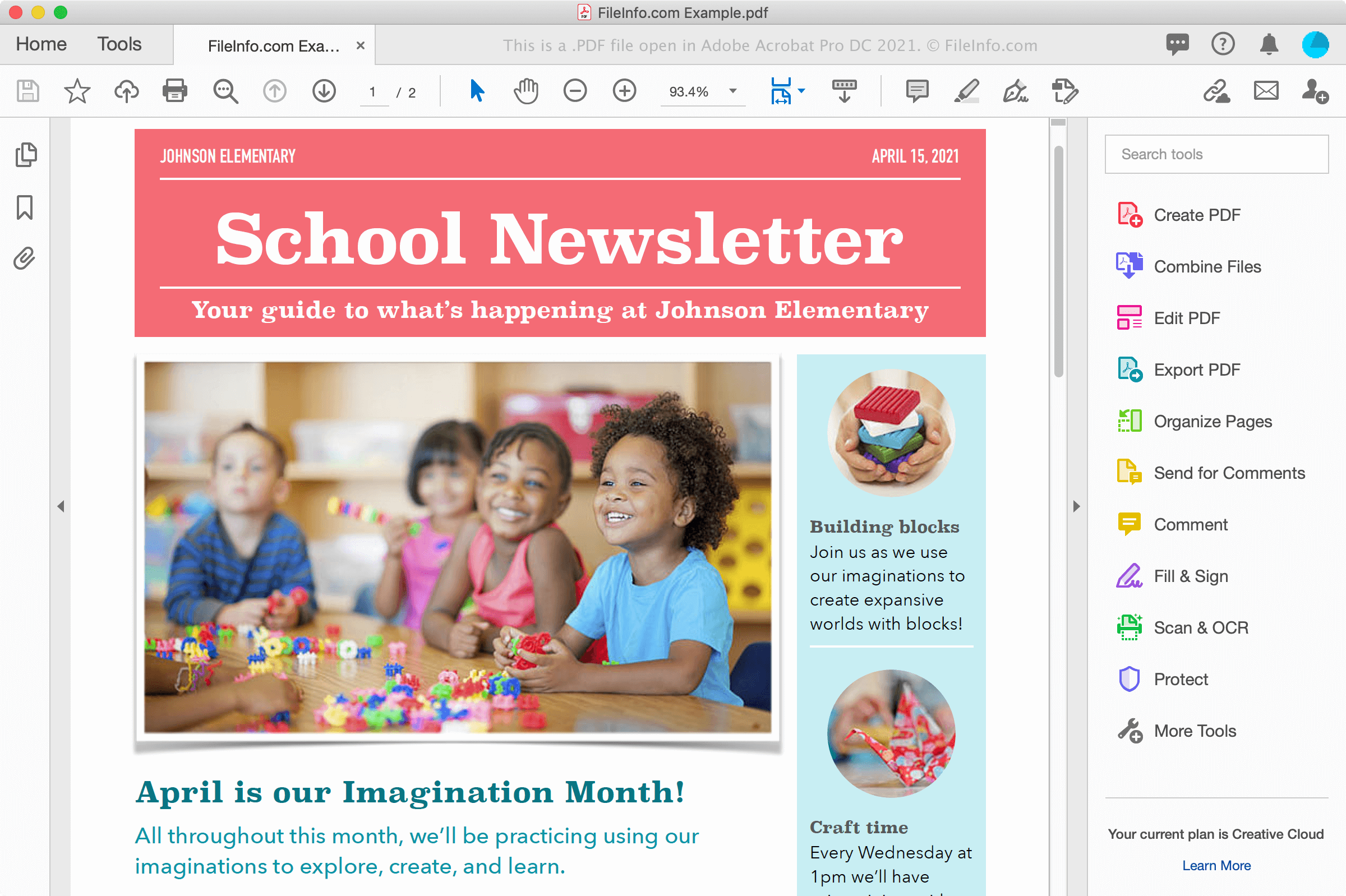
PDF-Dateien können Ihnen auf verschiedene Weise begegnen, etwa wenn Sie ein Dokument von einer Website herunterladen oder ein Dokument von einem Kollegen oder Freund als E-Mail-Anhang erhalten. PDF-Dateien bewahren außerdem Schriftarten und Formatierungen elektronisch auf verschiedenen Plattformen und sehen auf dem Bildschirm genauso aus wie auf Papier ausgedruckt.
PDF-Dateien erstellen
Sie können PDF-Dateien mit verschiedenen Programmen erstellen, darunter Textverarbeitungsprogrammen, Bildbearbeitungsprogrammen und PDF-Hilfsprogrammen wie Adobe Acrobat. Sie können PDF-Dateien auch aus Dokumenten über das Druckdialogfeld in Windows und macOS erstellen.
In Windows können Sie beispielsweise auswählen oder auf das Druckersymbol klicken, um das Druckdialogfeld innerhalb einer Anwendung zu öffnen. Wählen Sie anschließend aus der Liste der verfügbaren Drucker im Druckdialogfeld aus und klicken Sie auf , um die PDF-Datei zu erstellen. In macOS können Sie im Menü der Anwendung auswählen und anschließend im PDF-Dropdownmenü des Fensters auswählen.
HINWEIS: Weitere Informationen finden Sie in der Definition von PDF.
So öffnen Sie eine PDF-Datei
Sie können PDF-Dateien mit zahlreichen Anwendungen öffnen und anzeigen, insbesondere mit Adobe Acrobat Reader (plattformübergreifend) und Adobe Acrobat (plattformübergreifend), die PDF-Dateien auch bearbeiten können. Nitro Pro (Windows) und Smile PDFpenPro (macOS) sind weitere Anwendungen, die Funktionen zum Anzeigen und Bearbeiten von PDF-Dateien bieten.
Weitere Möglichkeiten zum Anzeigen von PDF-Dateien sind Microsoft Word (Windows und macOS), Apple Preview (in macOS enthalten), Foxit Reader und Webbrowser wie Google Chrome (plattformübergreifend) und Microsoft Edge (plattformübergreifend), der auch Anmerkungsfunktionen bietet.
Auf Mobilgeräten können Sie PDF-Dateien mit Adobe Reader (Android und iOS), Apple Books (iOS), Apple Pages (iOS), Google Play Books (Android) und in Webbrowsern wie Chrome und Safari anzeigen.
So konvertieren Sie eine PDF-Datei
Mehrere Anwendungen, darunter Adobe Acrobat, Microsoft Word, Apple Preview und Nitro Pro, können PDF-Dateien in andere Formate konvertieren.
Adobe Acrobat kann PDF-Dateien in die folgenden Formate konvertieren:
- .DOCX - Word-Dokument
- .XLSX - Excel-Tabelle
- .PPTX - PowerPoint-Präsentation
- .JPEG - JPEG-Bild
- .PNG - PNG-Bild
- .TIFF - TIFF-Bild
- .HTML - HTML-Webseite
Adobe bietet außerdem kostenlose Online-Konverter für PDF in Word, PDF in Excel, PDF in PowerPoint und PDF in JPG an.