.GBS 文件扩展名
Game Boy Sound File
| 开发者 | 不适用 |
| 受欢迎程度 |
4.1 | 16 票 |
什么是 GBS 文件?
A GBS file is a song ripped from a Game Boy game cartridge or ROM. It contains music that was originally intended to be played on a Game Boy as part of a Game Boy game. GBS files can be played in many PC-based media players, allowing gamers to play Game Boy music on their computers.
更多信息
Nostalgic gamers download GBS files so they can re-listen to the songs used in their favorite Game Boy video games. Online repositories like Zophar's Music Domain store GBS files for most Game Boy games, including popular and lesser-known titles.
如何打开 GBS 文件
You can open a GBS file and play the music it contains in a variety of media players, including VideoLAN VLC media player (cross-platform), Audacious (Windows, Linux), and Nullsoft Winamp (Windows). To play a GBS file in Winamp, you must install the NEZPlug++, Meridian, or Chimpamp plug-ins.
可打开或引用 GBS 文件的程序
Gerber Bottom Solder Mask Data File
| 开发者 | Ucamco |
| 受欢迎程度 |
3.9 | 7 票 |
Data file created by CAD Printed Circuit Board (PCB) programs like Altium Designer; contains bottom-side solder mask data for boards with multiple layers; includes information about all the pads that need soldering to prevent solder bridging of traces and pads during production; similar to the .GTS file extension.
更多信息
The name of the GBS file is derived from the name of your PCB. Therefore, if your PCB is called "MyProject," the file will be called MyProject.gbs.
Gerber format files, like GBS, are stored in RS-274X format and act similar to .PDF files. They're an exported version of the PCB layout and are meant to be viewed and referenced but not edited. They're utilized by PCB manufacturing machines to designate electrical connections between components with pads and tracks.
注: The GBS format was originally developed by Gerber Systems but is now maintained by Ucamco.
可打开 GBS 文件的程序
Generic Build Support Metadata File
| 开发者 | Randy Marques Consultancy |
| 受欢迎程度 |
2.7 | 7 票 |
File created by Generic Build Support (GBS), a build automation system that helps users develop software projects; contains data referenced by the GBS application that specifies different functions within the application, such as where files are exported or the general settings for system generation.
更多信息
In the GBS application, there are a variety of GBS files located in different directories. One example of a GBS file is target.gbs. This file is used to associate file extensions with builders, such as compilers and linkers, for a specific target. It is located in the GBS_SYSGEN_PATH/target directory. Another example is steps.gbs, which is located in the GBS_SYS_PATH directory. This file defines the conditions and order for generating or auditing SubSystems.
注: Other examples of GBS files include audit.gbs, export.gbs, flags.gbs, incs.gbs, owners.gbs, sca.gbs, scope.gbs, switch.gbs, sys.gbs, system.gbs, and tool.gbs.
可打开或引用 GBS 文件的程序
OtterUI Scene
| 开发者 | Aonyx Software |
| 受欢迎程度 |
2.6 | 5 票 |
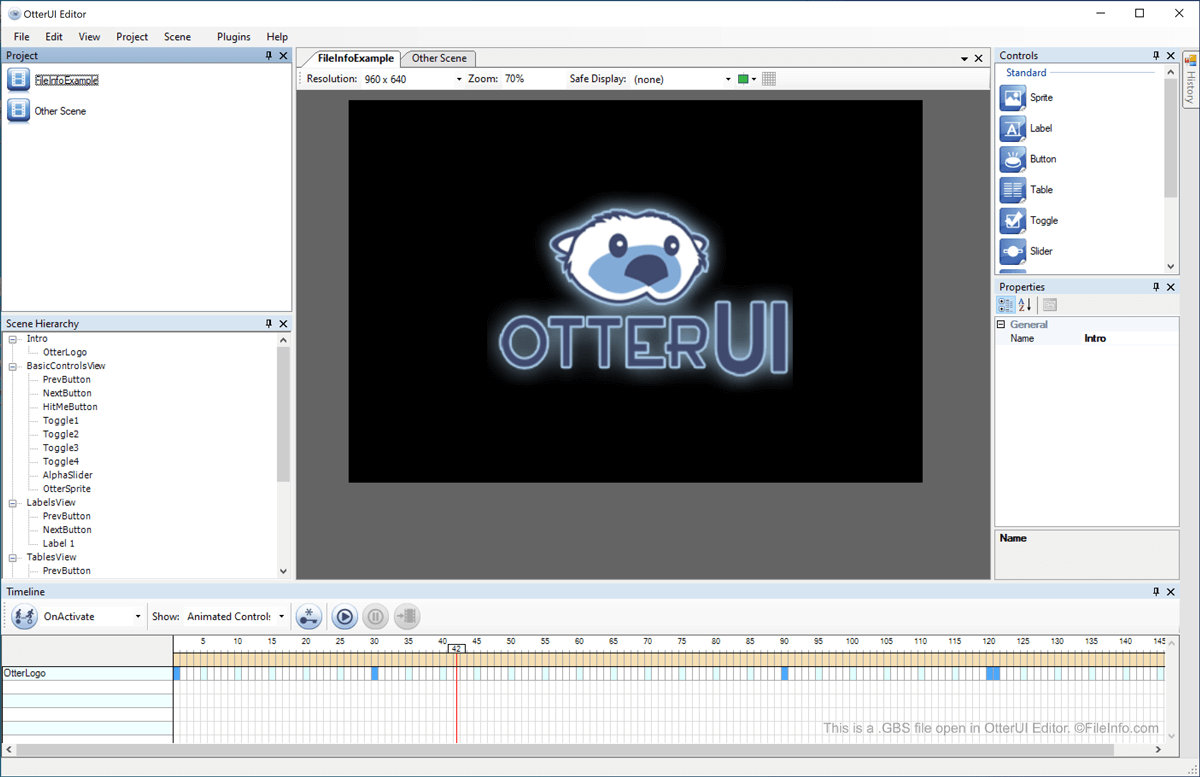
A GBS file is a video game menu or other animated scene created using OtterUI, an open-source game UI library. It contains references to the assets used to create a scene, as well as code used to show and animate those assets. GBS files are used in the video games Skullgirls, developed by Lab Zero Games, and Them's Fightin' Herds, developed by Mane6.
更多信息
OtterUI is a video game UI development toolkit that allows developers to create navigable menus and other animated scenes. These scenes are saved in GBS files, which a game then references and loads to show scenes to players.
When using OtterUI to create a set of menus or scenes for their video game, developers first create a new project (.GGP file) in OtterUI Editor, a GUI editor that comes bundled with OtterUI. Then, developers begin adding and editing scenes by right-clicking in OtterUI Editor's Project window and selecting Add. Each scene created within OtterUI Editor is associated with a project file.
如何打开 GBS 文件
You can open a GBS file in OtterUI Editor (Windows) by opening the OtterUI project (GGP file) the GBS file is associated with. Typically, GGP files are stored in the C:/Program Files (x86)/Aonyx Software/OtterUI Editor directory.