

.SSA Extension de fichier
Fichier de sous-titres Sub Station Alpha
| Développeur | Kotus |
| Popularité |
2,7 | 13 Votes |
Qu'est-ce qu'un fichier SSA ?
Un fichier SSA contient des sous-titres écrits au format de sous-titres Sub Station Alpha. Il est utilisé pour afficher des sous-titres avec une vidéo associée. Vous pouvez ouvrir et modifier un fichier SSA dans n'importe quel éditeur de texte. Vous pouvez l'utiliser comme piste de sous-titres dans VideoLAN VLC media player, MPlayer et CyberLink PowerDVD.
Plus d'informations
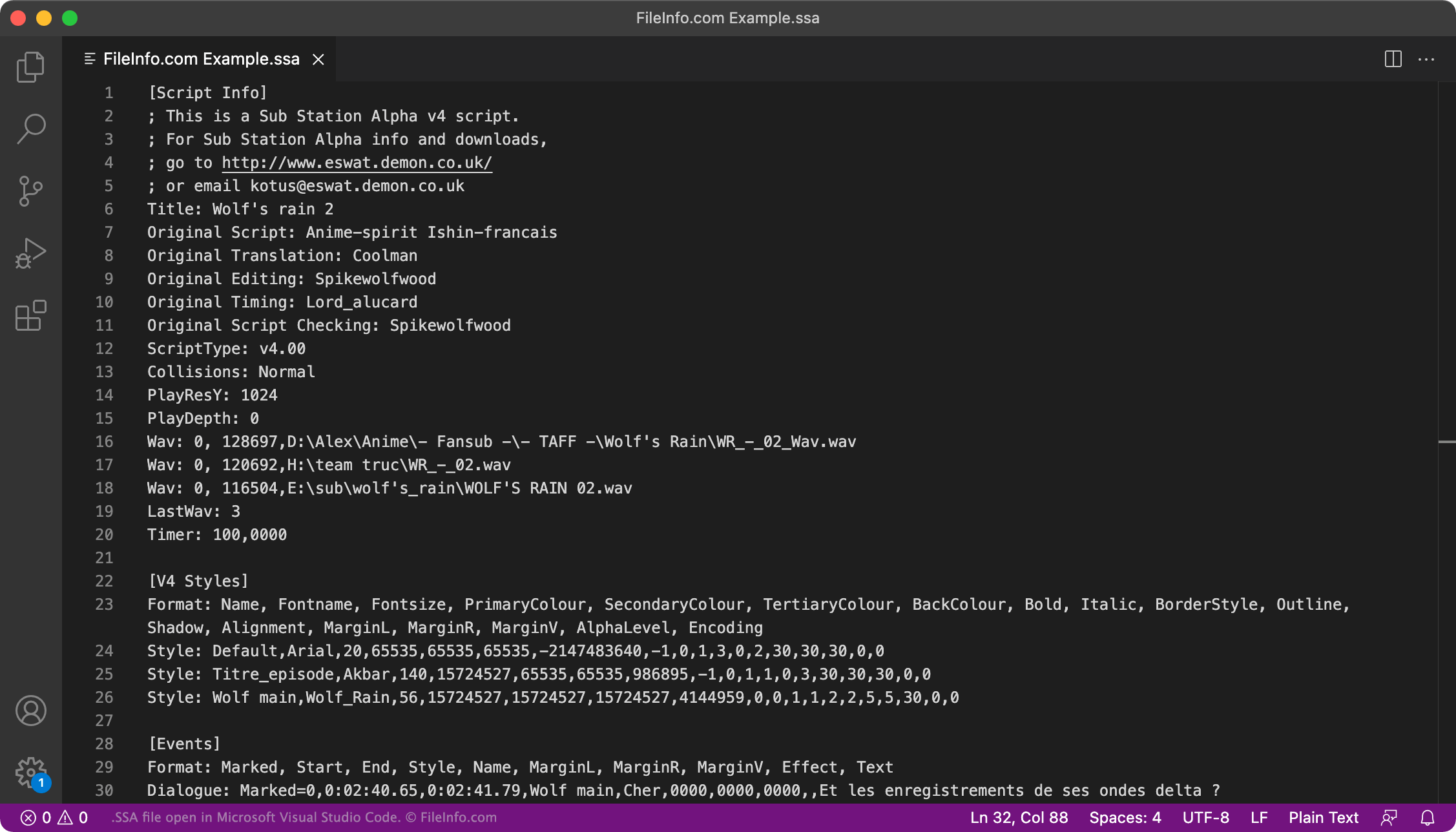
Sub Station Alpha est un programme qui vous permet de créer des sous-titres personnalisés pour des vidéos. Par exemple, de nombreux fans d'anime anglophones utilisent Sub Station Alpha pour créer des sous-titres pour des anime non doublés.
Les sous-titres créés avec Sub Station Alpha sont enregistrés au format SSA. Chaque fichier SSA est un fichier texte brut qui comprend trois sections :
- [Script Info] : répertorie la vidéo avec laquelle le fichier SSA est destiné à être utilisé, l'auteur du fichier et d'autres métadonnées
- [Styles] : contient les informations de style utilisées pour définir la police, la couleur, etc. des sous-titres
- [Events] : contient le texte des sous-titres et les informations de minutage
Certains autres programmes de création de sous-titres, comme Aegisub et Gnome Subtitles, vous permettent également d'enregistrer des sous-titres au format SSA. Cependant, à ce stade, le format .ASS (Aegisub Advanced SubStation Alpha) a largement remplacé le format SSA.
Comment puis-je vérifier que mes sous-titres SSA sont correctement formatés ?
Vous pouvez vérifier que les sous-titres contenus dans votre fichier SSA sont correctement formatés en téléversant le fichier vers le Subtitle Validator disponible à l'adresse https://validator.subtitledpro.com/.
Comment ouvrir un fichier SSA
Vous pouvez utiliser un fichier SSA comme piste de sous-titres dans VideoLAN VLC media player (multiplateforme), MPlayer (multiplateforme) et CyberLink PowerDVD (Windows).
Par exemple, pour utiliser un fichier SSA comme piste de sous-titres dans VLC media player :
- Ouvrez VLC et lisez la vidéo avec laquelle vous souhaitez utiliser votre fichier SSA.
- Dans la barre de menus de VLC, sélectionnez .
- Accédez à votre fichier SSA et ouvrez-le.
Pour modifier les sous-titres contenus dans un fichier SSA, ouvrez le fichier dans Aegisub (multiplateforme), Microsoft Notepad (Windows), Apple TextEdit (Mac) ou n'importe quel éditeur de texte.