

.SSA Dateiendung
Sub Station Alpha-Untertiteldatei
| Entwickler | Kotus |
| Beliebtheit |
2,7 | 13 Stimmen |
Was ist eine SSA-Datei?
Eine SSA-Datei enthält Untertitel im Sub-Station-Alpha-Untertitelformat. Sie wird verwendet, um Untertitel zusammen mit einem zugehörigen Video anzuzeigen. Sie können eine SSA-Datei in jedem Texteditor öffnen und bearbeiten. Sie können sie als Untertitelspur in VideoLAN VLC media player, MPlayer und CyberLink PowerDVD verwenden.
Weitere Informationen
Sub Station Alpha ist ein Programm, mit dem Sie eigene Untertitel für Videos erstellen können. Viele englischsprachige Anime-Fans verwenden Sub Station Alpha beispielsweise, um Untertitel für nicht synchronisierte Animes zu erstellen.
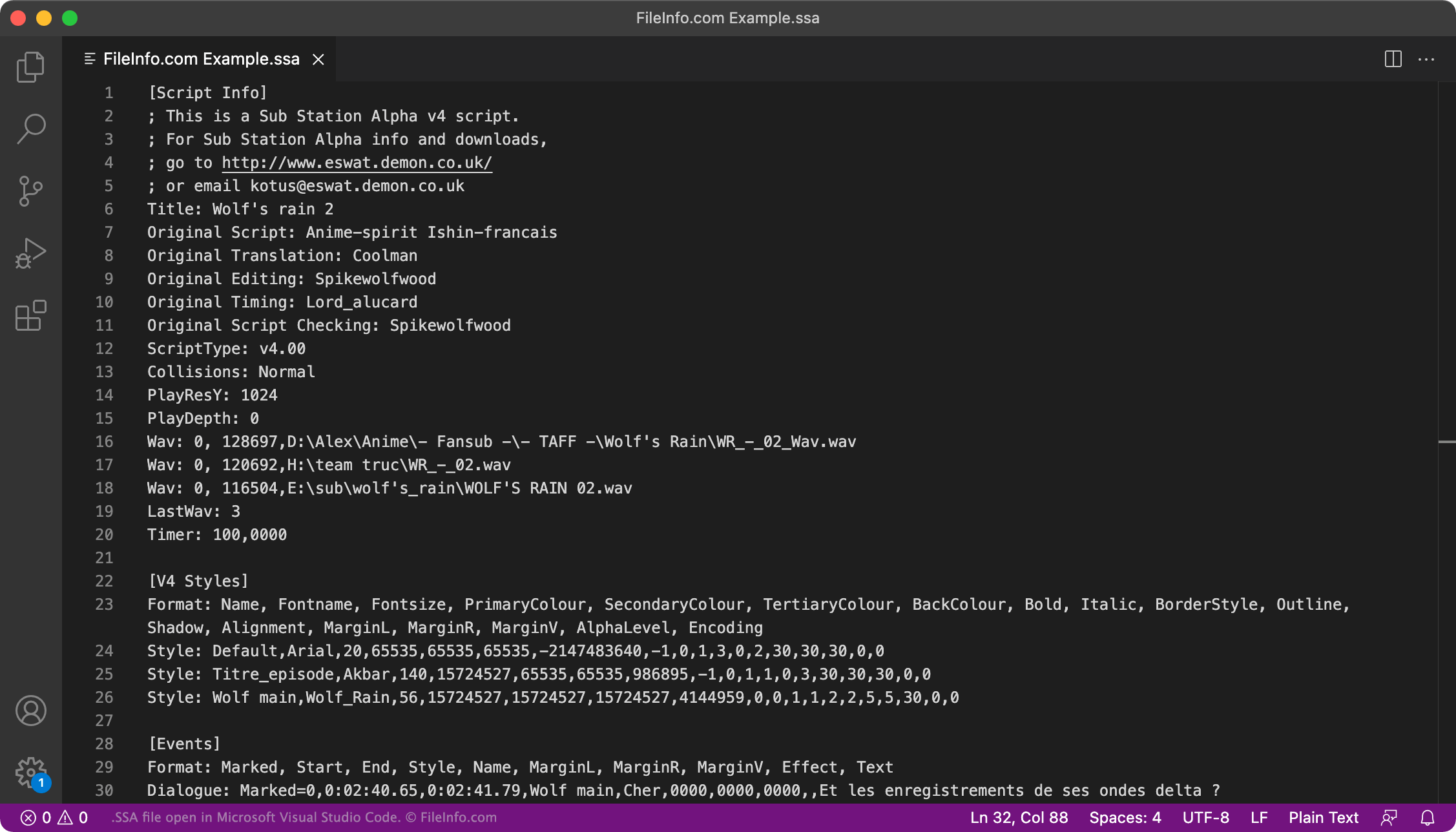
Mit Sub Station Alpha erstellte Untertitel werden im SSA-Format gespeichert. Jede SSA-Datei ist eine Textdatei ohne Formatierung, die drei Abschnitte enthält:
- [Script Info]: Listet das Video auf, für das die SSA-Datei verwendet werden soll, den Autor der Datei und andere Metadaten
- [Styles]: Enthält Formatierungsinformationen zum Festlegen der Schriftart, Farbe usw. der Untertitel
- [Events]: Enthält den Untertiteltext und Zeitangaben
Einige andere Programme zum Erstellen von Untertiteln, etwa Aegisub und Gnome Subtitles, ermöglichen ebenfalls das Speichern von Untertiteln im SSA-Format. Inzwischen hat das .ASS-Format (Aegisub Advanced SubStation Alpha) das SSA-Format jedoch weitgehend ersetzt.
Wie kann ich überprüfen, ob meine SSA-Untertitel korrekt formatiert sind?
Sie können überprüfen, ob die in Ihrer SSA-Datei enthaltenen Untertitel korrekt formatiert sind, indem Sie die Datei beim unter https://validator.subtitledpro.com/ verfügbaren Subtitle Validator hochladen.
So öffnen Sie eine SSA-Datei
Sie können eine SSA-Datei als Untertitelspur in VideoLAN VLC media player (plattformübergreifend), MPlayer (plattformübergreifend) und CyberLink PowerDVD (Windows) verwenden.
So verwenden Sie beispielsweise eine SSA-Datei als Untertitelspur in VLC media player:
- Öffnen Sie VLC und spielen Sie das Video ab, mit dem Sie Ihre SSA-Datei verwenden möchten.
- Wählen Sie in der Menüleiste von VLC aus.
- Wechseln Sie zu Ihrer SSA-Datei und öffnen Sie sie.
Um die in einer SSA-Datei enthaltenen Untertitel zu bearbeiten, öffnen Sie die Datei in Aegisub (plattformübergreifend), Microsoft Notepad (Windows), Apple TextEdit (Mac) oder einem beliebigen Texteditor.