

.SSA Estensione file
File di sottotitoli Sub Station Alpha
| Sviluppatore | Kotus |
| Popolarità |
2,7 | 13 Voti |
Che cos'è un file SSA?
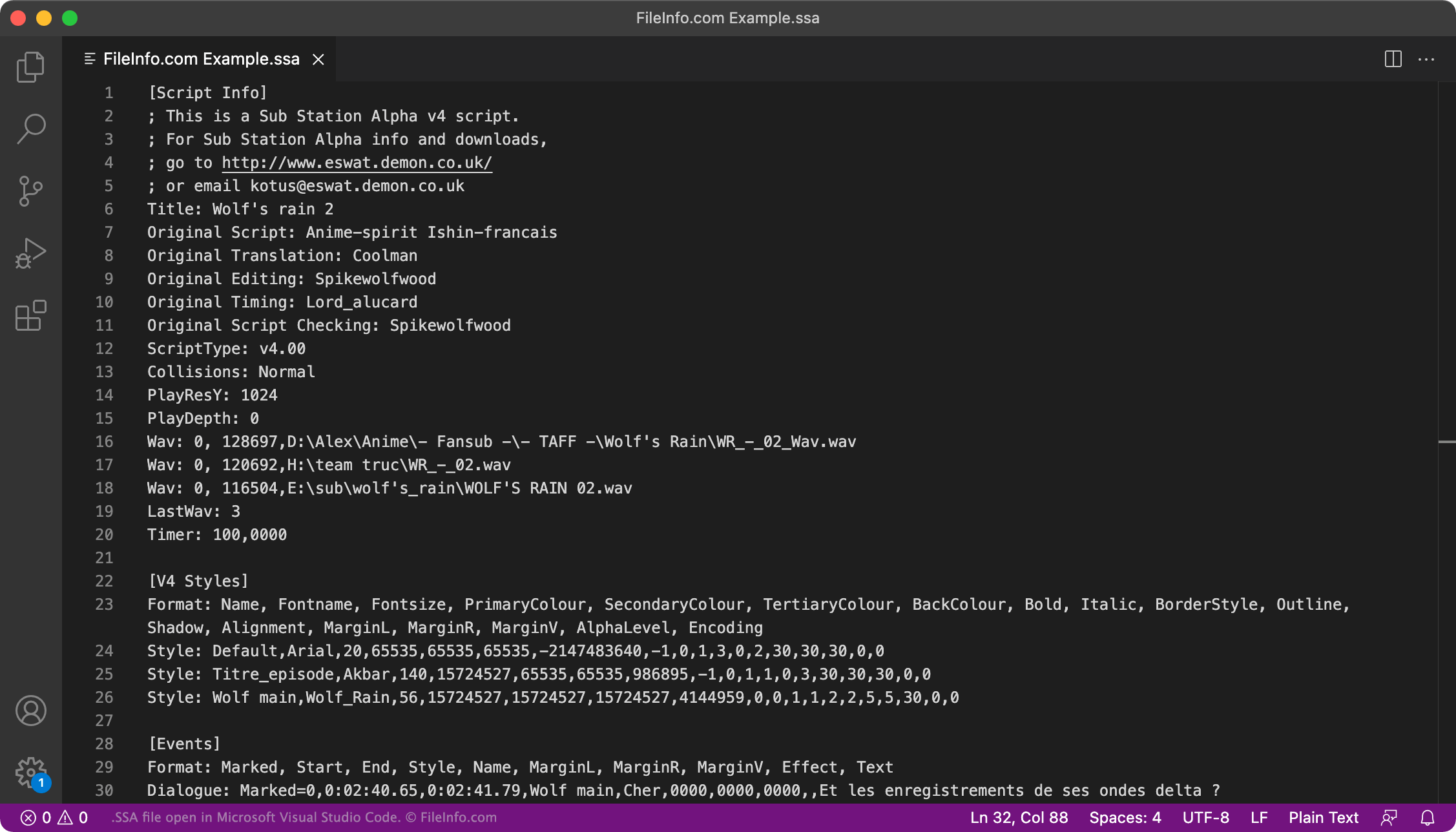
Un file SSA contiene sottotitoli scritti nel formato di sottotitoli Sub Station Alpha. Viene utilizzato per mostrare i sottotitoli insieme a un video associato. Puoi aprire e modificare un file SSA in qualsiasi editor di testo. Puoi utilizzarlo come traccia dei sottotitoli in VideoLAN VLC media player, MPlayer e CyberLink PowerDVD.
Maggiori informazioni
Sub Station Alpha è un programma che ti consente di creare sottotitoli personalizzati per i video. Ad esempio, molti appassionati di anime di lingua inglese usano Sub Station Alpha per creare sottotitoli per anime non doppiati.
I sottotitoli creati con Sub Station Alpha vengono salvati nel formato SSA. Ogni file SSA è un file di testo normale che include tre sezioni:
- [Script Info]: elenca il video con cui il file SSA deve essere utilizzato, l'autore del file e altri metadati
- [Styles]: contiene le informazioni sullo stile utilizzate per impostare il carattere, il colore e altro dei sottotitoli
- [Events]: contiene il testo dei sottotitoli e le informazioni sulla temporizzazione
Anche alcuni altri programmi per la creazione di sottotitoli, come Aegisub e Gnome Subtitles, ti consentono di salvare i sottotitoli nel formato SSA. Tuttavia, a questo punto, il formato .ASS (Aegisub Advanced SubStation Alpha) ha in gran parte sostituito il formato SSA.
Come posso verificare che i miei sottotitoli SSA siano formattati correttamente?
Puoi verificare che i sottotitoli contenuti nel tuo file SSA siano formattati correttamente caricando il file nel Subtitle Validator disponibile all'indirizzo https://validator.subtitledpro.com/.
Come aprire un file SSA
Puoi utilizzare un file SSA come traccia dei sottotitoli in VideoLAN VLC media player (multipiattaforma), MPlayer (multipiattaforma) e CyberLink PowerDVD (Windows).
Ad esempio, per utilizzare un file SSA come traccia dei sottotitoli in VLC media player:
- Apri VLC e riproduci il video con cui vuoi utilizzare il tuo file SSA.
- Dalla barra dei menu di VLC, seleziona .
- Individua e apri il tuo file SSA.
Per modificare i sottotitoli contenuti in un file SSA, apri il file in Aegisub (multipiattaforma), Microsoft Notepad (Windows), Apple TextEdit (Mac) o in qualsiasi editor di testo.