.MATERIAL Dateiendung

Rigs of Rods Texture Reference File

Entwickler k. A.
Beliebtheit
3.0  |  7 Stimmen
 

Was ist eine MATERIAL-Datei?

File used by Rigs of Rods, an open source truck, car, airplane, and boat simulator; contains nested instructions and properties that reference a particular 3D model, such as a truck, to a texture file; specifies textures that are declared in a corresponding .TRUCK file.

Weitere Informationen

NOTE: Valid texture files are in .PNG, .JPG, and .DDS formats, and DDS is the recommended format.

Über 400 Dateiformate öffnen mit File Viewer Plus.Kostenloser Download

Programme, die .MATERIAL-Dateien öffnen oder referenzieren

Windows
Kostenlos
Mac
Kostenlos

Godot Engine Material

Entwickler Godot
Beliebtheit
4.0  |  2 Stimmen
 

A MATERIAL file is a material used by Godot Engine, an open-source game development engine. It contains properties that control how light interacts with a 3D object. Some 3D scene creation tools, such as Blender, create MATERIAL files when a user exports a Godot Engine scene.

Weitere Informationen

Video game developers use Godot Engine to create 2D and 3D video games. These games are comprised of one or more scenes. Often, developers create scenes outside Godot Engine and then import them. Scenes created outside Godot Engine may use internal materials, stored in the scene file, or external materials, stored in separate MATERIAL files.

For example, the Godot Blender Exporter allows developers to export scenes as .ESCN files. If a developer selects Generate External Material while creating an ESCN file, Godot Blender Exporter saves the scene's materials in separate MATERIAL files. The developer must then import these MATERIAL files into Godot Engine along with their ESCN file.

So öffnen Sie eine MATERIAL-Datei

You can import the material a MATERIAL file contains into Godot Engine (multiplatform). To do so, review Godot Engine's documentation for importing scenes with separate materials.

Programme, die .MATERIAL-Dateien öffnen

Windows
Kostenlos
Mac
Kostenlos
Linux
Kostenlos

OGRE Material Script

Entwickler The OGRE Team
Beliebtheit
3.0  |  1 Stimme
 

A MATERIAL file is a material definition script used by OGRE (Object-Oriented Graphics Rendering Engine). It contains rendering instructions and asset references that define how OGRE renders a complex material. Video game developers create and use MATERIAL files when developing games that use OGRE.

Weitere Informationen

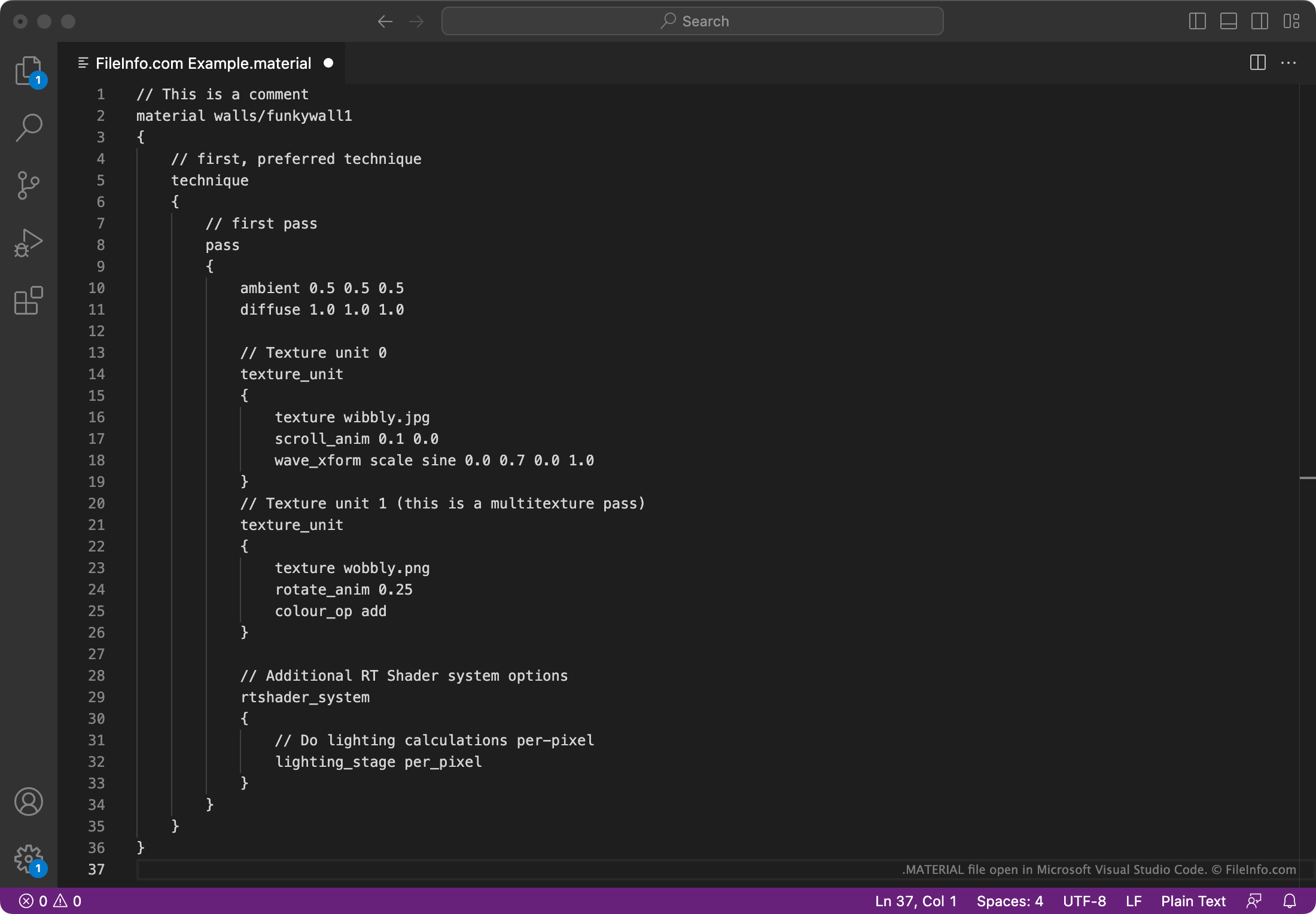
Screenshot einer .material-Datei in Microsoft Visual Studio Code
MATERIAL-Datei geöffnet in Microsoft Visual Studio Code

OGRE is an open-source 3D rendering engine used by many popular games. Some examples include Rigs of Rods, Torchlight, and until 2014, Roblox.

Developers using OGRE have the option of creating materials using material scripts. This allows them to easily reuse the same materials in multiple places, without manually coding the material each time. Material scripts are saved in MATERIAL files.

Each MATERIAL file typically begins with a top-level comment, stating what material the file defines. It then goes on to specify rendering instructions, carried out using various OGRE rendering techniques. Each technique can be performed one or more times, with each pass used to render the material in a slightly different way, producing a composite effect.

HINWEIS: The MATERIAL files that Rigs of Rods uses are OGRE MATERIAL files. Rigs of Rods uses the OGRE rendering engine.

So öffnen Sie eine MATERIAL-Datei

You can open and edit a MATERIAL file with Microsoft Visual Studio Code (multiplatform) or any other source code or text editor. For instructions on how to use MATERIAL files with OGRE (multiplatform), refer to the program's documentation.

Programme, die .MATERIAL-Dateien öffnen oder referenzieren

Windows
Mac
Linux

Geprüft von FileInfo.com

Das FileInfo.com-Team hat alle auf dieser Seite aufgeführten Dateiformate und Softwareprogramme unabhängig recherchiert. Unser Ziel ist 100% Genauigkeit, und wir veröffentlichen nur Informationen zu Dateitypen, die wir überprüft haben.

Wenn Sie Ergänzungen oder Aktualisierungen zu dieser Seite vorschlagen möchten, teilen Sie es uns bitte.