

Canva Affinity
| Version | 2026(as of 5/27/2026) |
| Platforms | Windows, Mac |
| License | Freeware |
| Category | Graphics |
Main Features
- Supports raster, vector graphics, and multi-page layout workflows
- Uses a non-destructive editing system that preserves original content and allows reversible adjustments
- Provides layers, masks, adjustment layers, and live effects
- Offers Canva AI Studio, which includes generative AI and machine-learning tools
- Imports and exports widely used file formats, including .JPG, .PNG, .TIFF, .PDF, .PSD, and .SVG
- Includes advanced design tools such as retouching brushes, pen and node tools for precise vector creation, and layout grids for professional page design
Software Overview
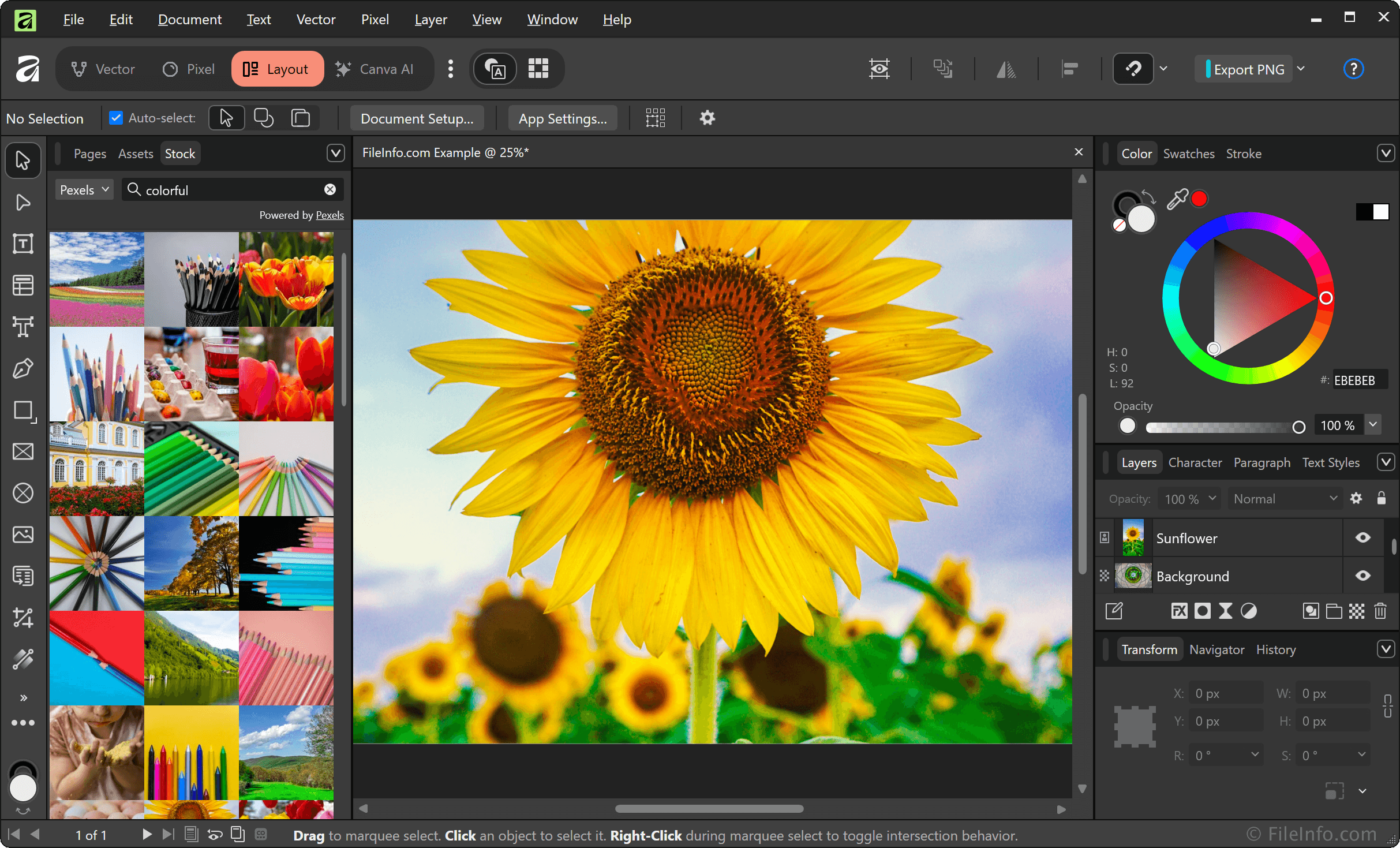
Canva Affinity is a professional creative software suite used by designers, photographers, illustrators, and publishers that includes photo editing, vector illustration, and page layout design capabilities. The Affinity app replaced the Affinity Photo, Designer, and Publisher programs when Canva acquired Serif in March 2024.
Affinity supports raster graphics (pixel-based), vector graphics, and multi-page layout workflows. The software primarily uses the proprietary .AF format to save projects, which preserve layers, edits, and design elements. It can also import and export common formats such as .JPG, .PNG, .TIFF, .PDF, .PSD, and .SVG.
A key feature of Affinity is its non-destructive workflow, which allows users to make edits without permanently altering the original image or design. It uses layers extensively, along with adjustment layers, masks, and live effects to enable flexible and reversible editing. Affinity also includes advanced tools such as retouching brushes, pen and node tools for precise vector creation, and layout grids for print design. It is widely used for professional print production, digital illustration, UI design, and photo retouching, with built-in export options for web, print, and digital publishing workflows.
Summary
Affinity is a professional design app used by creatives for photo editing, vector illustration, and page layout design. Key features include support for raster and vector workflows, various file formats, and a non-destructive layer-based editing system. It also offers a wide range of professional design and retouching tools, making Canva Affinity a strong, free alternative to subscription-based creative software, like Adobe Photoshop and Illustrator.
Primary File Type
 .AFAffinity Document
Supported File Types
| Extension | File Type |
|---|---|
| .AF | Affinity Document |
| .AFBOOK | Affinity Publisher Book |
| .AFBRUSHES | Affinity Brushes File |
| .AFDESIGN | Affinity Design Document |
| .AFPACKAGE | Affinity Package |
| .AFPHOTO | Affinity Photo Document |
| .AFPUB | Affinity Publisher Document |
| .AFTEMPLATE | Affinity Template |
Additional Related File Types
| Extension | File Type |
|---|---|
| .AI | Adobe Illustrator Artwork |
| .BMP | Bitmap Image |
| .CRW | Canon Raw CIFF Image File |
| .DWG | AutoCAD Drawing |
| .DXB | Drawing Exchange Binary |
| .DXF | Drawing Exchange Format File |
| .EMF | Enhanced Windows Metafile |
| .EPS | Encapsulated PostScript File |
| .EXR | OpenEXR Image |
| .GIF | Graphical Interchange Format File |
| .HDR | High Dynamic Range Image File |
| .HEIC | High Efficiency Image Format |
| .HEIF | High Efficiency Image Format |
| .HIF | High Efficiency Image Format |
| .IDML | Adobe InDesign Markup Language File |
| .J2K | JPEG 2000 Image |
| .JP2 | JPEG 2000 Core Image |
| .JPEG | JPEG Image |
| .JPG | JPEG Image |
| .JXL | JPEG XL Image |
| .JXR | JPEG XR Image |
| Portable Document Format File | |
| .PNG | Portable Network Graphic |
| .PS | PostScript File |
| .PSB | Photoshop Large Document Format |
| .PSD | Adobe Photoshop Document |
| .SVG | Scalable Vector Graphic |
| .TGA | Targa Graphic |
| .TIF | Tagged Image File |
| .TIFF | Tagged Image File Format |
| .WEBP | WebP Image |
| .WMF | Windows Metafile |