

.PAGES Bestandsextensie
Apple Pages-document
| Ontwikkelaar | Apple |
| Populariteit |
3,5 | 480 stemmen |
Wat is een PAGES-bestand?
Een PAGES-bestand is een document dat is gemaakt met Apple Pages, een tekstverwerker en programma voor paginaopmaak voor macOS en iOS. Het bevat een document, zoals een rapport, poster, cv, nieuwsbrief, boek, certificaat of brochure, dat vanaf een lege pagina of op basis van een sjabloon is gemaakt. PAGES-documenten bevatten meestal tekst en informatie over de paginaopmaak, maar kunnen ook afbeeldingen, tabellen, diagrammen en grafieken bevatten.
Meer informatie
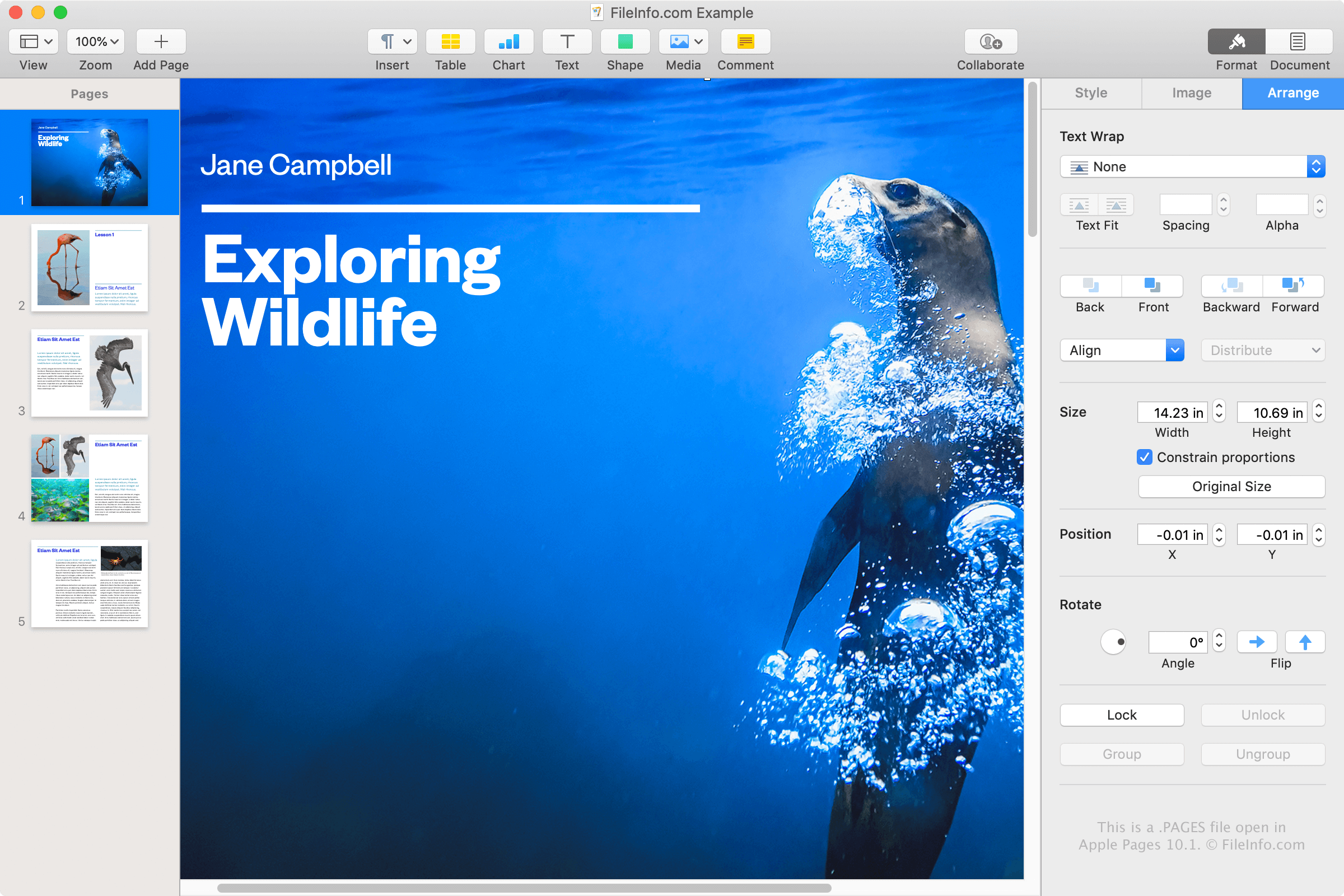
Apple Pages is een tekstverwerker die vergelijkbaar is met Microsoft Word en deel uitmaakt van het iWork-kantoorpakket, samen met Numbers en Keynote, dat bij macOS wordt meegeleverd. Je kunt Pages gebruiken om verschillende soorten documenten te maken en deze op te slaan als PAGES-bestanden of ze naar een andere indeling te converteren.
Je komt een PAGES-bestand waarschijnlijk alleen tegen als je een Apple-apparaat gebruikt, zoals een MacBook of iPad, en documenten opslaat met de Pages-app. Je kunt echter ook een PAGES-bestand tegenkomen als je geen Apple-apparaat gebruikt. Een collega of vriend die Pages op een Mac gebruikt, kan bijvoorbeeld een als PAGES-bestand opgeslagen brief met je delen.
Een PAGES-bestand maken
Pages slaat documenten standaard op als PAGES-bestanden, net zoals Word documenten standaard opslaat als DOCX-bestanden. Als je met Pages op een Mac een PAGES-bestand wilt maken, selecteer je , kies je een sjabloon of een leeg document en selecteer je vervolgens .
Een PAGES-bestand openen
Je kunt een PAGES-bestand openen met Apple Pages op een Mac of iOS-apparaat. Dit is de beste optie, omdat Pages mogelijkheden biedt om documenten rechtstreeks te bekijken en te bewerken.
Als je geen toegang hebt tot Pages, kun je PAGES-bestanden uploaden naar je online iCloud-account en het document bekijken en bewerken in de iCloud-versie van Pages. Daar kun je het document bekijken en bewerken en een kopie van het document downloaden als een PAGES-, PDF-, DOCX- of EPUB-bestand.
Omdat PAGES-bestanden worden opgeslagen in de indeling .ZIP, kun je de inhoud van een PAGES-bestand ook handmatig bekijken door het uit te pakken met een hulpprogramma voor het decomprimeren van ZIP-bestanden. Dit is vooral handig voor Windows-gebruikers die Pages niet kunnen installeren en de inhoud van een PAGES-document moeten bekijken. De inhoud die uit een PAGES-bestand kan worden gehaald, omvat een .JPG-bestand en een optioneel PDF-bestand die een voorbeeld van het document geven.
Volg deze instructies om de inhoud van een PAGES-bestand handmatig te bekijken:
- Wijzig de bestandsextensie .pages in .zip.
- Pak het resulterende ZIP-bestand uit met een hulpprogramma voor het decomprimeren van ZIP-bestanden, zoals Microsoft File Explorer, Corel WinZip of Apple Archive Utility. De uitgepakte bestanden moeten een map met de naam QuickLook bevatten. Ga naar deze map.
- Open in de map QuickLook het bestand Thumbnail.jpg. Dit bestand geeft alleen een voorbeeld van de eerste pagina van het document, maar kan in sommige situaties toch nuttig zijn.
- In de map QuickLook kan ook een PDF-bestand met de naam Preview.pdf staan. Open dit bestand om een voorbeeld van het volledige PAGES-document te bekijken. Het PDF-bestand wordt alleen gemaakt als de gebruiker ervoor heeft gekozen het oorspronkelijke document in Pages op te slaan met aanvullende voorbeeldinformatie.
Een PAGES-bestand converteren
Apple Pages kan PAGES-bestanden converteren naar verschillende indelingen. Selecteer in de macOS-versie en kies vervolgens een van de volgende indelingen:
- .DOCX, .DOC - Microsoft Word-document
- .PDF - Portable Document Format
- .EPUB - Open eBook
- .RTF, .RTFD - Rich Text Format
- .TXT - Platte tekst
- Pages '09-document
Selecteer in de iCloud-versie de knop , selecteer en exporteer je bestand als een .PDF-, .DOCX- of .EPUB-bestand.
Je kunt PAGES-bestanden ook naar PDF-bestanden converteren met Apple Voorvertoning door te selecteren.