.ART 파일 확장자

ArtCAM Model

개발사 Delcam
인기도
3.5  |  52 투표
 

ART 파일이란 무엇인가요?

CAD model created by ArtCAM, a CNC (computer numerical control) program used for artistic design and manufacturing; saves a 2D or 3D model as well as instructions for a machine to cut or engrave the design; used for signs, woodworking, engraving, and jewelry.

추가 정보

Delcam ArtCAM is no longer developed.

File Viewer Plus(으)로 400개 이상의 파일 형식을 여세요.무료 다운로드

ART 파일을 여는 프로그램

Windows
Delcam ArtCAM
카테고리: CAD
업데이트: 2020-07-17

AOL Compressed Image File

개발사 AOL
인기도
3.0  |  22 투표
 

Bitmap image file compressed by America Online (AOL); saved in a proprietary format that most image viewing programs do not recognize; can be opened within America Online by selecting "File→Open..."

추가 정보

To save an ART file in a more compatible format, open the image with AOL File Viewer, choose "Save As..." and select a different format.

ART 파일을 여는 프로그램

Windows
AOL
Mac
AOL

BERNINA Embroidery File

개발사 BERNINA
인기도
2.9  |  17 투표
 

An ART file is an embroidery design created by versions 1 to 4 of BERNINA ARTlink, an embroidery application. It contains a design that includes object outlines, stitches, thread colors, a preview thumbnail image, and other metadata. ART files can be loaded into a BERNINA sewing machine and stitched onto a quilt, shirt, or another piece of fabric.

추가 정보

BERNINA ARTlink 8에서 열린 .art 파일의 스크린샷
BERNINA ARTlink 8에서 열린 ART 파일

The ART format is one of many design file types utilized in the embroidery community and is the native format used by BERNINA sewing machines and software. Other embroidery formats include .PES, .VP3, .VIP, .JEF, .HUS, and .PCS.

There are several different versions of the ART format, and older versions of BERNINA software may not open newer versions of ART files. Also, beginning with version 5 of ARTlink, the software saves designs with file extensions that reflect the version of the software. For example, ARTlink 5 saves designs as .ART50 files, and ARTlink 6 saves designs as ART60 files.

How do I transfer an ART file from my computer to a sewing machine?

To transfer an ART file to a sewing machine, insert a USB storage device in your computer, then transfer the ART file from your computer to the connected storage device via File Explorer in Windows or Finder in macOS. After transferring the file, eject the storage device from your computer and insert it into the BERNINA sewing machine to transfer the design to embroider it onto the material.

ART 파일을 여는 방법

You can open and edit BERNINA ART files with the embroidery software included with BERNINA sewing machines. You can also be open, view, and print ART files with BERNINA ARTlink in Windows.

If you are looking to convert an ART file to another embroidery format, you can do so with BERNINA ARTlink by selecting File → Export Machine File.... Conversion options include PES, JEF, SEW, PEC, VP3, VIP, HUS, .SHV, and .EXP.

ART 파일을 여는 프로그램

Windows
무료 체험판
카테고리: 기타
업데이트: 2021-03-25

Art Document

개발사 해당 없음
인기도
2.3  |  7 투표
 

Image file that may have been created by several different drawing programs; typically a vector graphic and uses points, vertices, and lines to represent the image instead of dots like a bitmap image; also used by various clipart programs.

ART 파일을 여는 프로그램

Windows
무료 체험판
Mac
무료 체험판

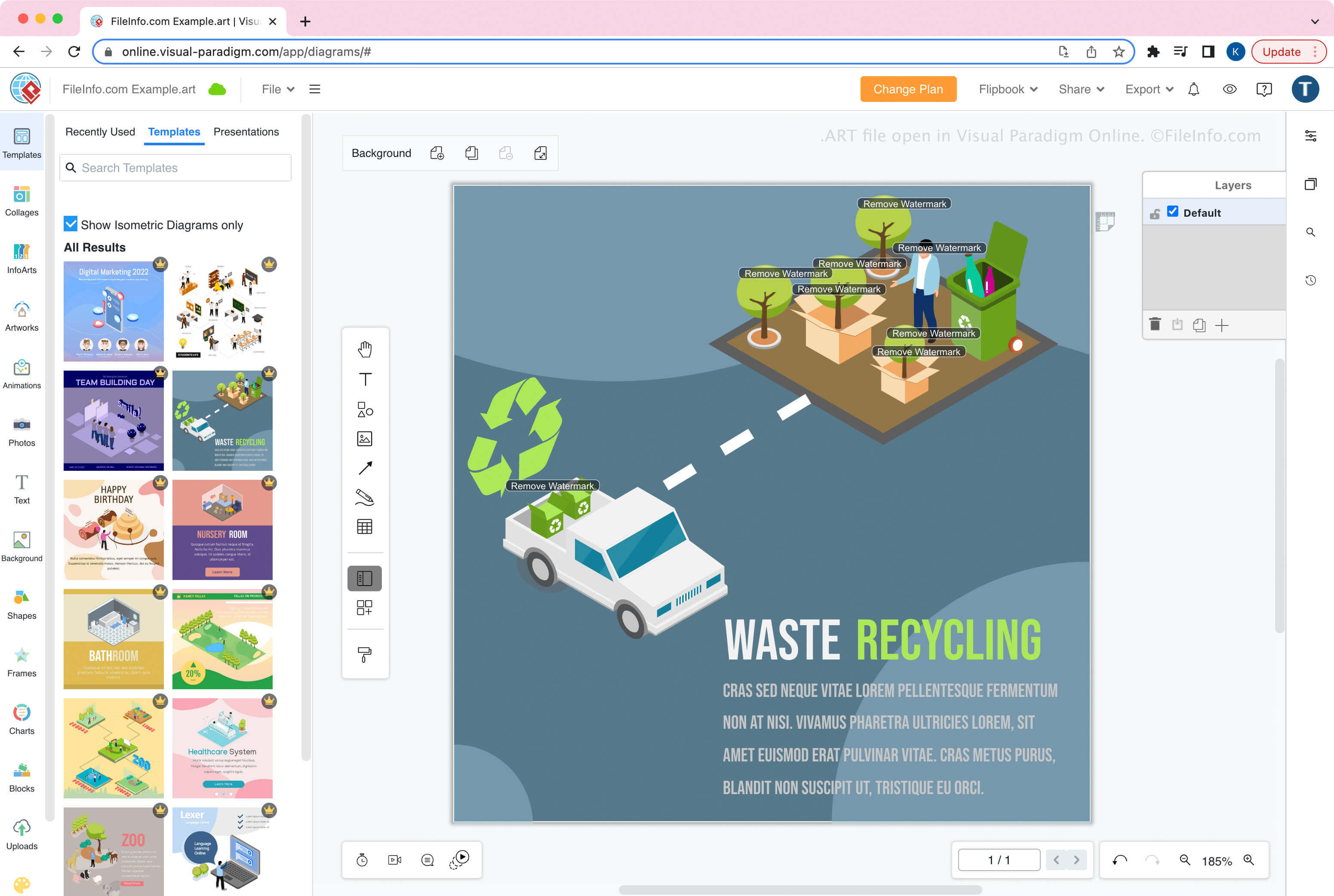
Visual Paradigm Online Artwork

개발사 Visual Paradigm
인기도
3.5  |  2 투표
 

An ART file is an artwork project created by Visual Paradigm Online, a web app for designing documents, such as infographics and brochures. It is saved in the native Visual Paradigm Online Artwork (ART) format and contains document formatting, one or more layers, graphics, text, shapes, and other design elements.

추가 정보

Visual Paradigm Online에서 열린 .art 파일의 스크린샷
Visual Paradigm Online에서 열린 ART 파일

Visual Paradigm Online is the online counterpart to the desktop Visual Paradigm application. The tool allows you to create, edit, save, export, and import artwork, such as infographics, flyers, posters, brochures, greeting cards, and resumes.

How to create an ART file

When you save artwork as an ART file with Visual Paradigm Online, you can choose to save it to local storage (your device) or Google Drive. After saving the file, you can import the file into Visual Paradigm Online to continue modifying the design.

To create an ART file:

  1. Select File → Create New
  2. Design the artwork
  3. Select File → Save as...
  4. Name the file and choose the save location (Google Drive or Device)

참고: In Visual Paradigm Online, you can choose from different apps to create different types of artwork. When creating diagrams with the Diagram app module, Visual Paradigm Online saves diagrams as .VPD files.

ART 파일을 여는 방법

You can open an ART file with Visual Paradigm Online in a web browser. To open an ART file, select File → Open.

ART 파일을 변환하는 방법

Visual Paradigm Online can convert ART files to various image formats:

  • .PDF - Portable Document Format
  • .JPG - JPEG Image
  • .PNG - Portable Network Graphic
  • .SVG - Scalable Vector Graphics File

ART 파일을 여는 프로그램

Artifacts Artifact File

개발사 Versioned
인기도
1.8  |  13 투표
 

Visual Studio program bug description created with Artifacts, a file-based bug tracker; saved as an "artifact" with a unique ID and contains a bug description in an XML format; can be categorized and filtered by labels within Artifacts.

ART 파일을 여는 프로그램

Windows
Versioned Artifacts
카테고리: 개발자
업데이트: 2013-06-04

검증자 FileInfo.com

FileInfo.com 팀 이 페이지에 나열된 모든 파일 형식과 소프트웨어 프로그램을 독자적으로 조사했습니다. 저희의 목표는 100% 정확성이며, 검증한 파일 유형에 대한 정보만 게시합니다.

이 페이지에 추가하거나 업데이트할 내용을 제안하고 싶으시면 알려 주세요.