

.ART Extension de fichier
Fichier de broderie BERNINA
| Développeur | BERNINA |
| Popularité |
2,9 | 17 Votes |
Un fichier ART est un motif de broderie créé par les versions 1 à 4 de BERNINA ARTlink, une application de broderie. Il contient un motif comprenant les contours des objets, les points, les couleurs de fil, une image miniature d’aperçu et d’autres métadonnées. Les fichiers ART peuvent être chargés dans une machine à coudre BERNINA et brodés sur une couverture, une chemise ou une autre pièce de tissu.
Plus d'informations

Le format ART est l’un des nombreux types de fichiers de motifs utilisés dans le domaine de la broderie et constitue le format natif des machines à coudre et des logiciels BERNINA. Les autres formats de broderie incluent .PES, .VP3, .VIP, .JEF, .HUS et .PCS.
Il existe plusieurs versions différentes du format ART, et les anciennes versions des logiciels BERNINA peuvent ne pas ouvrir les versions plus récentes des fichiers ART. De plus, à partir de la version 5 d’ARTlink, le logiciel enregistre les motifs avec des extensions de fichier qui indiquent la version du logiciel. Par exemple, ARTlink 5 enregistre les motifs sous forme de fichiers .ART50, et ARTlink 6 enregistre les motifs sous forme de fichiers ART60.
Comment transférer un fichier ART de mon ordinateur vers une machine à coudre ?
Pour transférer un fichier ART vers une machine à coudre, insérez un périphérique de stockage USB dans votre ordinateur, puis transférez le fichier ART de votre ordinateur vers le périphérique de stockage connecté à l’aide de l’Explorateur de fichiers sous Windows ou du Finder sous macOS. Après avoir transféré le fichier, éjectez le périphérique de stockage de votre ordinateur et insérez-le dans la machine à coudre BERNINA pour transférer le motif et le broder sur le tissu.
Comment ouvrir un fichier ART
Vous pouvez ouvrir et modifier les fichiers ART BERNINA avec le logiciel de broderie fourni avec les machines à coudre BERNINA. Vous pouvez également ouvrir, afficher et imprimer les fichiers ART avec BERNINA ARTlink sous Windows.
Si vous souhaitez convertir un fichier ART vers un autre format de broderie, vous pouvez le faire avec BERNINA ARTlink en sélectionnant . Les options de conversion incluent PES, JEF, SEW, PEC, VP3, VIP, HUS, .SHV et .EXP.
Programmes qui ouvrent les fichiers ART
Illustration Visual Paradigm Online
| Développeur | Visual Paradigm |
| Popularité |
3,5 | 2 Votes |
Un fichier ART est un projet d’illustration créé par Visual Paradigm Online, une application web servant à concevoir des documents tels que des infographies et des brochures. Il est enregistré dans le format natif Visual Paradigm Online Artwork (ART) et contient la mise en forme du document, un ou plusieurs calques, des graphiques, du texte, des formes et d’autres éléments de conception.
Plus d'informations
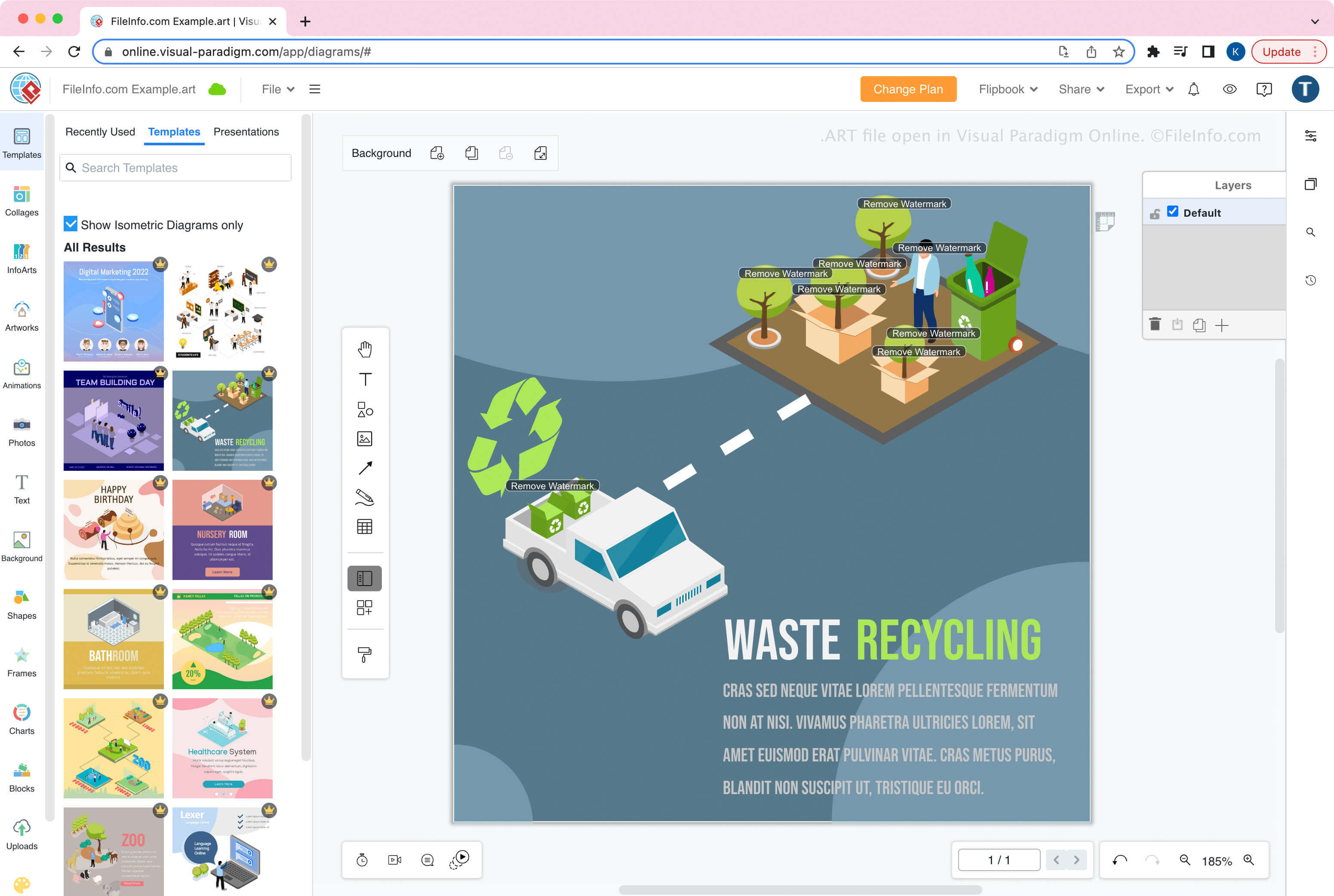
Visual Paradigm Online est la version en ligne de l’application de bureau Visual Paradigm. Cet outil vous permet de créer, modifier, enregistrer, exporter et importer des illustrations telles que des infographies, des prospectus, des affiches, des brochures, des cartes de vœux et des CV.
Comment créer un fichier ART
Lorsque vous enregistrez une illustration dans un fichier ART avec Visual Paradigm Online, vous pouvez choisir de l’enregistrer dans un stockage local (votre appareil) ou sur Google Drive. Après avoir enregistré le fichier, vous pouvez l’importer dans Visual Paradigm Online pour continuer à modifier la conception.
Pour créer un fichier ART :
- Sélectionnez
- Concevez l’illustration
- Sélectionnez
- Nommez le fichier et choisissez l’emplacement d’enregistrement (Google Drive ou Device)
REMARQUE : Dans Visual Paradigm Online, vous pouvez choisir parmi différentes applications pour créer différents types d’illustrations. Lorsque vous créez des diagrammes avec le module de l’application Diagram, Visual Paradigm Online enregistre les diagrammes sous forme de fichiers .VPD.
Comment ouvrir un fichier ART
Vous pouvez ouvrir un fichier ART avec Visual Paradigm Online dans un navigateur web. Pour ouvrir un fichier ART, sélectionnez .