.ART ファイル拡張子

ArtCAM Model

開発元 Delcam
人気度
3.5  |  52 
 

ARTファイルとは?

CAD model created by ArtCAM, a CNC (computer numerical control) program used for artistic design and manufacturing; saves a 2D or 3D model as well as instructions for a machine to cut or engrave the design; used for signs, woodworking, engraving, and jewelry.

詳細情報

Delcam ArtCAM is no longer developed.

File Viewer Plusで400種類以上のファイル形式を開けます。無料ダウンロード

ARTファイルを開くプログラム

Windows
Delcam ArtCAM
カテゴリ: CAD
更新日: 2020-07-17

AOL Compressed Image File

開発元 AOL
人気度
3.0  |  22 
 

Bitmap image file compressed by America Online (AOL); saved in a proprietary format that most image viewing programs do not recognize; can be opened within America Online by selecting "File→Open..."

詳細情報

To save an ART file in a more compatible format, open the image with AOL File Viewer, choose "Save As..." and select a different format.

ARTファイルを開くプログラム

Windows
AOL
Mac
AOL

BERNINA Embroidery File

開発元 BERNINA
人気度
2.9  |  17 
 

An ART file is an embroidery design created by versions 1 to 4 of BERNINA ARTlink, an embroidery application. It contains a design that includes object outlines, stitches, thread colors, a preview thumbnail image, and other metadata. ART files can be loaded into a BERNINA sewing machine and stitched onto a quilt, shirt, or another piece of fabric.

詳細情報

BERNINA ARTlink 8で開いた.artファイルのスクリーンショット
BERNINA ARTlink 8で開いたARTファイル

The ART format is one of many design file types utilized in the embroidery community and is the native format used by BERNINA sewing machines and software. Other embroidery formats include .PES, .VP3, .VIP, .JEF, .HUS, and .PCS.

There are several different versions of the ART format, and older versions of BERNINA software may not open newer versions of ART files. Also, beginning with version 5 of ARTlink, the software saves designs with file extensions that reflect the version of the software. For example, ARTlink 5 saves designs as .ART50 files, and ARTlink 6 saves designs as ART60 files.

How do I transfer an ART file from my computer to a sewing machine?

To transfer an ART file to a sewing machine, insert a USB storage device in your computer, then transfer the ART file from your computer to the connected storage device via File Explorer in Windows or Finder in macOS. After transferring the file, eject the storage device from your computer and insert it into the BERNINA sewing machine to transfer the design to embroider it onto the material.

ARTファイルの開き方

You can open and edit BERNINA ART files with the embroidery software included with BERNINA sewing machines. You can also be open, view, and print ART files with BERNINA ARTlink in Windows.

If you are looking to convert an ART file to another embroidery format, you can do so with BERNINA ARTlink by selecting File → Export Machine File.... Conversion options include PES, JEF, SEW, PEC, VP3, VIP, HUS, .SHV, and .EXP.

ARTファイルを開くプログラム

Windows
無料体験版
カテゴリ: その他
更新日: 2021-03-25

Art Document

開発元 不明
人気度
2.3  |  7 
 

Image file that may have been created by several different drawing programs; typically a vector graphic and uses points, vertices, and lines to represent the image instead of dots like a bitmap image; also used by various clipart programs.

ARTファイルを開くプログラム

Windows
Mac
無料体験版

Visual Paradigm Online Artwork

開発元 Visual Paradigm
人気度
3.5  |  2 
 

An ART file is an artwork project created by Visual Paradigm Online, a web app for designing documents, such as infographics and brochures. It is saved in the native Visual Paradigm Online Artwork (ART) format and contains document formatting, one or more layers, graphics, text, shapes, and other design elements.

詳細情報

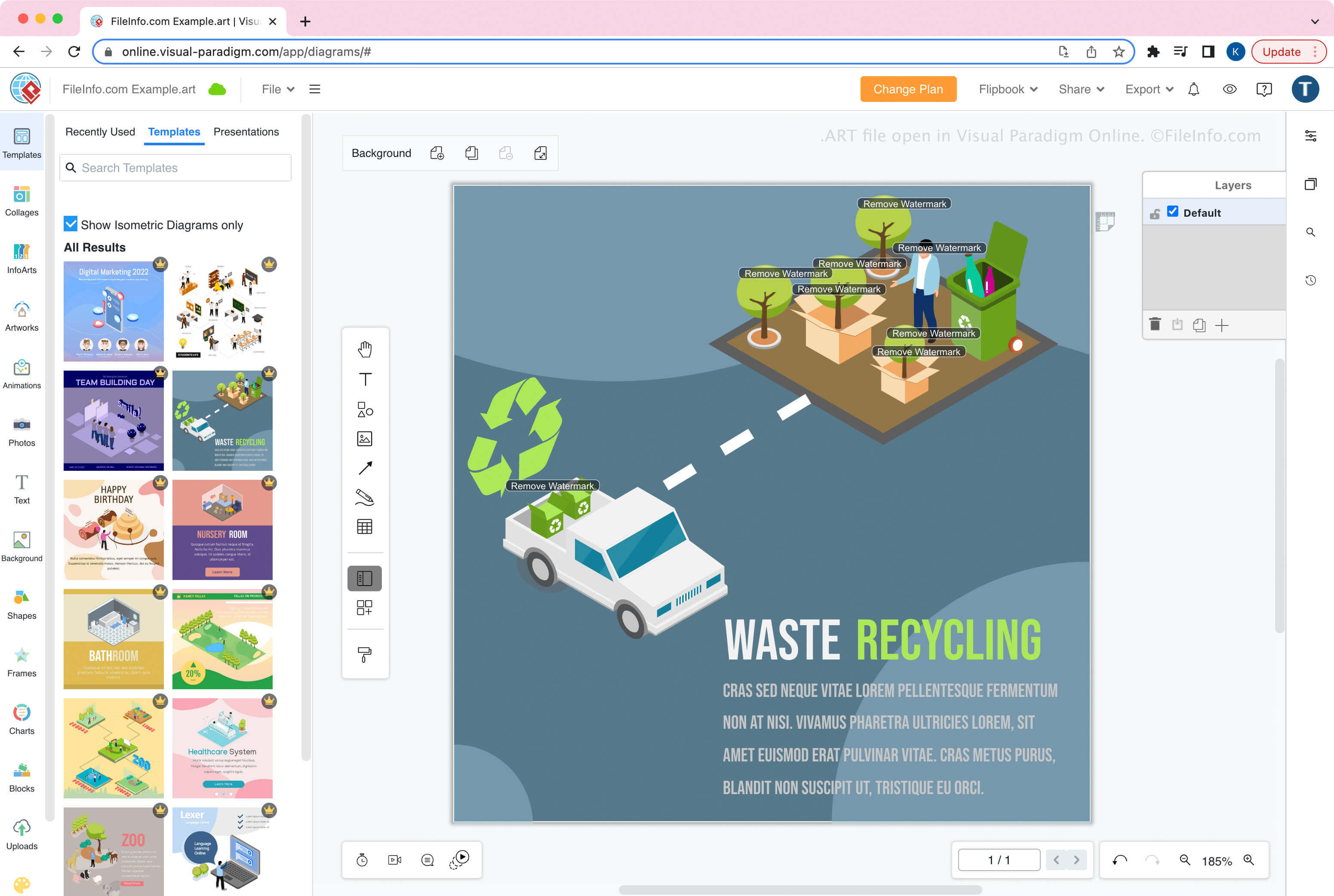
Visual Paradigm Onlineで開いた.artファイルのスクリーンショット
Visual Paradigm Onlineで開いたARTファイル

Visual Paradigm Online is the online counterpart to the desktop Visual Paradigm application. The tool allows you to create, edit, save, export, and import artwork, such as infographics, flyers, posters, brochures, greeting cards, and resumes.

How to create an ART file

When you save artwork as an ART file with Visual Paradigm Online, you can choose to save it to local storage (your device) or Google Drive. After saving the file, you can import the file into Visual Paradigm Online to continue modifying the design.

To create an ART file:

  1. Select File → Create New
  2. Design the artwork
  3. Select File → Save as...
  4. Name the file and choose the save location (Google Drive or Device)

注: In Visual Paradigm Online, you can choose from different apps to create different types of artwork. When creating diagrams with the Diagram app module, Visual Paradigm Online saves diagrams as .VPD files.

ARTファイルの開き方

You can open an ART file with Visual Paradigm Online in a web browser. To open an ART file, select File → Open.

ARTファイルの変換方法

Visual Paradigm Online can convert ART files to various image formats:

  • .PDF - Portable Document Format
  • .JPG - JPEG Image
  • .PNG - Portable Network Graphic
  • .SVG - Scalable Vector Graphics File

ARTファイルを開くプログラム

Artifacts Artifact File

開発元 Versioned
人気度
1.8  |  13 
 

Visual Studio program bug description created with Artifacts, a file-based bug tracker; saved as an "artifact" with a unique ID and contains a bug description in an XML format; can be categorized and filtered by labels within Artifacts.

ARTファイルを開くプログラム

Windows
Versioned Artifacts
カテゴリ: 開発者
更新日: 2013-06-04

検証者 FileInfo.com

FileInfo.comチーム は、このページに掲載されているすべてのファイル形式とソフトウェアについて独自に調査しました。 私たちの目標は100%の正確性であり、検証済みのファイルタイプに関する情報のみを公開しています。

このページへの追加や更新をご提案いただける場合は、お知らせください。