.VP3 파일 확장자

On2 Streaming Video File

개발사 On2 Technologies
인기도
3.3  |  16 투표
 
🔍File Helper(으)로 .VP3 파일을 웹 브라우저에서 바로 여세요.온라인으로 보기

VP3 파일이란 무엇인가요?

Streaming video file compressed on-demand using the VP3 video codec; contains compressed video at variable compression rates; used to send the highest video quality possible given bandwidth adjustments and fluctuations.

추가 정보

VP3 files can be played in Windows Media Player and QuickTime provided they have the appropriate codec installed.

The VP3 format was created by On2 Technologies, and is now maintained by Xiph.org Foundation, who has updated the VP3 format to the Theora format.

VP3 파일을 여는 프로그램

Mac
OS에 포함됨
Web
카테고리: 비디오
업데이트: 2014-03-27

Husqvarna Viking / Pfaff Embroidery File

개발사 SGSB Co. Ltd.
인기도
4.0  |  1 투표
 

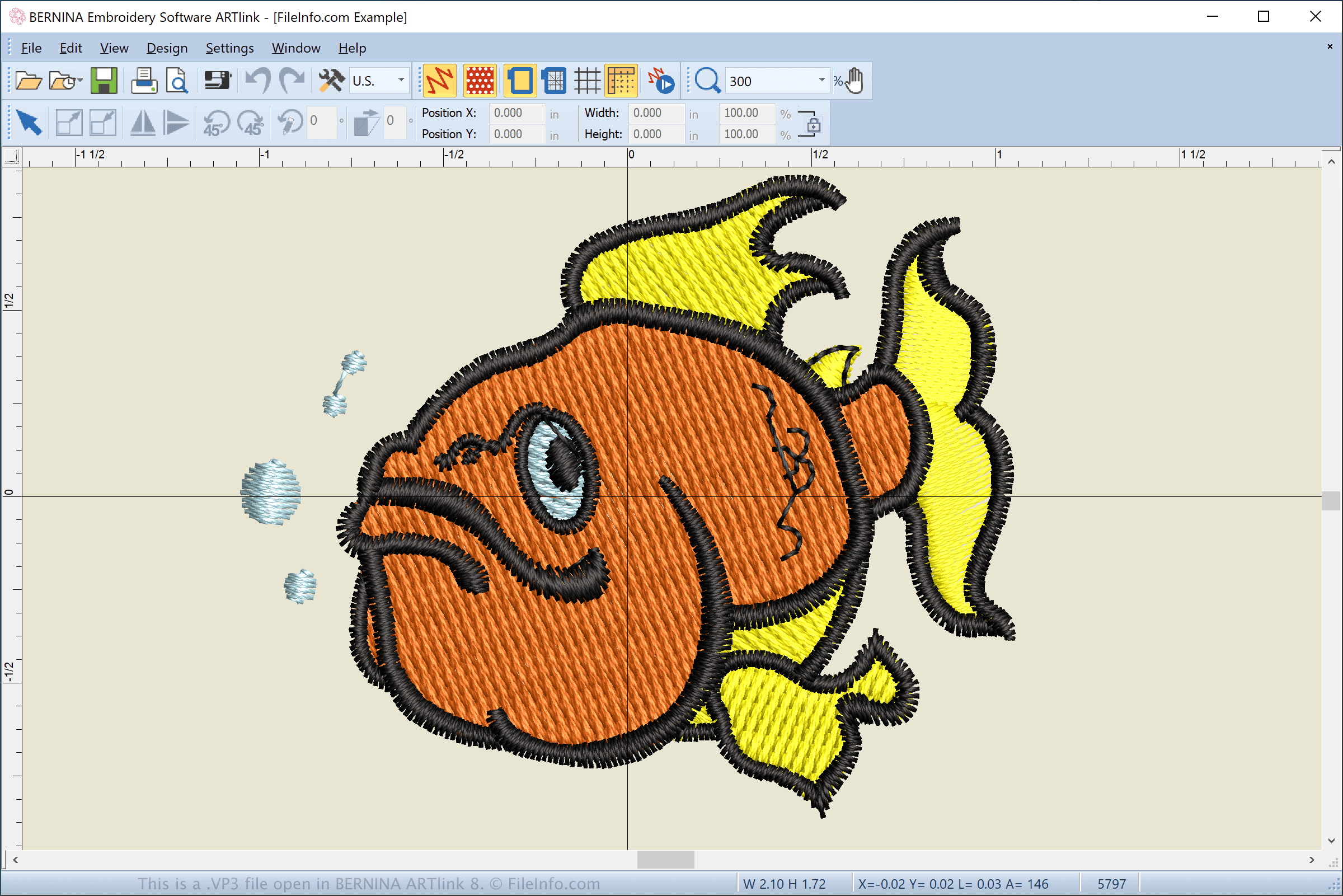
A VP3 file is a computer-aided manufacturing (CAM) file saved in version 3 of the Husqvarna Viking / Pfaff format (VP3). It stores embroidery stitch information for a Pfaff or Husqvarna Viking sewing machine to stitch a pattern onto a piece of fabric. VP3 files contain information about one or more designs (typically just one) organized into "StitchBlocks," which are sets of continuous stitches in a specific color.

추가 정보

BERNINA ARTlink 8에서 열린 .vp3 파일의 스크린샷
BERNINA ARTlink 8에서 열린 VP3 파일

Pfaff and Husqvarna developed the VP3 format to replace the .VIP and .PCS embroidery pattern files used by older Pfaff and Husqvarna sewing machines. Older Pfaff models, such as the 7570, 7562, 7550, and 1400 series, utilize PCS files. Newer models, such as 2124, 2134, 2170, 2144, and 2140 use VP3 files.

What is the data structure of a VP3 file?

The VP3 format improves upon older formats by supporting extra design information, which has become necessary as patterns have grown more advanced and complex. The VP3 format typically consists of the following structure:

  1. File Header and Data - Includes metadata, hoop and design information, and the number of stitch blocks in the file.
  2. Design Block - Includes ColorBlocks, which are organized into StitchBlocks that store stitch information.
  3. Additional Design Blocks - Includes ColorBlocks for an additional design block. Most VP3 files only have one design block.

How do I transfer a VP3 file from my computer to a sewing machine?

To transfer a VP3 file to a sewing machine, insert a USB storage device in your computer. Then, transfer the VP3 file from your computer to the connected storage device via File Explorer in Windows or Finder in macOS.

After transferring the file, eject the storage device from your computer and insert it into the Pfaff or Husqvarna Viking sewing machine to transfer the design to embroider it onto the material. If your sewing machine is Wifi-enabled, you can download the design directly to the machine via the machine's touchscreen interface.

참고: Husqvarna Viking and Pfaff sewing machines are owned by SGSB Co. Ltd.

VP3 파일을 여는 방법

You can open VP3 files with various applications, including BERNINA ARTlink (Windows), Wings Systems my editor (Windows), PREMIER+ Embroidery (multiplatform), and Wilcom TrueSizer (Windows). These apps enable you to convert VP3 files to other embroidery and image formats, such as .PES, .JEF, .JPG, and .PNG.

You can also view and convert VP3 files to other formats with the Embroidery Viewer and Converter web application and plugin for the Google Chrome web browser. If you are an Android user, you can use Touch Embroidery Free and Embroidery Viewer to open VP3 files.

VP3 파일을 여는 프로그램

카테고리: 기타
업데이트: 2021-03-25

검증자 FileInfo.com

FileInfo.com 팀 이 페이지에 나열된 모든 파일 형식과 소프트웨어 프로그램을 독자적으로 조사했습니다. 저희의 목표는 100% 정확성이며, 검증한 파일 유형에 대한 정보만 게시합니다.

이 페이지에 추가하거나 업데이트할 내용을 제안하고 싶으시면 알려 주세요.