.SAM ファイル拡張子
LMHOSTS Sample File
| 開発元 | Microsoft |
| 人気度 |
3.9 | 29 票 |
SAMファイルとは?
Sample of the LMHOSTS setting file used by Microsoft Windows; contains mappings of IP addresses to NetBIOS names of remote servers a computer will communicate with over TCP/IP;
詳細情報
Windows automatically loads the first 100 entries of the LMHOSTS marked with "#PRE" at startup. This number can be changed in the system registry but may be limited by computer performance.
Both the LMHOSTS file and the sample file are located in %windir% on Windows 95, 98, and Millenium Edition. They are located in %windir%system32driversetc. on Windows NT 4.0 through 7 and Windows Server 2003, 2008, and 2008 R2.
注: The LMHOSTS file is not used by Windows 8.
SAMファイルを開く、または参照するプログラム
Samurize Package
| 開発元 | Samurize |
| 人気度 |
3.6 | 15 票 |
File used by Samurize, a program used for customizing the Windows desktop; similar to a Windows .GADGET file and saves images, configuration information, and scripts; used for distributing Samurize packages.
詳細情報
SAM files are .ZIP files with the ".zip" extension renamed to ".sam." You can install them by double-clicking them (assuming that Samurize is installed).
注: Samurize only supports Windows 2000, XP, and 2003 operating systems.
SAMファイルを開くプログラム
MOD Edit Sample File
| 開発元 | Gamma Software |
| 人気度 |
3.7 | 9 票 |
A SAM file is an audio sample file created by Gamma Software MOD Edit, an old audio tracker primarily used in the late 1980s and early 1990s. It contains signed 8-bit raw audio data, which consists of uncompressed sound samples without additional metadata, such as sample rate or loop points. MOD Edit created SAM files when users recorded or imported audio samples and then referenced them within .MOD music module files to build music tracks.
詳細情報
MOD Edit was one of the early tracker programs, allowing users to arrange sound samples into patterns to create music. It was particularly popular with demoscene musicians and early game developers, who needed lightweight yet flexible audio solutions. As digital audio technology advanced, formats, such as .WAV and .MP3 became more common, and MOD Edit, along with the SAM format, fell out of widespread use.
SAMファイルの開き方
You can open SAM files with FMJ-Software Awave Studio in Windows. To open a SAM file with Awave Studio, select File → Open.
SAMファイルの変換方法
SAMファイルを開くプログラム
Ami Pro Document
| 開発元 | Samna |
| 人気度 |
2.8 | 5 票 |
A SAM file is a word processing document created by Samna Ami Pro, an early graphical word processor for Windows. It may contain formatted text, images, tables, and other document layout information. SAM files may also be encrypted when an Ami Pro user protects a document with a password.
詳細情報
Samna developed Ami Pro in the late 1980s, and Lotus Development acquired Samna in 1990. Ami Pro saved documents in the SAM format by default, letting users save their work, close the document, and reopen it later for further editing. Businesses and other Windows users who created documents with Ami Pro in the late 1980s and early 1990s used the format primarily.
Lotus later replaced Ami Pro with Lotus Word Pro, a substantially rewritten word processor that introduced the .LWP format as its native document format. Although the SAM format became obsolete as newer word-processing formats replaced it, older SAM files may still appear in archived documents and legacy software collections.
SAMファイルの開き方
You can open SAM files with Samna Ami Pro and IBM Lotus Word Pro in Windows, although both programs are discontinued. You can also open SAM files with Corel WordPerfect in Windows. However, some document formatting or features may not appear exactly as they did in Ami Pro.
SAM files contain human-readable text along with formatting information, so you can also open them with a text editor to view portions of their contents. However, the document text may include formatting codes, will not appear as the author formatted it, and embedded images will not display. If a SAM file is encrypted, you may need compatible Ami Pro or Lotus Word Pro software and the correct password to access its protected contents.
SAMファイルの変換方法
Corel WordPerfect can convert SAM files to various formats, including:
- .DOCX, .DOC - Microsoft Word Document
- .PDF - Portable Document Format
- .HTML - Hypertext Markup Language
- .ODT - OpenDocument Text Document
- .RTF - Rich Text Format
- .TXT - Plain Text
- .EPUB - Open eBook
- .WSD - WordStar Document
- .WP - WordPerfect Document (Legacy)
Green 18 Enterprises Ami Pro Converter can also convert SAM files to various formats, including DOCX, PDF, and RTF.
SAMファイルを開く、または参照するプログラム
SAM Studio Project
| 開発元 | SAM Labs |
| 人気度 |
1.7 | 3 票 |
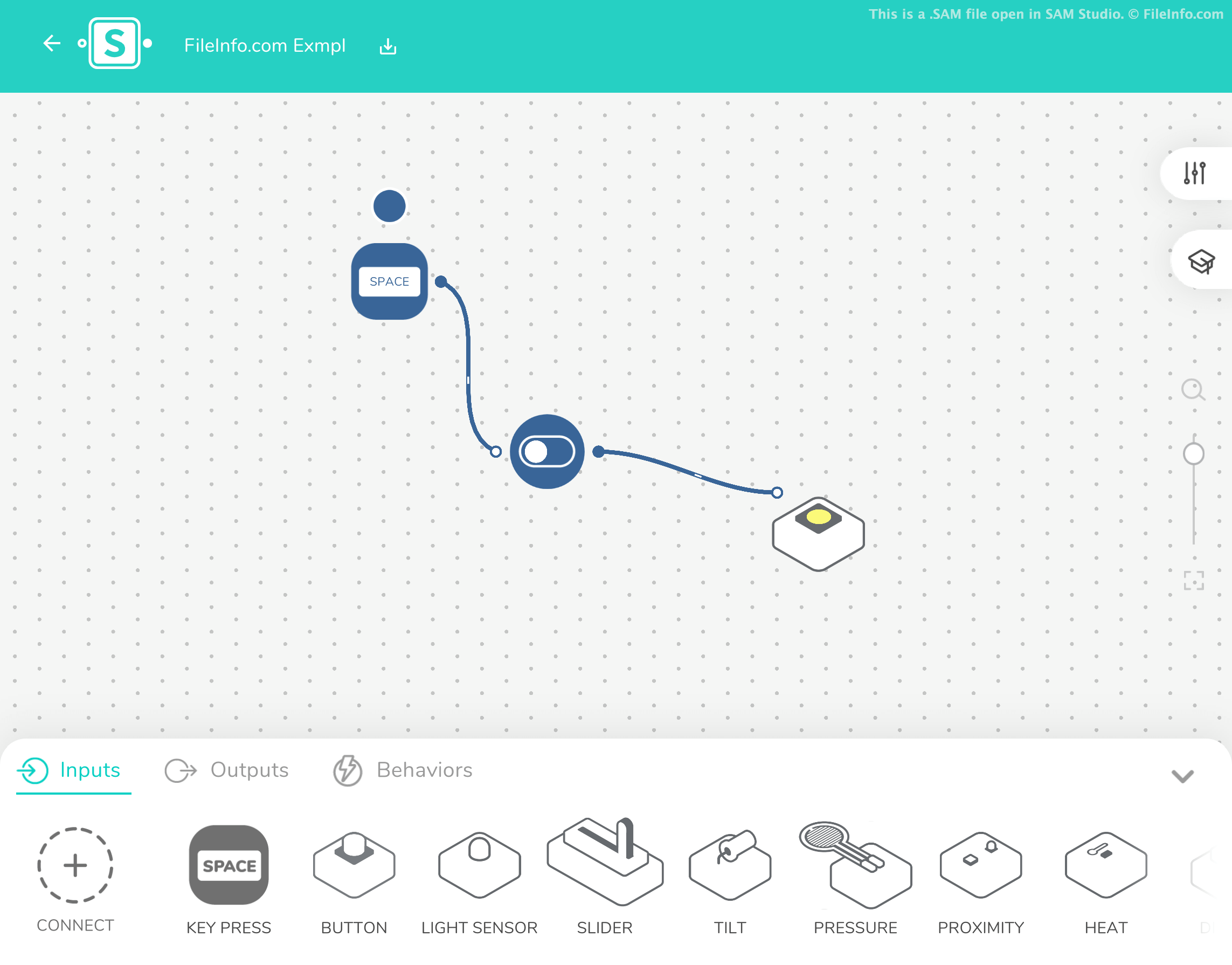
A SAM file is a project file created by SAM Studio, an online, block-based coding platform. It contains plain text that defines a program's inputs, outputs, and behaviors. SAM files are used to install programs on devices built using SAM Labs course, starter, and maker kits.
詳細情報
SAM Studio is a program STEM and STEAM teachers use to teach students how to code. SAM Studio contains two sub-applications, SAM Space and SAM Blockly, that save students' coding projects as SAM files.
When loaded in SAM Studio, SAM files appear as interactive, block-based coding projects that students use to create simple programs. However, SAM files are actually plain text files. If you open a SAM file in a text editor, you can view the project's title and the workspaceData that defines how the project appears in SAM Studio.
If you need to determine whether a SAM file was created by SAM Space or SAM Blockly, and you do not have access to SAM Studio, you can open the file in a text editor and view its "type" setting. SAM Space SAM files have the type samspace, while SAM Blockly files have the type beepboop.
After a student finishes creating a SAM Studio program, they can install the program on a corresponding SAM Labs device. To do so, the student must open their SAM file in SAM Studio and pair their device with the application.
SAMファイルの開き方
SAM files are meant to be opened in SAM Studio (Web, Chrome OS). To open a SAM file in SAM Studio, select the gray Import icon that appears on the program's right-hand side. Then, select Import file.
If you do not have access to SAM Studio, or you want to view your SAM file's plain text contents, you can also open the file in any text editor.