

.PSD Přípona souboru
Dokument Adobe Photoshop
| Vývojář | Adobe |
| Popularita |
4,2 | 721 hlasů |
Co je soubor PSD?
Soubor PSD je nativní obrazový formát používaný programem Adobe Photoshop, profesionálním programem pro úpravu obrázků, který slouží k vylepšování digitálních fotografií a tvorbě webové grafiky. Soubory PSD mohou obsahovat vrstvy obrázku, vrstvy úprav, anotace, informace o souboru, klíčová slova a další prvky specifické pro Photoshop. Grafičtí profesionálové je běžně vytvářejí a sdílejí.
Další informace
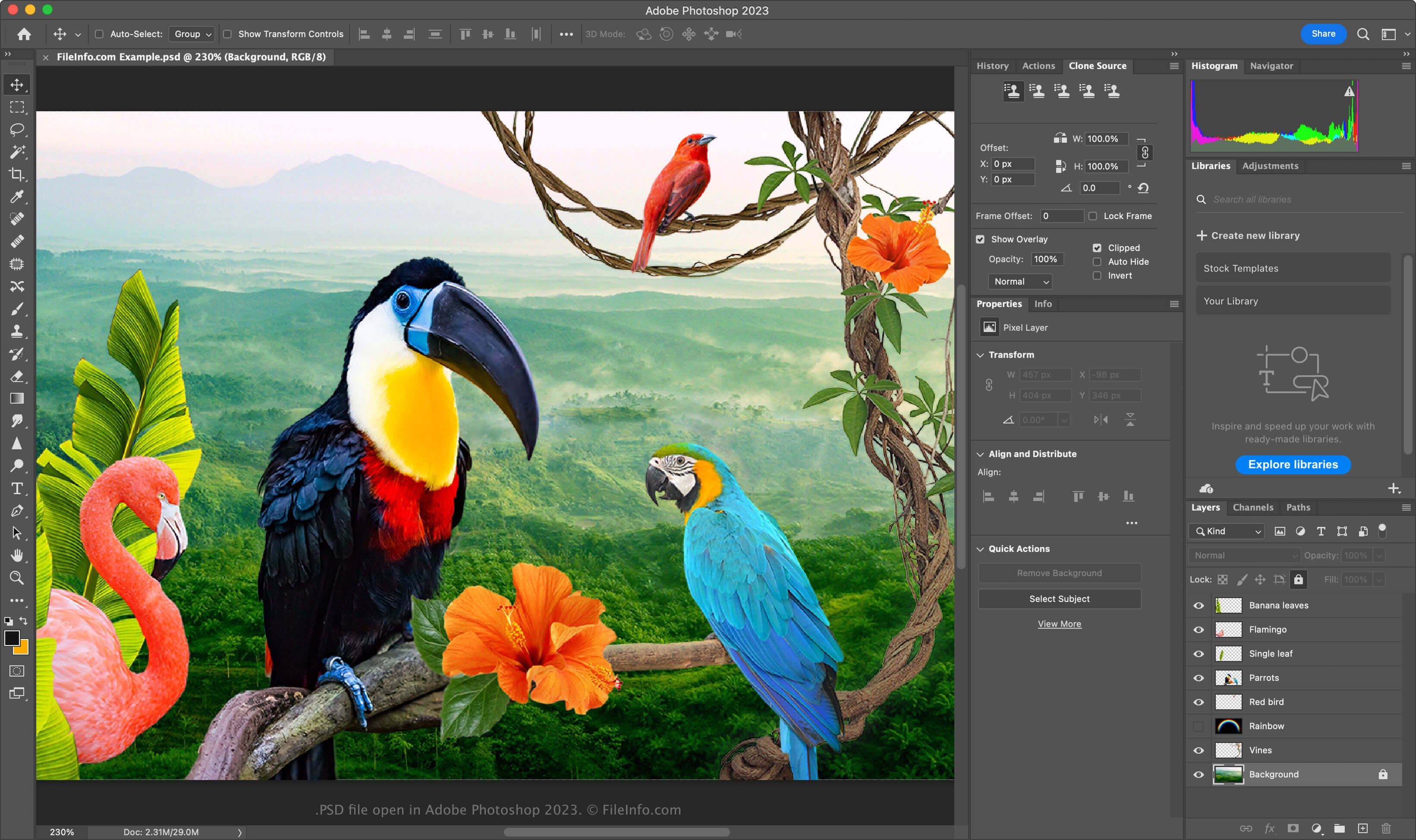
Formát PSD je plně upravitelný nekomprimovaný formát, který je ideální pro úpravu rastrových obrázků. V souboru PSD můžete upravovat jednotlivé prvky, například obrázky, tvary, text a efekty. Nové verze Photoshopu (2024 a novější) umožňují vytvářet a vkládat grafiku generovanou umělou inteligencí.
Soubory PSD podporují barevné režimy RGB, CMYK, ve stupních šedi, monochromatický, duotónový, s indexovanými barvami, Lab a vícekanálový. Barevný režim můžete změnit výběrem položky ve Photoshopu.
Datová struktura souboru PSD
Formát souborů Photoshopu se skládá z pěti částí:
- Hlavička souboru – Ukládá vlastnosti obrázku, například rozměry, bitovou hloubku, barevný režim a počet kanálů
- Data barevného režimu – Obsahují další data, pokud soubor používá indexované nebo duotónové barvy
- Zdroje obrázku – Obsahují prvky nesouvisející s obrázkem, například vodítka, styly textu nebo cesty
- Informace o vrstvách a maskách – Ukládají data o vrstvách, maskách, režimech prolnutí a efektech
- Data obrázku – Obsahují skutečná data obrázku (pixelová data) a metodu komprese použitou ke zmenšení celkové velikosti souboru (například raw, RLE nebo ZIP)
POZNÁMKA: Photoshop podporuje soubory PSD o velikosti až 30 000 × 30 000 pixelů nebo 2 GB. Obrázky větší než tyto limity je nutné uložit ve formátu .PSB (Photoshop Big) Large Document.
Jak otevřít soubor PSD
Soubory PSD můžete otevřít v programech Adobe Photoshop pro Windows a macOS. Soubor PSD ve Photoshopu otevřete výběrem položky .
Soubory PSD se sice ukládají v proprietárním formátu, ale můžete je otevřít také v jiných multiplatformních aplikacích, například Adobe Illustrator, Corel Painter, GIMP a Photopea (ve webovém prohlížeči).
V systému Windows můžete soubory PSD otevřít pomocí integrované aplikace Microsoft Photos. V systému macOS je můžete zobrazit pomocí aplikace Apple Preview, která je součástí operačního systému.
Jak převést soubor PSD
Několik aplikací včetně Adobe Photoshop, Corel PaintShop Pro a Apple Preview dokáže převádět soubory PSD do jiných formátů.
Adobe Photoshop může například exportovat soubory PSD do těchto formátů: