

.CUR Bestandsextensie
Windows-cursorafbeelding
| Ontwikkelaar | N.v.t. |
| Populariteit |
4,3 | 356 stemmen |
Wat is een CUR-bestand?
Een CUR-bestand is een cursorafbeelding van Microsoft Windows. Het wordt gebruikt om het uiterlijk van de muisaanwijzer van Windows te wijzigen. Typische CUR-afbeeldingen zijn pijlen (voor algemeen gebruik), zandlopers (om aan te geven wanneer een bestand of programma wordt geladen) en I-balken (voor tekstbewerking).
Meer informatie
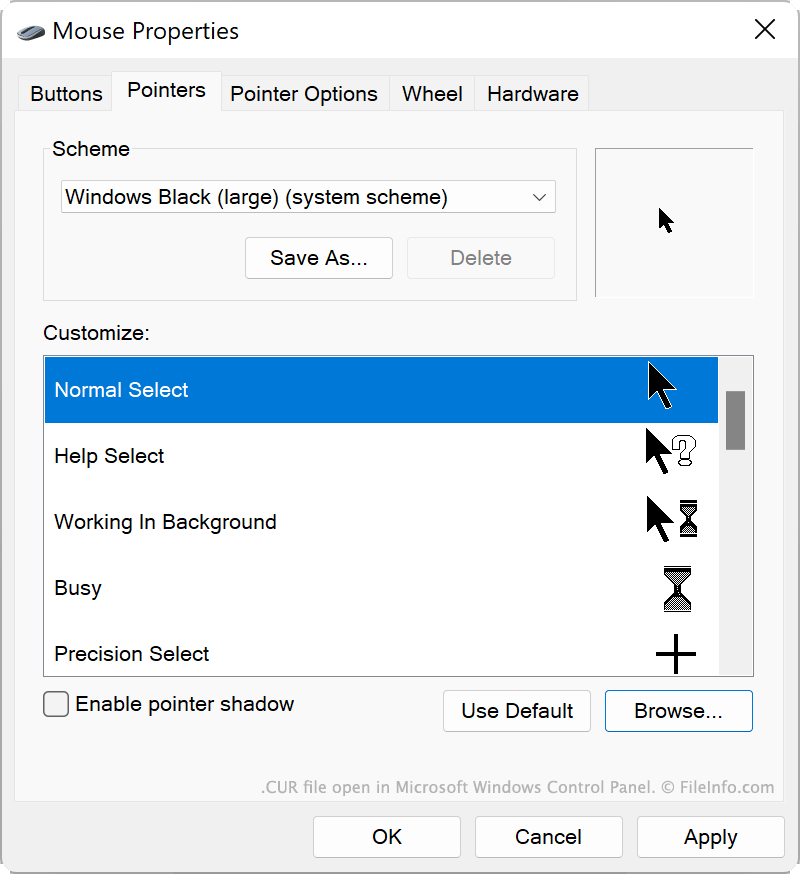
Windows bevat verschillende standaard-CUR-bestanden die het uiterlijk van je cursor in verschillende situaties bepalen, bijvoorbeeld wanneer het systeem bezig is, je het formaat van een venster wijzigt of je tekst bewerkt. Deze CUR-bestanden worden op de volgende locatie opgeslagen:
C:/Windows/Cursors
Je kunt ook aangepaste CUR-bestanden installeren, die je zelf hebt gemaakt of online hebt gedownload. Aangepaste Windows-thema's (.THEME-bestanden) bevatten vaak aangepaste CUR-bestanden.
Een CUR-bestand gebruiken als cursorafbeelding
Zo gebruik je een CUR-bestand als cursorafbeelding in Windows:
- Open het Configuratiescherm van Windows en zoek naar 'muis'.
- Selecteer .
- Selecteer in het menu Pointers van het venster Muiseigenschappen de cursorafbeelding die je wilt wijzigen.
- Klik op en navigeer vervolgens naar je CUR-bestand en selecteer het.
- Klik op om je wijzigingen toe te passen.
OPMERKING: CUR-bestanden bevatten altijd statische cursorafbeeldingen. Geanimeerde cursorafbeeldingen worden opgeslagen als .ANI-bestanden.
Een CUR-bestand openen
Je kunt een CUR-bestand openen met Axialis CursorWorkshop (Windows), RealWorld Cursor Editor (Windows) of Inkscape (multiplatform) om de afbeelding die het bevat te bekijken en te bewerken.
Een CUR-bestand converteren
Je kunt Inkscape, RealWorld Cursor Editor of Axialis CursorWorkshop gebruiken om CUR-afbeeldingen naar andere indelingen te converteren. Axialis CursorWorkshop kan CUR-afbeeldingen bijvoorbeeld converteren naar de volgende indelingen: