

.CUR Dateiendung
Windows-Cursorbild
| Entwickler | k. A. |
| Beliebtheit |
4,3 | 356 Stimmen |
Was ist eine CUR-Datei?
Eine CUR-Datei ist ein Microsoft-Windows-Cursor-Bild. Sie wird verwendet, um das Aussehen des Windows-Mauszeigers zu ändern. Typische CUR-Bilder enthalten Pfeile (für die allgemeine Verwendung), Sanduhren (um darzustellen, dass eine Datei oder ein Programm geladen wird) und I-Balken (für die Textbearbeitung).
Weitere Informationen
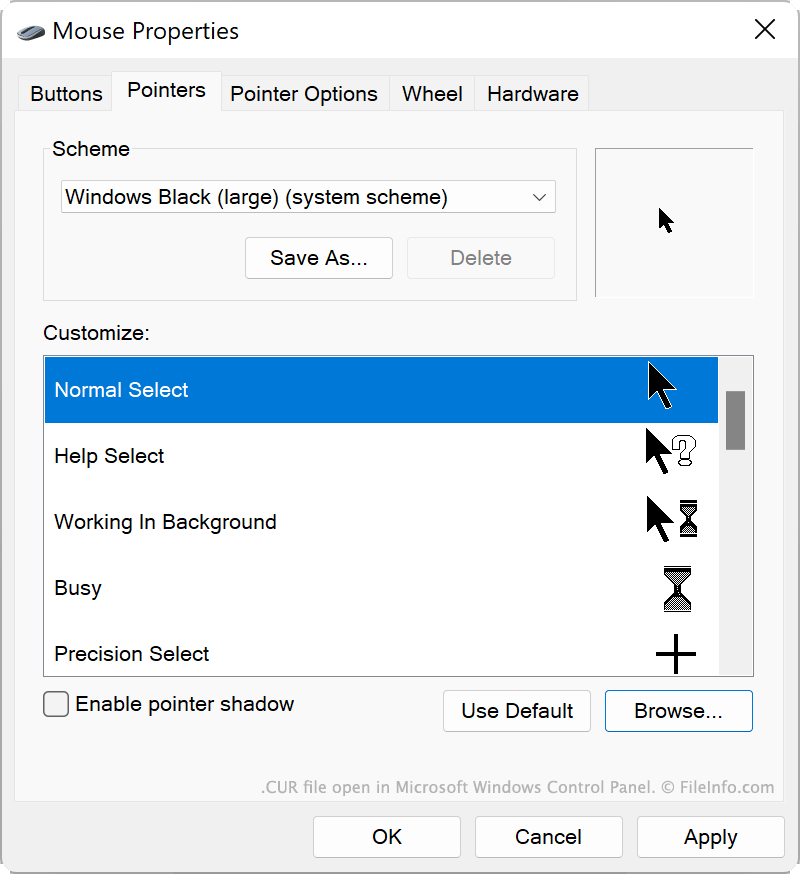
Windows enthält mehrere standardmäßige CUR-Dateien, die das Aussehen Ihres Cursors in verschiedenen Situationen bestimmen, etwa wenn das System ausgelastet ist, Sie die Größe eines Fensters ändern oder Text bearbeiten. Diese CUR-Dateien werden am folgenden Speicherort gespeichert:
C:/Windows/Cursors
Sie können auch benutzerdefinierte CUR-Dateien installieren, die Sie selbst erstellt oder aus dem Internet heruntergeladen haben. Benutzerdefinierte Windows-Designs (.THEME-Dateien) enthalten häufig benutzerdefinierte CUR-Dateien.
So verwenden Sie eine CUR-Datei als Cursorbild
So verwenden Sie eine CUR-Datei als Windows-Cursorbild:
- Öffnen Sie die Windows-Systemsteuerung und suchen Sie nach „Maus“.
- Wählen Sie aus.
- Wählen Sie im Menü „Zeiger“ des Fensters „Mauseigenschaften“ das Cursorbild aus, das Sie ändern möchten.
- Klicken Sie auf und navigieren Sie anschließend zu Ihrer CUR-Datei und wählen Sie sie aus.
- Klicken Sie auf , um Ihre Änderungen anzuwenden.
HINWEIS: CUR-Dateien enthalten immer statische Cursorbilder. Animierte Cursorbilder werden als .ANI-Dateien gespeichert.
So öffnen Sie eine CUR-Datei
Sie können eine CUR-Datei mit Axialis CursorWorkshop (Windows), RealWorld Cursor Editor (Windows) oder Inkscape (plattformübergreifend) öffnen, um das darin enthaltene Bild anzuzeigen und zu bearbeiten.
So konvertieren Sie eine CUR-Datei
Sie können Inkscape, RealWorld Cursor Editor oder Axialis CursorWorkshop verwenden, um CUR-Bilder in andere Formate zu konvertieren. Axialis CursorWorkshop kann CUR-Bilder beispielsweise in die folgenden Formate konvertieren: