

.CUR Extension de fichier
Image de curseur Windows
| Développeur | N/D |
| Popularité |
4,3 | 356 Votes |
Qu'est-ce qu'un fichier CUR ?
Un fichier CUR est une image de curseur Microsoft Windows. Il est utilisé pour modifier l'apparence du pointeur de souris de Windows. Les images CUR courantes comprennent des flèches (pour un usage général), des sabliers (pour indiquer qu'un fichier ou un programme est en cours de chargement) et des barres en I (pour modifier du texte).
Plus d'informations
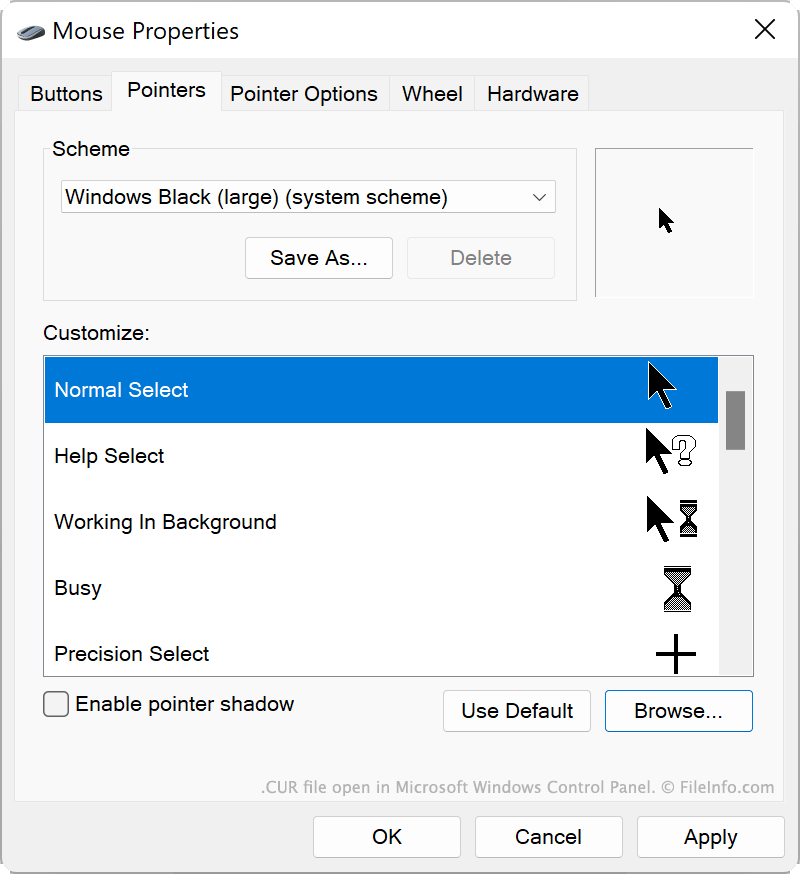
Windows inclut plusieurs fichiers CUR par défaut qui déterminent l'apparence de votre curseur dans différentes situations, par exemple lorsque le système est occupé, que vous redimensionnez une fenêtre ou que vous modifiez du texte. Ces fichiers CUR sont stockés à l'emplacement suivant :
C:/Windows/Cursors
Vous pouvez également installer des fichiers CUR personnalisés, que vous avez peut-être créés vous-même ou téléchargés en ligne. Les thèmes Windows personnalisés (fichiers .THEME) contiennent souvent des fichiers CUR personnalisés.
Comment utiliser un fichier CUR comme image de curseur
Pour utiliser un fichier CUR comme image de curseur Windows :
- Ouvrez le Panneau de configuration Windows et recherchez « souris ».
- Sélectionnez .
- Dans le menu Pointeurs de la fenêtre Propriétés de la souris, sélectionnez l'image de curseur que vous souhaitez modifier.
- Cliquez sur , puis accédez à votre fichier CUR et sélectionnez-le.
- Cliquez sur pour appliquer vos modifications.
REMARQUE : Les fichiers CUR contiennent toujours des images de curseur statiques. Les images de curseur animées sont enregistrées dans des fichiers .ANI.
Comment ouvrir un fichier CUR
Vous pouvez ouvrir un fichier CUR avec Axialis CursorWorkshop (Windows), RealWorld Cursor Editor (Windows) ou Inkscape (multiplateforme) pour afficher et modifier l'image qu'il contient.
Comment convertir un fichier CUR
Vous pouvez utiliser Inkscape, RealWorld Cursor Editor ou Axialis CursorWorkshop pour convertir des images CUR dans d'autres formats. Par exemple, Axialis CursorWorkshop peut convertir des images CUR dans les formats suivants :