.VWX ファイル拡張子

Vectorworks Design

開発元 Nemetschek
人気度
3.6  |  35 
 

VWXファイルとは?

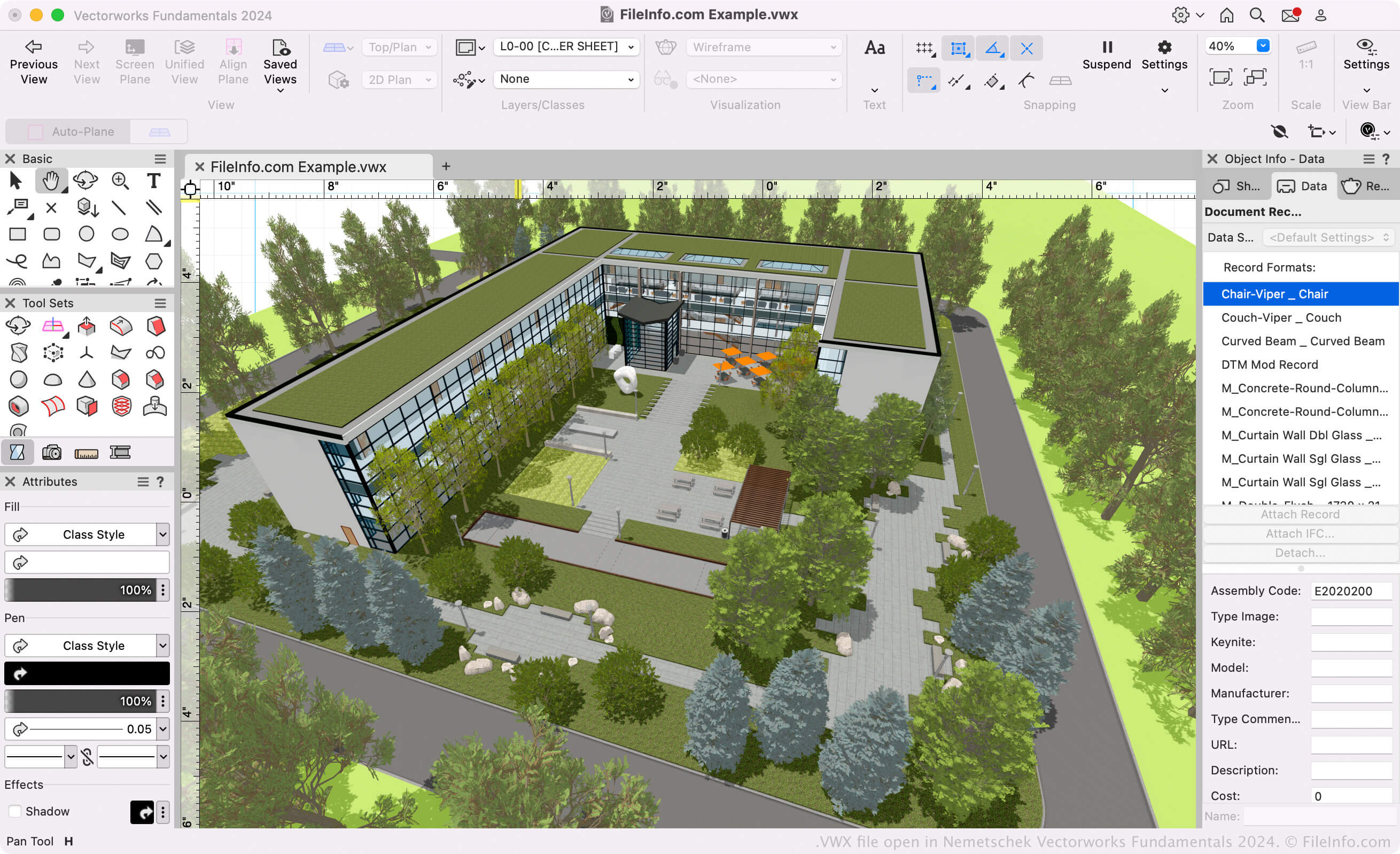
A VWX file is a building, interior, or landscape design created by Nemetschek Vectorworks, a CAD design suite. It typically contains both a 3D model and 2D renderings of that model. For example, a VWX file may contain a 3D model of a building and various 2D drawings of the building's architecture and floor plan.

詳細情報

Nemetschek Vectorworks Fundamentals 2024で開いた.vwxファイルのスクリーンショット
Nemetschek Vectorworks Fundamentals 2024で開いたVWXファイル

Architects, landscape designers, and live event designers use Vectorworks software to create 3D models and 2D drawings of buildings, landscapes, and live event setups. Primarily, the Vectorworks suite consists of the following programs (known collectively as the Vectorworks Design Suite):

  • Architect: Used to model and draw building projects.
  • Landmark: Used to model and draw landscape projects.
  • Spotlight: Used to model and draw live event setups (staging, lighting, interior design, etc.).
  • Fundamentals: Used to create CAD drawings and models for design and fabrication.

These programs all save users' models and drawings as VWX files. They are available in Vectorworks Design Suite and as standalone apps.

Vectorworks Format

Nemetschek introduced the Vectorworks (VWX) format when it released Vectorworks 2008, replacing the .MCD format used by Vectorworks 12.5 and earlier. The binary format is proprietary to Vectorworks and saves all of the design's information, which may include 2D drafts, 3D model data (e.g., object properties and geometry), layer information, and project metadata.

VWXファイルの開き方

If you only want to view the design your VWX file contains, you can open it with Nemetschek Vectorworks Viewer. This free VWX viewer is available for Windows and macOS.

If you need to edit or convert your VWX file, you can open it with the appropriate Nemetschek Vectorworks program (version 2008 and later). For example, if you have a VWX file created by Vectorworks Landmark, you can open that file with Vectorworks Landmark (select File → Open).

注: Vectorworks 12.5 and earlier versions cannot open VWX files.

VWXファイルの変換方法

Vectorworks design programs can convert VWX files to various drawing, 3D model, document, and image formats. Typically, to convert a VWX file to another format, you must:

  1. Open the VWX file in the appropriate Vectorworks program.
  2. Select File → Export
  3. Select your desired export format.
  4. Name and save your converted file.

Some common formats that Vectorworks can convert VWX files to include:

  • .DXF - Drawing Exchange Format
  • .DWG - AutoCAD Drawing
  • .FBX - Autodesk FBX Interchange File
  • .C4D - Cinema 4D Model
  • .OBJ - Wavefront 3D Object
  • .STP - STEP 3D Model
  • .STL - Stereolithography File
  • .KML - Keyhole Markup Language
  • .JPG - JPEG Image
  • .PDF - Portable Document Format
File Viewer Plusで400種類以上のファイル形式を開けます。無料ダウンロード

VWXファイルを開くプログラム

カテゴリ: CAD
更新日: 2023-10-31

検証者 FileInfo.com

FileInfo.comチーム は、このページに掲載されているVectorworks Designファイル形式とMac and Windowsアプリについて独自に調査しました。 私たちの目標は100%の正確性であり、検証済みのファイルタイプに関する情報のみを公開しています。

このページへの追加や更新をご提案いただける場合は、お知らせください。