

.PUB Estensione file
Documento di Publisher
| Sviluppatore | Microsoft |
| Popolarità |
3,7 | 504 Voti |
Che cos'è un file PUB?
Un file PUB è un documento creato da Microsoft Publisher, un programma di desktop publishing usato per creare documenti professionali e materiali di marketing. Contiene un layout di pagina ed elementi di progettazione, come testo, forme e grafica vettoriale o raster. Gli utenti salvano spesso brochure, newsletter, volantini, inviti e poster come file PUB.
Maggiori informazioni
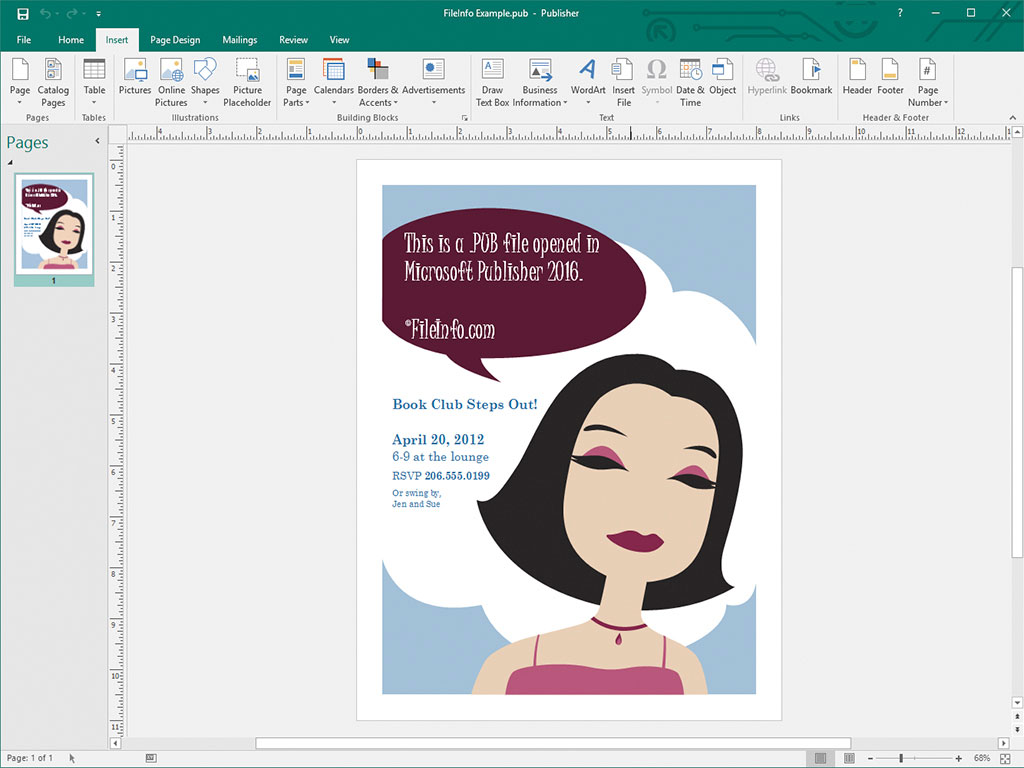
I designer amatoriali e professionisti usano principalmente Microsoft Publisher per progettare materiali di marketing e altri documenti. Il software è disponibile solo per Windows come parte del servizio di abbonamento Microsoft 365 o come acquisto una tantum indipendente.
Quando si salva un documento in Publisher, il programma crea un file PUB per archiviare i contenuti del documento. Dopo aver salvato il file PUB, è possibile chiuderlo e riaprirlo per continuare a modificare il documento in un secondo momento.
NOTA: Oltre a salvare i layout di pagina come file PUB, gli utenti esperti di Publisher possono anche creare file PUB per integrare e archiviare origini dati per le unioni di posta e la generazione di schede dati.
Come aprire un file PUB
È possibile aprire un file PUB con Microsoft Publisher selezionando dalla barra dei menu del programma, quindi individuando e aprendo il file PUB.
È anche possibile aprire i file PUB con diverse altre applicazioni di desktop publishing. Ad esempio, è possibile aprire i file PUB con LibreOffice Draw (incluso in LibreOffice) e CorelDRA
Come convertire un file PUB
Microsoft Publisher può convertire i file PUB in diversi tipi di file, inclusi i seguenti formati:
- .PDF - Portable Document Format
- .JPEG - Immagine JPEG
- .PNG - Portable Network Graphics
- .TIF - Tagged Image File Format
- .EMF - Enhanced Windows Metafile
- .WMF - Windows Metafile
- .BMP - Immagine bitmap
- .EPS - Encapsulated PostScript
- .PS - File PostScript
- .DOCX - Documento Microsoft Word
- .RTF - Rich Text Format
- .TXT - File di testo semplice
- .HTML - Hypertext Markup Language
- .XPS - XML Paper Specification
NOTA: Quando si esegue la conversione in un file DOCX, la formattazione viene mantenuta, ma non la grafica o le colonne incluse nel file PUB.
Programmi che aprono i file PUB
File di chiave pubblica
| Sviluppatore | N/D |
| Popolarità |
3,1 | 47 Voti |
Un file PUB è una chiave pubblica utilizzata nella crittografia a chiave pubblica. Contiene testo crittografato utilizzato per crittografare e decrittografare i dati, insieme a una chiave privata corrispondente. Programmi come ssh-keygen e PuTTY possono creare file PUB (e le chiavi private corrispondenti).
Maggiori informazioni

La crittografia a chiave pubblica è una forma comune di crittografia che utilizza coppie di "chiavi", ovvero stringhe di testo crittografato create tramite programmi per la generazione delle chiavi. Le coppie di chiavi sono costituite da una chiave pubblica, che deve essere condivisa con altri, e da una chiave privata, che non deve essere condivisa.
Le chiavi pubbliche create da programmi come ssh-keygen e PuTTY vengono salvate come file PUB. Ad esempio, ssh-keygen crea chiavi denominate id_rsa.pub e le salva per impostazione predefinita nella directory ~/.ssh.
I file PUB creati con OpenSSH, come quelli creati da ssh-keygen, vengono utilizzati principalmente per autenticare le credenziali di un utente quando accede a un server. In questi casi, il file PUB deve essere archiviato sul server in questione (spesso in una directory .ssh/authorized_keys), mentre l'utente conserva la propria chiave privata.
File PUB di PuTTY
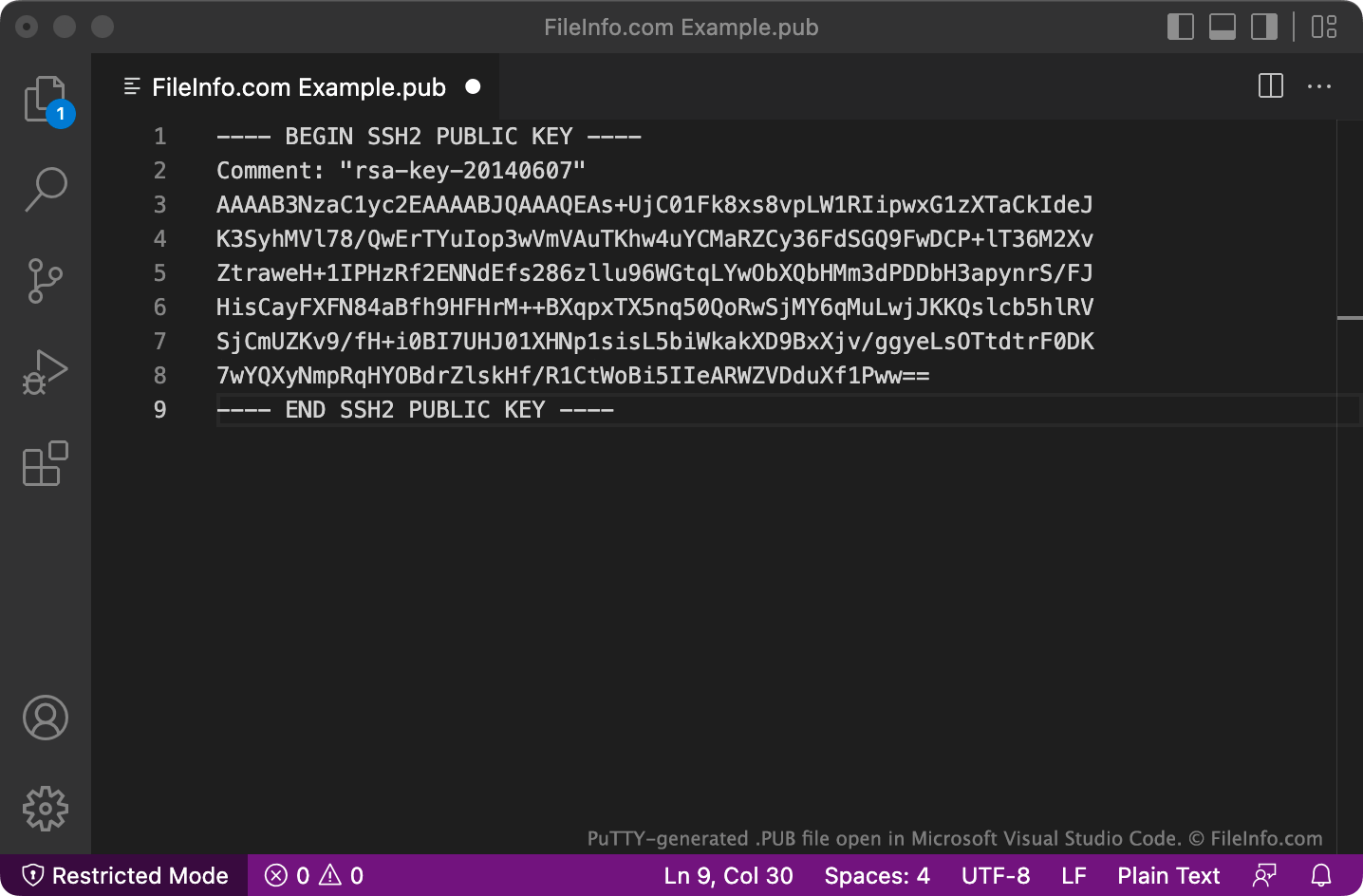
PuTTY salva i file PUB in un formato su più righe che OpenSSH potrebbe non riconoscere per impostazione predefinita. Per utilizzare con OpenSSH i file PUB salvati in questo formato, rimuovi le righe BEGIN, Comment: e END, nonché tutti i caratteri di nuova riga. Quindi aggiungi ssh-rsa all'inizio del file.
Come aprire un file PUB
Puoi aprire un file PUB e visualizzare il testo che contiene con qualsiasi editor di testo, come Microsoft Notepad (Windows), Apple TextEdit (Mac) o GitHub Atom (multipiattaforma).