.XLSX 文件扩展名

Microsoft Excel Spreadsheet

开发者 Microsoft
受欢迎程度
3.9  |  1004 
 
🔍使用File Helper直接在您的网络浏览器中打开 .XLSX 文件在线查看

什么是 XLSX 文件?

An XLSX file is an Excel spreadsheet created by Microsoft Excel or exported by another spreadsheet program, such as OpenOffice Calc or Apple Numbers. It stores data in worksheets, which contain cells arranged in a grid of rows and columns, and may also contain charts, mathematical functions, styles, and formatting. XLSX files are commonly used to store financial data and to save simple or complex mathematical models.

更多信息

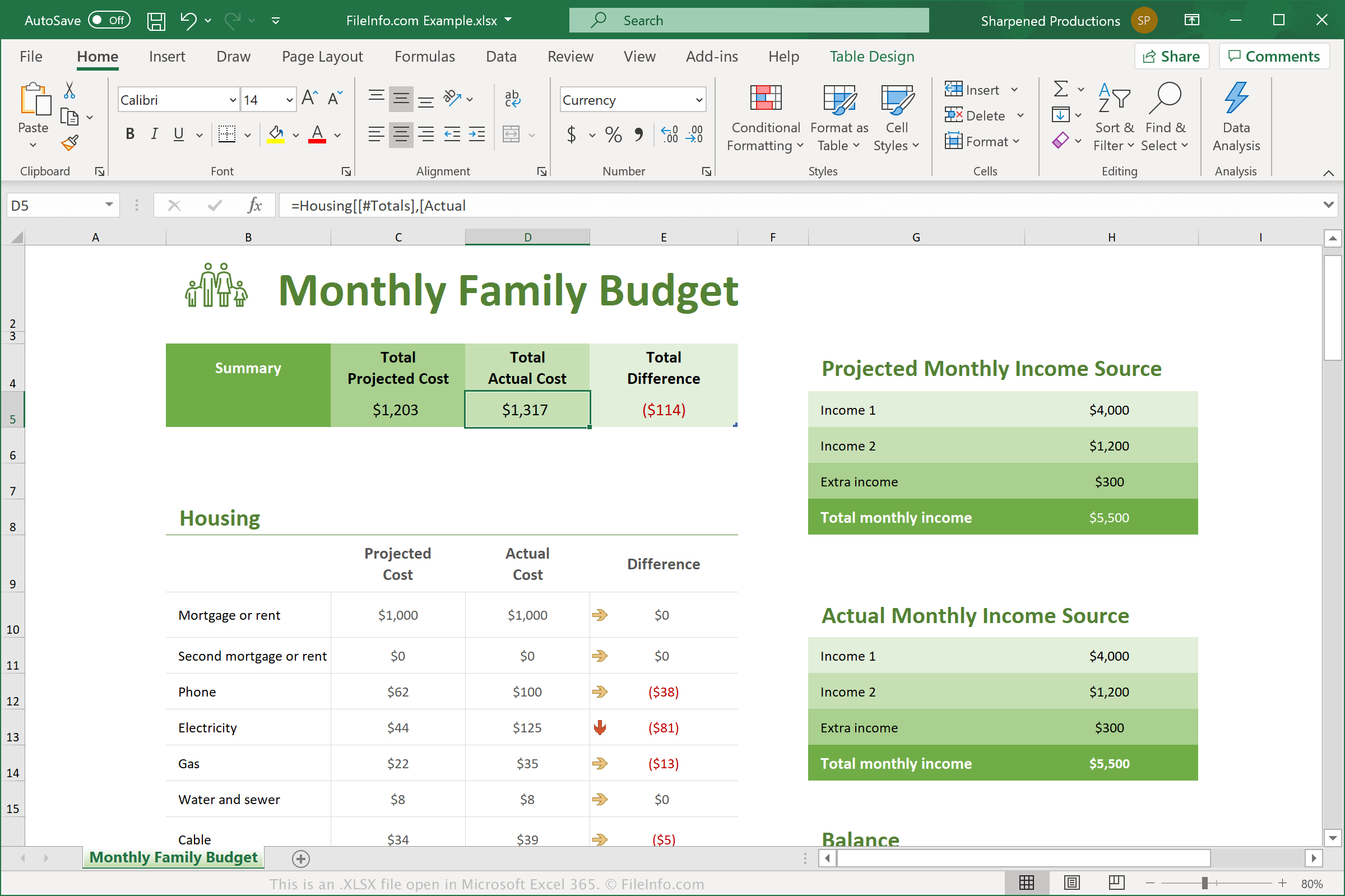
在 Microsoft Excel 365 中打开的 .xlsx 文件截图
在 Microsoft Excel 365 中打开的 XLSX 文件

Microsoft introduced the Excel Open XML Spreadsheet (XLSX) format when it released Excel 2007. Since then, XLSX files have become one of the most common file types for saving data in spreadsheets, and as such, are now typically referred to as just Excel spreadsheets.

In Excel 2007, XLSX files replaced .XLS files as the standard file for saving spreadsheets in Excel. Unlike XLS files, which store spreadsheet data in a single binary file, XLSX files are saved in the Open XML format, which stores data as separate files and folders in a compressed Zip package. The archive includes the [Content_Types].xml file, which describes the spreadsheet, and an .XML file for each worksheet within the spreadsheet.

Each cell in an XLSX spreadsheet may be formatted individually. For example, cells may have a number, text, currency, or another format, as well as color, border style, custom font, and size. Cells may also reference other cells to compute a resulting value.

注: To explore the contents of an XLSX file, you can change the .xlsx extension to .zip and then decompress the resulting file with any Zip decompression utility.

常见 .XLSX 文件名

Workbook1.xlsx - The default filename Microsoft Excel gives to new workbooks beginning with Excel 2007.

如何打开 XLSX 文件

You can open XLSX files with Microsoft Excel in Windows and macOS. Excel is the best option for opening XLSX files because it fully supports the formatting of Excel spreadsheets, which includes images, graphs, and spacing of data fields. Excel is also available for Android and iOS devices.

Many other spreadsheet programs can open and edit XLSX files, but they may not fully support the formatting of the original spreadsheets. Alternative programs include Corel Quattro Pro (Windows), Apple Numbers (Mac), and OpenOffice Calc (multiplatform).

You can also open XLSX files with various web programs. Google Sheets is a great free option that allows you to upload an XLSX file and view, edit, save, and convert the spreadsheet.

如何转换 XLSX 文件

Several spreadsheet applications, including Microsoft Excel, Apple Numbers, and LibreOffice Calc, can convert XLSX files to other formats.

For example, you can select File → Save As in the Windows and Mac versions of Microsoft Excel to convert XLSX files to one of the following formats:

  • .XLS - Microsoft Excel Spreadsheet (Legacy)
  • .XLSB - Microsoft Excel Binary Spreadsheet
  • .ODS - OpenDocument Spreadsheet
  • .CSV - Comma-Separated Values
  • .DIF - Data Interchange Format
  • .PDF - Portable Document Format
  • .XPS - XML Paper Specification (Windows only)
  • .RTF - Rich Text Format
  • .TXT - Plain Text
  • .HTM, .HTML - HTML Webpage
  • .XML - Extensible Markup Language
  • .MHT, .MHTML - MIME HTML Archive

可打开 XLSX 文件的程序

验证者 FileInfo.com

FileInfo.com 团队 独立研究了本页面列出的 Microsoft Excel Spreadsheet 文件格式和 Mac, Windows, Linux, Android, and iOS 应用。 我们的目标是达到 100% 的准确率,并且仅发布我们已验证过的文件类型信息。

如果您想为此页面提出新增或更新建议,请告诉我们