.ODS 文件扩展名

OpenDocument Spreadsheet

开发者 OASIS
受欢迎程度
3.5  |  285 
 

什么是 ODS 文件?

An ODS file is a spreadsheet created by Calc, a spreadsheet program included with the LibreOffice and Apache OpenOffice suites. It stores data in cells organized into rows and columns, similar to .XLSX spreadsheets, and it may also contain charts, mathematical functions, and formatting. Several programs can open, edit, save, and convert ODS files, including the Calc apps in the LibreOffice and Apache OpenOffice suites and Microsoft Excel.

更多信息

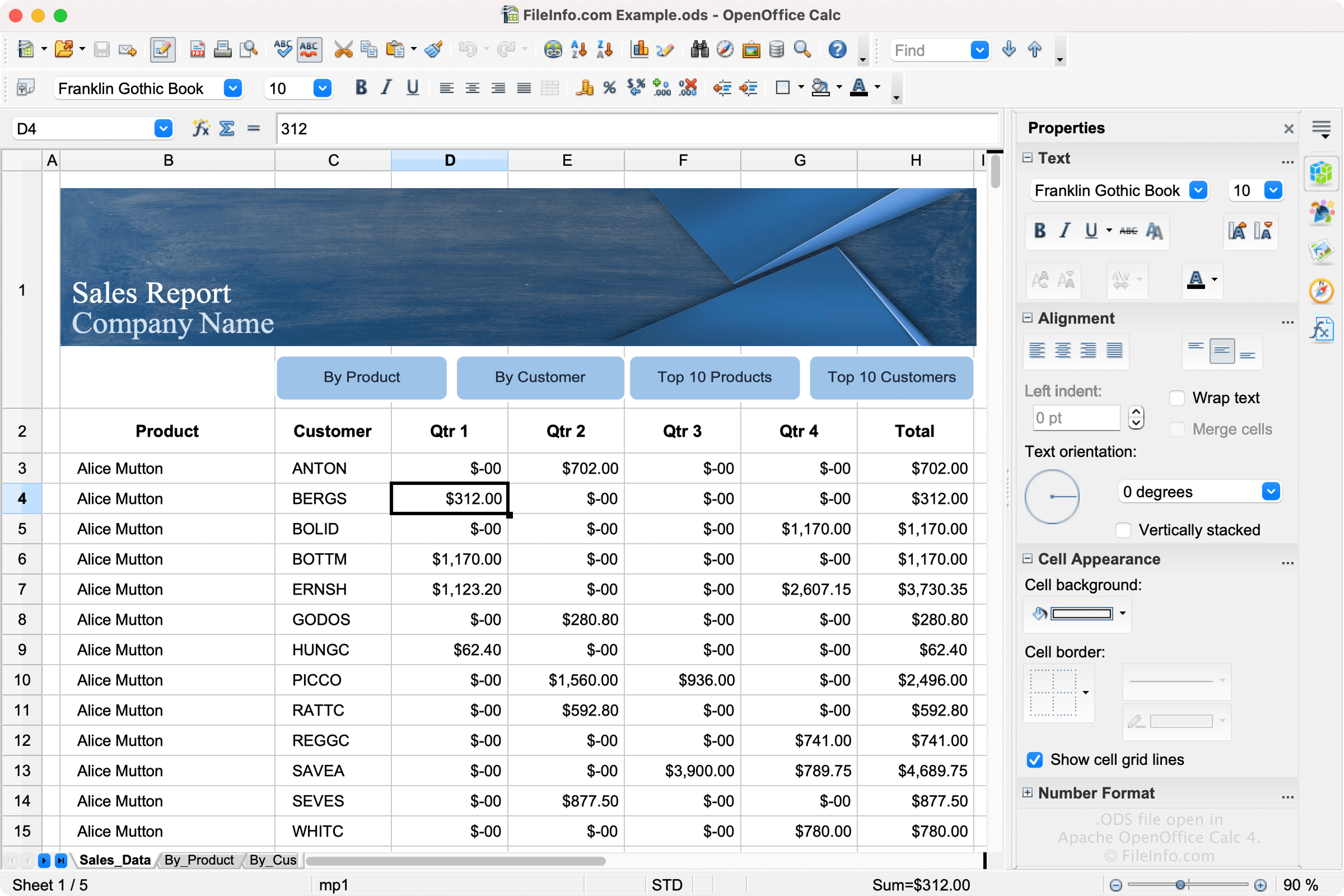
在 Apache OpenOffice Calc 4 中打开的 .ods 文件截图
在 Apache OpenOffice Calc 4 中打开的 ODS 文件

LibreOffice and Apache OpenOffice are open-source alternatives to Microsoft Office. Calc is included with LibreOffice and Apache OpenOffice and the equivalent to Microsoft Excel.

The software allows users to create spreadsheets to save project trackers, budgets, to-do lists, and other spreadsheet types. Calc saves users' spreadsheets as ODS files by default. To create an ODS file in Calc, select File → New → Spreadsheet, then select File → Save As.

ODS Format

ODS files are formatted using the OASIS OpenDocument XML-based standard, which The Organization for the Advancement of Structured Information Standards (OASIS) maintains. LibreOffice, OpenOffice, and other variants, all of which save spreadsheets as ODS files, use this standard.

如何打开 ODS 文件

You can open an ODS file with OpenOffice Calc and LibreOffice Calc. Calc is the best option for opening ODS files because it fully supports the formatting of OpenDocument spreadsheets, which may include the spacing of data fields, graphs, etc.

Various other spreadsheet applications can open and edit ODS files, but they may not fully support the formatting of the original spreadsheets. Alternative programs include Microsoft Excel and Google Sheets.

如何转换 ODS 文件

Several spreadsheet applications, including OpenOffice Calc and Microsoft Excel, can convert ODS files to other formats.

For example, OpenOffice Calc can convert ODS files to many file types, including the following formats:

  • .OTS - OpenDocument Spreadsheet Template
  • .XLS - Microsoft Excel Spreadsheet (Legacy)
  • .XLT - Microsoft Excel Template (Legacy)
  • .CSV - Comma-Separated Values
  • .DIF - Data Interchange Format
  • .PDF - Portable Document Format
  • .UOS - Uniform Office Spreadsheet
  • .PXL - Pocket Excel File
  • .SXC - StarOffice Calc Spreadsheet
  • .STC - StarOffice Calc Spreadsheet Template
使用File Viewer Plus打开 400 多种文件格式。免费下载

可打开 ODS 文件的程序

Outlook Express 5 Mailbox

开发者 Microsoft
受欢迎程度
3.1  |  21 
 

An ODS file is a mailbox created by Microsoft Outlook Express 5. It contains email messages and mailbox settings. ODS files have names like Messages.ods.

更多信息

Microsoft Outlook Express is a discontinued email and news client that was bundled with Internet Explorer versions 4 through 6. Version 5 of Outlook Express saves mailboxes as ODS files.

Outlook Express 5 also uses a file named Folders.ods, which contains an index of your mailboxes. If this file is deleted, Outlook Express 5 will automatically recreate it at startup.

注: Other versions of Outlook Express use mailboxes saved as .DBX folders.

如何打开 ODS 文件

Versions 4 and 5 of Microsoft Outlook Express are the only programs that can open ODS folders. Because these programs are discontinued, you likely will not be able to open your ODS files.

可打开 ODS 文件的程序

Windows
分类: 数据
更新时间: 2022-06-02

验证者 FileInfo.com

FileInfo.com 团队 独立研究了本页面列出的所有文件格式和软件程序。 我们的目标是达到 100% 的准确率,并且仅发布我们已验证过的文件类型信息。

如果您想为此页面提出新增或更新建议,请告诉我们