.RS 文件扩展名

Rust Source Code File

开发者 Rust Foundation
受欢迎程度
4.0  |  49 
 

什么是 RS 文件?

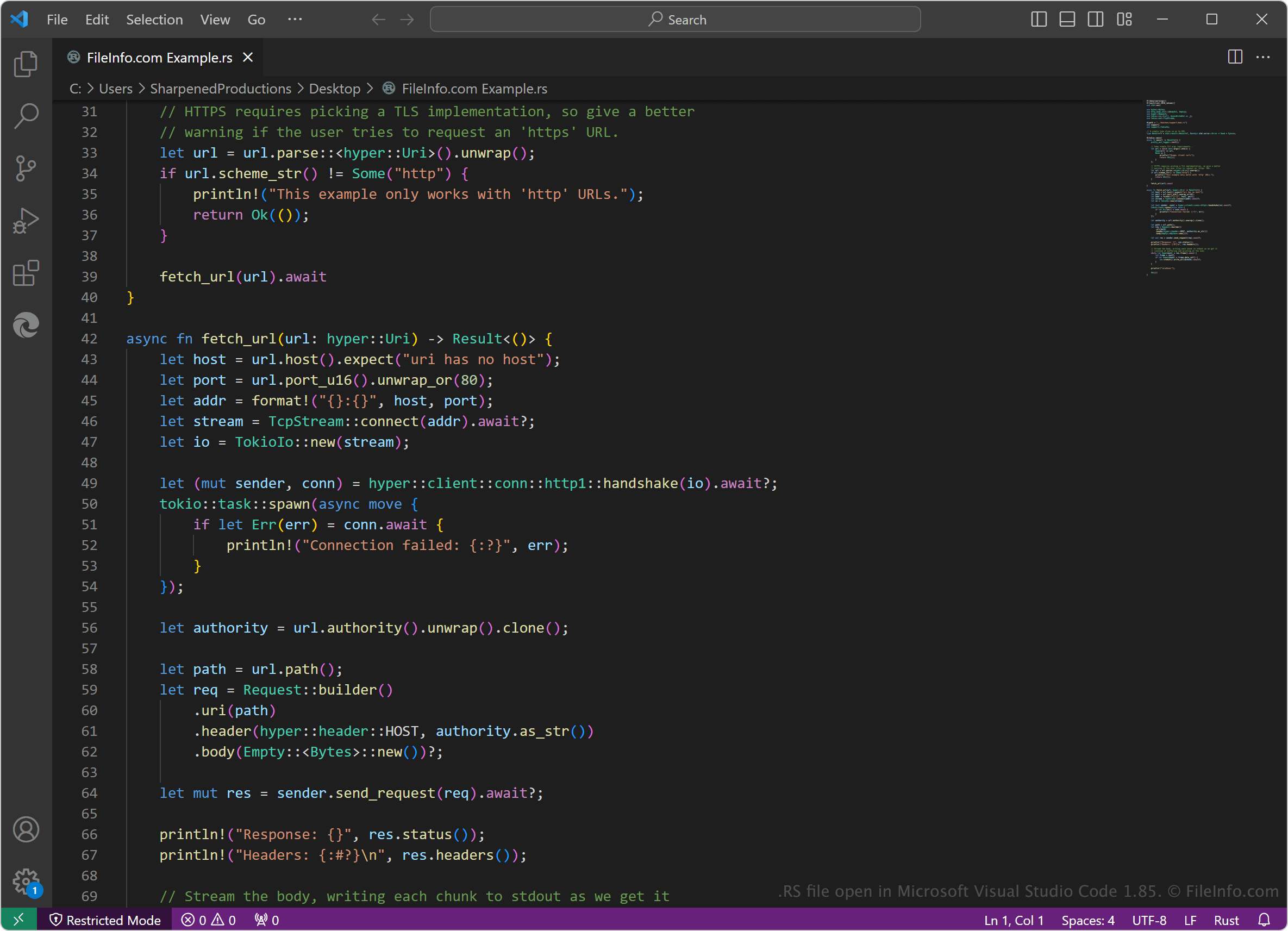
An RS file contains Rust source code, a programming language for developing large-scale, high-performance applications. Rust developers may open and edit RS files with source code editors or compile their source code with the Rust compiler to machine code to run as a program.

更多信息

在 Microsoft Visual Studio Code 1.85 中打开的 .rs 文件截图
在 Microsoft Visual Studio Code 1.85 中打开的 RS 文件

Graydon Hoare created the Rust programming language in 2006 while working at Mozilla Research. Various significant companies, including Microsoft, Google, Meta, Discord, and Amazon, adopted the language in the 2010s for numerous purposes, resulting in the formation of the Rust Foundation in February 2021 to manage the continued development of the language.

Rust developers use RS files to store their source code, then compile it with the rustc compiler included with the Rust package. Developers may also change the .rs file extension to .rs~ during the development process to signify to themselves and others that the source code is not ready to be compiled.

如何打开 RS 文件

You can open RS files with Rust, which allows you to edit and compile Rust source code in the files. You can install Rust on Windows, macOS, and Linux platforms or use the online version (Rust Playground).

Various source code editors also support RS files, including:

Plain text editors, such as Microsoft Notepad (Windows) and Apple TextEdit (Mac), can also open and edit RS files. However, they do not provide helpful coding features, such as syntax highlighting.

使用File Viewer Plus打开 400 多种文件格式。免费下载

可打开 RS 文件的程序

Windows
Mac
Linux
Android
分类: 开发者
更新时间: 2024-02-15

Windows Rating System File

开发者 Microsoft
受欢迎程度
2.8  |  10 
 

File used by the Windows operating system; contains rating system information that is used for applying parental controls to Web and desktop content; located in the C:\​Windows\​System32\​ directory.

更多信息

Example RS files include esrb.rs for Entertainment Software Rating Board (ESRB) ratings and WEB.rs for Web content ratings.

可打开或引用 RS 文件的程序

Windows
分类: 系统
更新时间: 2012-05-21

Sun Raster Graphic

开发者 Sun Microsystems
受欢迎程度
2.5  |  11 
 

An RS file is a raster image created on a SunOS workstation. It is saved in a proprietary image format developed by Sun Microsystems. RS files may contain full-color, paletted, or grayscale images.

更多信息

在 XnViewMP 中打开的 .rs 文件截图
在 XnViewMP 中打开的 RS 文件

Sun Microsystems, a technology company that was active from 1982 to 2010, created the Sun Raster Graphic format for use on its SunOS workstations and servers. Sun Raster Graphics can contain raw or compressed image data, with image depths (bits per pixel) of 1, 4, 8, 24, or 32 bits.

Some Sun Raster Graphics are saved as RS files. More commonly, Sun Raster Graphics are saved as .SUN or .RAS files. An easy way to identify a Sun Raster Graphic, regardless of its extension, is to view the file's 32-bit header in a hex editor. All Sun Raster Graphics include the identifying magic number 59a66a95 in their header.

如何打开 RS 文件

You can open an RS file in many image viewers and editors. Some examples include:

如何转换 RS 文件

You can use XnViewMP or ImageMagick to convert RS files to other image formats. For example, ImageMagick can convert RS files to the following formats:

  • .JPG - JPEG Image
  • .PNG - Portable Network Graphic
  • .TIFF - Tagged Image File Format
  • .BMP - Bitmap Image
  • .WMF - Windows Metafile
  • .MIFF - Magick Image
  • .SVG - Scalable Vector Graphics
  • .EPS - Encapsulated PostScript
  • .GIF - Graphical Interchange Format

可打开 RS 文件的程序

Windows
免费
免费
免费
免费
Mac
免费
免费
免费
免费
Linux
免费
免费
免费
免费

RapidSketch Document

开发者 Utilant
受欢迎程度
2.1  |  14 
 

Drawing created by RapidSketch, a program used for sketching residential and commercial properties; may contains a home floor plan or a layout of an entire property; used for design, appraisal, assessment, and construction work; can be used for accurately calculating square footage.

可打开 RS 文件的程序

Windows
分类: CAD
更新时间: 2012-03-19

验证者 FileInfo.com

FileInfo.com 团队 独立研究了本页面列出的所有文件格式和软件程序。 我们的目标是达到 100% 的准确率,并且仅发布我们已验证过的文件类型信息。

如果您想为此页面提出新增或更新建议,请告诉我们