

.MCOLOR Rozszerzenie pliku
Plik kolorów interfejsu Mine-imator
| Deweloper | David Norgren |
| Popularność |
1,5 | 2 Głosy |
Czym jest plik MCOLOR?
Plik MCOLOR to plik ustawień utworzony przez program Mine-imator, który służy do tworzenia animowanych filmów w stylu Minecraft. Zawiera ustawienia kolorów GUI programu Mine-imator, w tym kolor tekstu, przycisków, pól, osi czasu, alertów i wyróżnień. Pliki MCOLOR są używane tylko przez program Mine-imator.
Więcej informacji
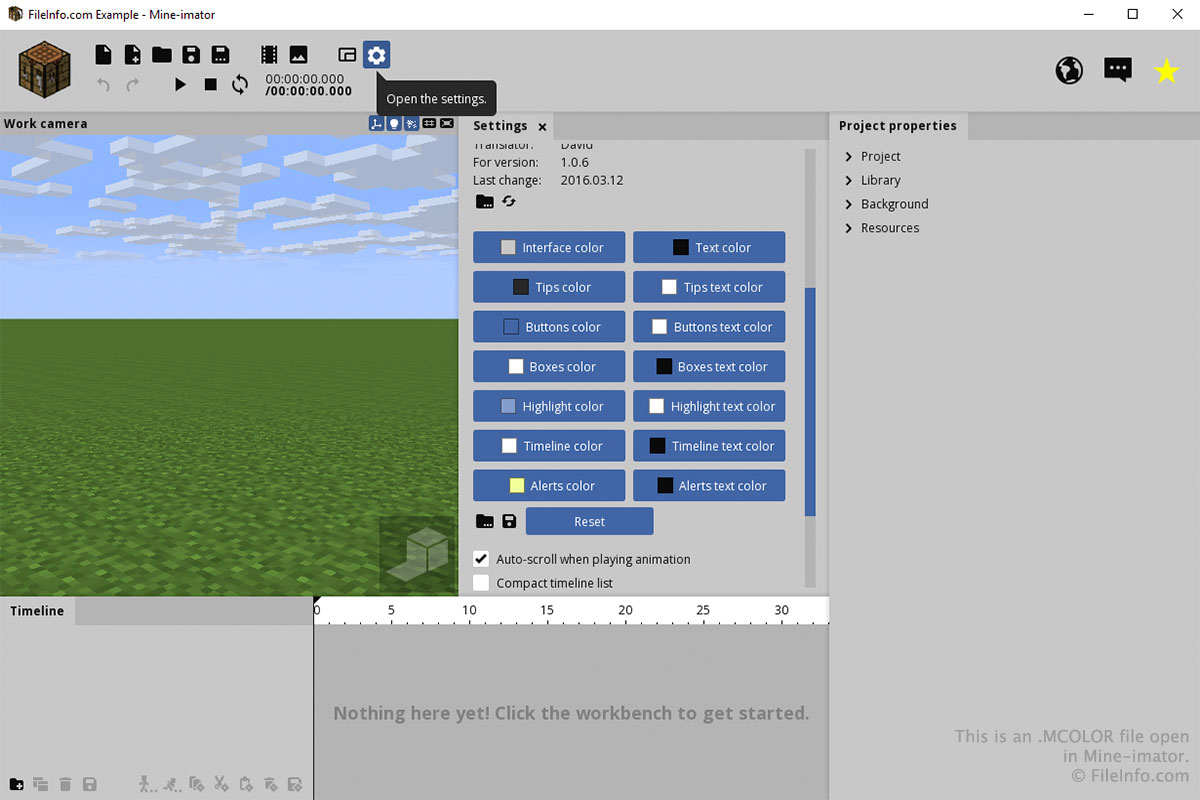
Najprawdopodobniej będziesz mieć kontakt z plikiem MCOLOR tylko za pośrednictwem karty „Ustawienia” w programie Mine-imator. Aby utworzyć lub otworzyć plik MCOLOR, wybierz ikonę koła zębatego „Ustawienia” i przewiń w dół do sekcji „Kolor interfejsu”. Wybierz ikonę folderu, aby wczytać plik MCOLOR, albo ikonę dyskietki, aby zapisać plik MCOLOR.
Możesz wybrać kolory poszczególnych elementów interfejsu, klikając przyciski w sekcji „Kolor interfejsu” na karcie „Ustawienia”. Po kliknięciu przycisku wybierz kolor i kliknij .