

.MCOLOR Dateiendung
Mine-imator-Oberflächenfarbdatei
| Entwickler | David Norgren |
| Beliebtheit |
1,5 | 2 Stimmen |
Was ist eine MCOLOR-Datei?
Eine MCOLOR-Datei ist eine Einstellungsdatei, die von Mine-imator erstellt wird, einem Programm zum Erstellen animierter Videos mit Minecraft-Thema. Sie enthält Farbeinstellungen für die grafische Benutzeroberfläche von Mine-imator, darunter Farben für Text, Schaltflächen, Felder, Zeitleiste, Warnungen und Hervorhebungen. MCOLOR-Dateien werden nur von Mine-imator verwendet.
Weitere Informationen
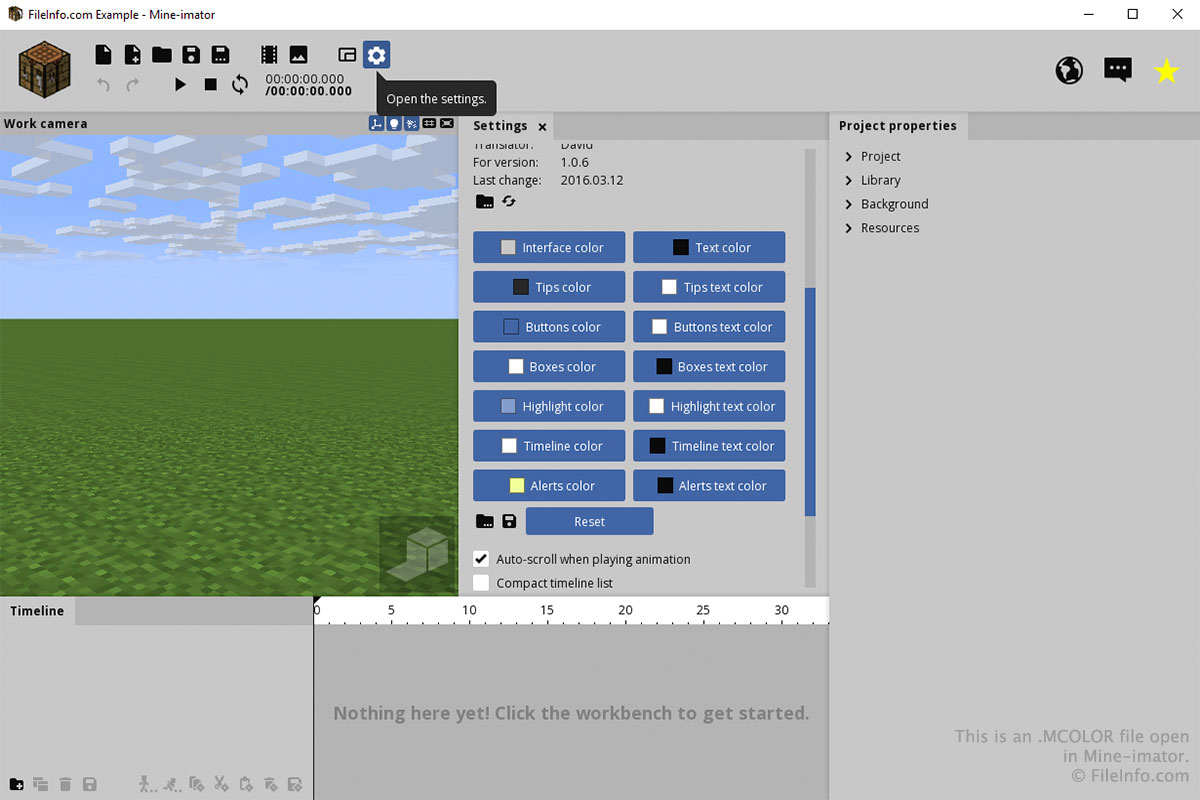
Wahrscheinlich werden Sie mit einer MCOLOR-Datei nur über die Registerkarte „Einstellungen“ in Mine-imator interagieren. Um eine MCOLOR-Datei zu erstellen oder zu öffnen, wählen Sie das Zahnradsymbol „Einstellungen“ aus und scrollen Sie nach unten zu „Oberflächenfarbe“. Wählen Sie das Ordnersymbol aus, um eine MCOLOR-Datei zu laden, oder das Diskettensymbol, um eine MCOLOR-Datei zu speichern.
Sie können die Farben für jeden Teil der Oberfläche auswählen, indem Sie auf die Schaltflächen im Abschnitt „Oberflächenfarbe“ der Registerkarte „Einstellungen“ klicken. Nachdem Sie auf eine Schaltfläche geklickt haben, wählen Sie die Farbe aus und klicken Sie auf .