

.MCOLOR Přípona souboru
Soubor barev rozhraní Mine-imatoru
| Vývojář | David Norgren |
| Popularita |
1,5 | 2 hlasy |
Co je soubor MCOLOR?
Soubor MCOLOR je soubor nastavení vytvořený programem Mine-imator, který se používá k vytváření animovaných videí s tematikou Minecraftu. Obsahuje nastavení barev GUI programu Mine-imator, včetně barev textu, tlačítek, polí, časové osy, upozornění a zvýraznění. Soubory MCOLOR používá pouze program Mine-imator.
Další informace
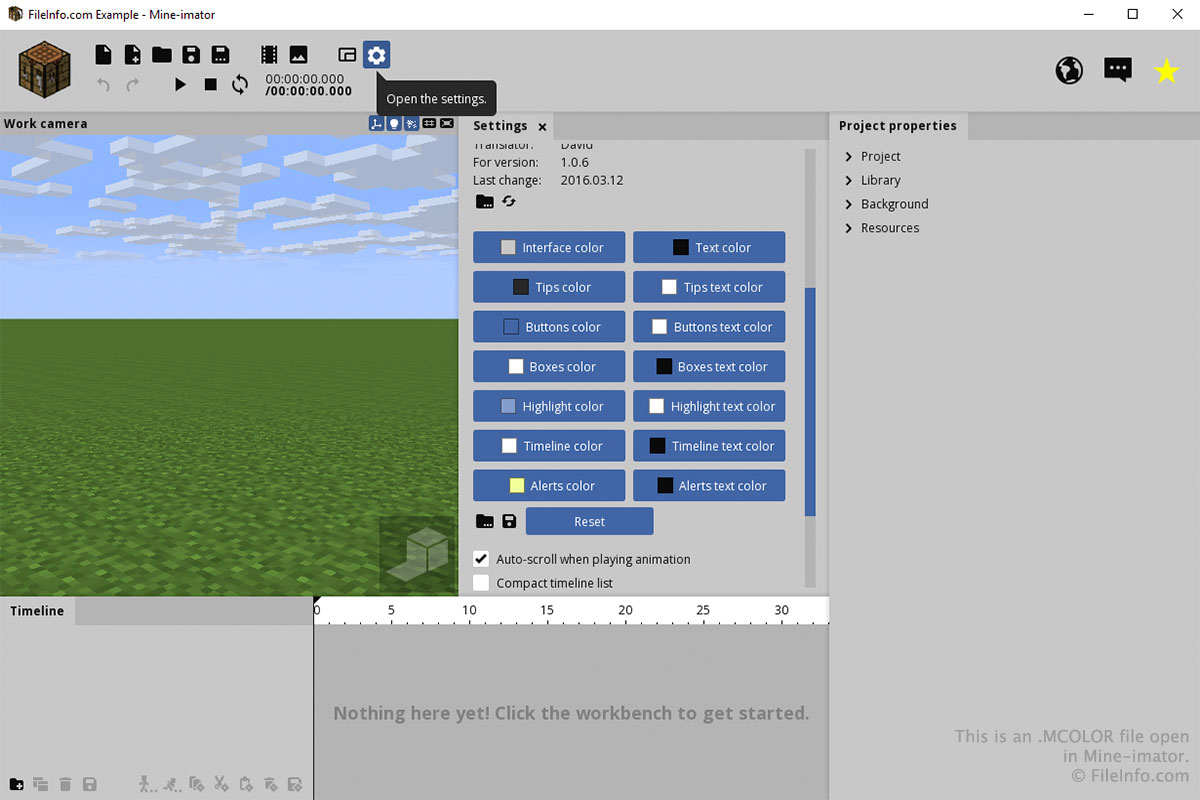
Se souborem MCOLOR se pravděpodobně setkáte pouze prostřednictvím karty „Nastavení“ v programu Mine-imator. Chcete-li vytvořit nebo otevřít soubor MCOLOR, vyberte ikonu ozubeného kola „Nastavení“ a přejděte dolů k položce „Barva rozhraní“. Výběrem ikony složky načtete soubor MCOLOR, nebo výběrem ikony diskety soubor MCOLOR uložíte.
Barvy jednotlivých částí rozhraní můžete vybrat kliknutím na tlačítka v části „Barva rozhraní“ na kartě „Nastavení“. Po kliknutí na tlačítko vyberte barvu a klikněte na .