

.MCOLOR Extension de fichier
Fichier de couleurs de l’interface de Mine-imator
| Développeur | David Norgren |
| Popularité |
1,5 | 2 Votes |
Qu'est-ce qu'un fichier MCOLOR ?
Un fichier MCOLOR est un fichier de paramètres créé par Mine-imator, un programme utilisé pour créer des vidéos animées sur le thème de Minecraft. Il contient les paramètres de couleur de l’interface graphique de Mine-imator, notamment pour le texte, les boutons, les cases, la chronologie, les alertes et les éléments en surbrillance. Les fichiers MCOLOR sont uniquement utilisés par Mine-imator.
Plus d'informations
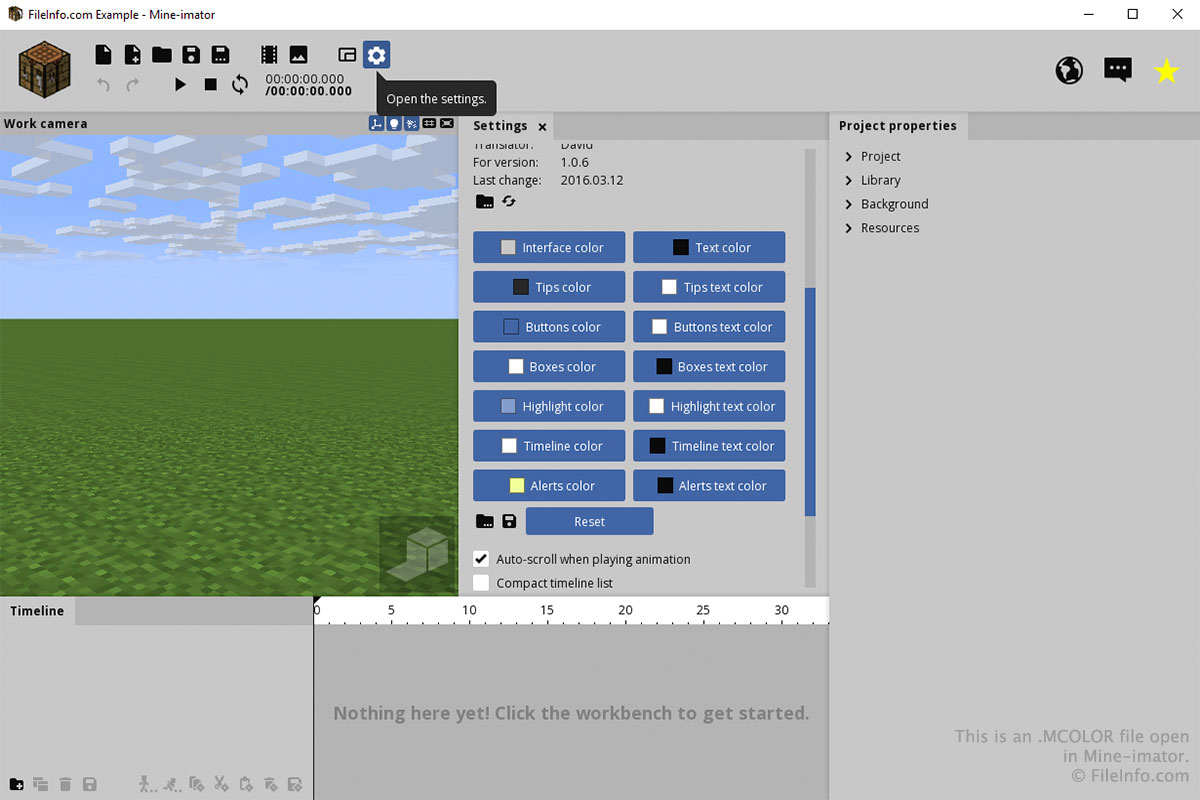
Vous n’interagirez probablement avec un fichier MCOLOR que par l’intermédiaire de l’onglet « Settings » de Mine-imator. Pour créer ou ouvrir un fichier MCOLOR, sélectionnez l’icône d’engrenage « Settings », puis faites défiler l’écran jusqu’à « Interface color ». Sélectionnez l’icône de dossier pour charger un fichier MCOLOR ou l’icône de disquette pour enregistrer un fichier MCOLOR.
Vous pouvez choisir les couleurs de chaque partie de l’interface en cliquant sur les boutons de la section « Interface color » de l’onglet « Settings ». Après avoir cliqué sur un bouton, choisissez la couleur et cliquez sur .