

.MCOLOR Estensione file
File dei colori dell'interfaccia di Mine-imator
| Sviluppatore | David Norgren |
| Popolarità |
1,5 | 2 Voti |
Che cos'è un file MCOLOR?
Un file MCOLOR è un file di impostazioni creato da Mine-imator, un programma usato per creare video animati a tema Minecraft. Contiene le impostazioni dei colori della interfaccia grafica di Mine-imator, inclusi i colori del testo, dei pulsanti, delle caselle, della sequenza temporale, degli avvisi e delle evidenziazioni. I file MCOLOR vengono usati solo da Mine-imator.
Maggiori informazioni
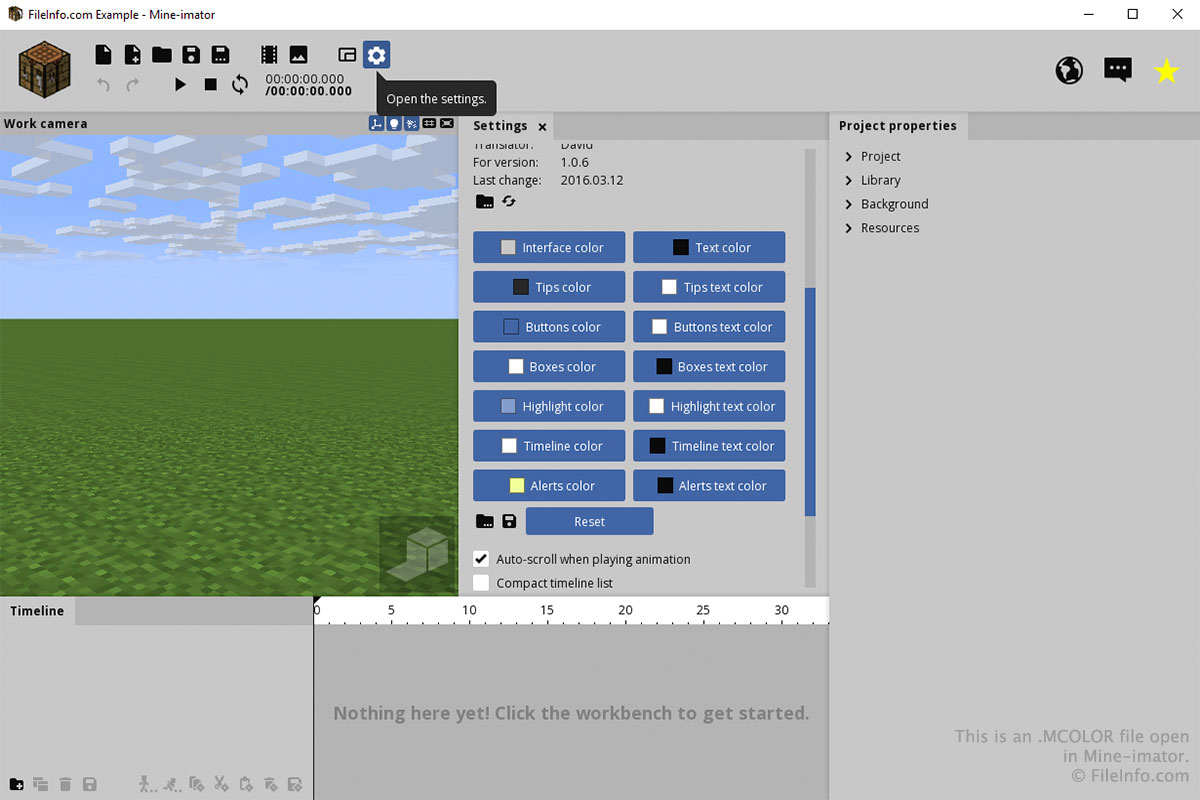
Molto probabilmente interagirai con un file MCOLOR solo tramite la scheda "Impostazioni" di Mine-imator. Per creare o aprire un file MCOLOR, seleziona l'icona a forma di ingranaggio "Impostazioni" e scorri verso il basso fino a "Colore dell'interfaccia". Seleziona l'icona della cartella per caricare un file MCOLOR oppure l'icona del dischetto per salvare un file MCOLOR.
Puoi scegliere i colori per ogni parte dell'interfaccia facendo clic sui pulsanti nella sezione "Colore dell'interfaccia" della scheda "Impostazioni". Dopo aver fatto clic su un pulsante, scegli il colore e fai clic su .