

.GPX 파일 확장자
GPS Exchange 파일
| 개발사 | 해당 없음 |
| 인기도 |
3.4 | 313 표 |
GPX 파일이란 무엇인가요?
GPX 파일은 GPS Exchange 형식으로 저장된 GPS 데이터 파일이며, GPS Exchange는 많은 GPS 프로그램에서 사용하는 개방형 표준입니다. 이 파일에는 웨이포인트, 경로, 트랙이 포함될 수 있는 경도 및 위도 위치 데이터가 들어 있습니다. GPX 파일은 XML 형식으로 저장되므로 여러 프로그램과 웹 서비스에서 GPS 데이터를 더 쉽게 가져오고 읽을 수 있습니다.
추가 정보
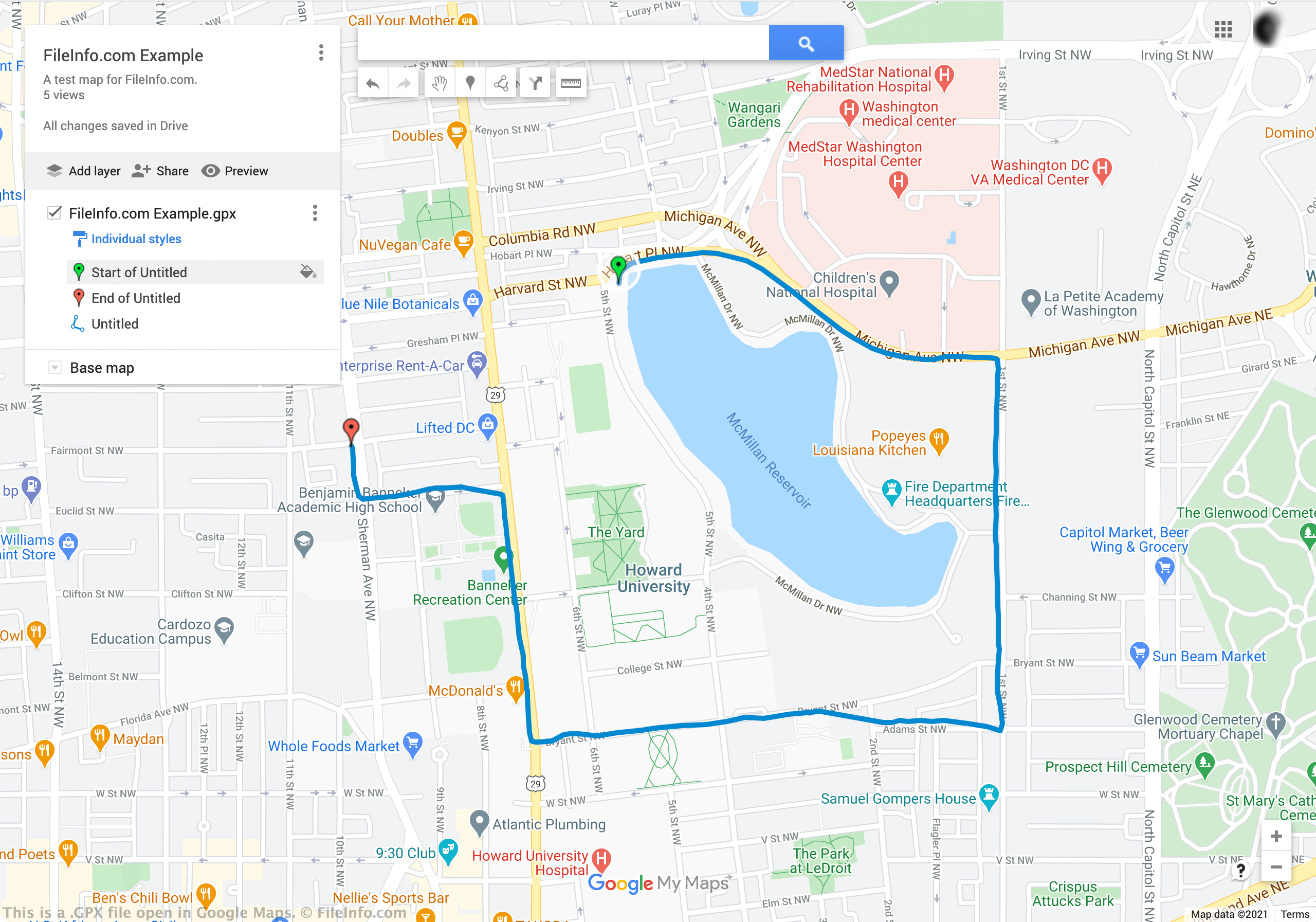
GPX 파일은 지도, 경로, 지오캐싱 정보를 비롯한 GPS 위치 데이터를 다른 사람과 교환하는 데 사용됩니다. 일반적으로 Garmin Connect 장치와 같은 피트니스 장치 및 애플리케이션은 GPX 파일을 사용하여 달리기 및 자전거 경로를 가져오고 내보냅니다. Google Earth Pro의 데스크톱 버전과 Google Maps의 웹 버전을 비롯한 더 정교한 지도 애플리케이션도 GPX 파일을 만들고 사용합니다.
GPX 파일에는 다음 세 가지 유형의 데이터가 저장됩니다.
- 웨이포인트 - 한 지점의 GPS 좌표를 포함합니다. 기타 설명 정보가 포함될 수도 있습니다.
- 경로 - 목적지로 이어지는 트랙 포인트 목록을 포함합니다. 트랙 포인트는 회전 지점 또는 구간 지점에 해당하는 웨이포인트입니다.
- 트랙 - 경로를 설명하는 지점 목록을 포함합니다.
지도 및 피트니스 애플리케이션은 이 세 가지 데이터 집합을 지도와 경로로 결합하여 사용자에게 표시합니다.
GPX 파일을 여는 방법
GPX 파일을 열고 파일에 포함된 지도 데이터를 보는 가장 쉬운 방법은 Google Maps의 웹 버전에 파일을 업로드하는 것입니다. 웹 브라우저에서 Google Maps를 열고 로그인한 후 다음과 같이 GPX 파일을 새 지도로 추가할 수 있습니다.
- Google Maps 메뉴를 열고 를 선택합니다.
- 을 선택합니다.
- 새 Google Maps 창이 열립니다. 해당 창에서 제목 없는 레이어 아래에 표시되는 버튼을 선택합니다.
- GPX 파일을 업로드합니다. 파일에 포함된 지도 데이터가 Google Maps에 표시됩니다.
다음과 같은 다양한 데스크톱 및 모바일 애플리케이션에서도 GPX 파일을 열 수 있습니다.
- Google Earth Pro (크로스 플랫폼)
- Garmin BaseCamp (Windows, Mac)
- Merkaartor (크로스 플랫폼)
- GPX Viewer (Android)
- GPX-Viewer (iOS)
GPX 파일을 KML 또는 KMZ 파일로 변환하려면 어떻게 해야 하나요?
경우에 따라 GPX 지도 파일을 .KML 또는 .KMZ 지도 파일로 변환해야 할 수 있습니다. 예를 들어 Google Earth Pro의 웹 버전을 사용하는 경우 GPX 파일을 Google Earth에 업로드하기 전에 KML 또는 KMZ 파일로 변환해야 합니다.
GPX 파일을 KML 또는 KMZ 파일로 변환하는 가장 쉬운 방법은 GPX 파일을 Google Maps(웹)에 업로드한 다음 결과 지도를 KML / KMZ 파일로 내보내는 것입니다. 위에서 GPX 파일을 Google Maps에 업로드하는 방법을 확인할 수 있습니다. Google Maps에서 KML / KMZ 파일을 내보내려면 다음 단계를 따르세요.
- 지도 제목 오른쪽에 표시되는 점 3개 아이콘을 선택합니다.
- 표시되는 메뉴에서 를 선택합니다.
- 전체 지도를 내보낼지 GPX 파일만 내보낼지 지정합니다.
- GPX 파일을 KMZ 파일로 변환하려면 이 단계를 건너뜁니다. GPX 파일을 KML 파일로 변환하려면 확인란을 선택합니다.
- 를 선택합니다.
그러면 새 KML 또는 KMZ 파일이 Downloads 폴더에 저장됩니다.
GPX 파일을 여는 프로그램
Guitar Pro 6 문서
| 개발사 | Arobas Music |
| 인기도 |
3.3 | 35 표 |
GPX 파일은 Guitar Pro 6으로 만들거나 Guitar Pro 7에서 내보낸 악보 문서입니다. 독점 형식으로 저장되며 기타, 베이스, 피아노, 드럼을 비롯한 다양한 악기의 악보와 작곡 내용이 포함되어 있습니다.
추가 정보
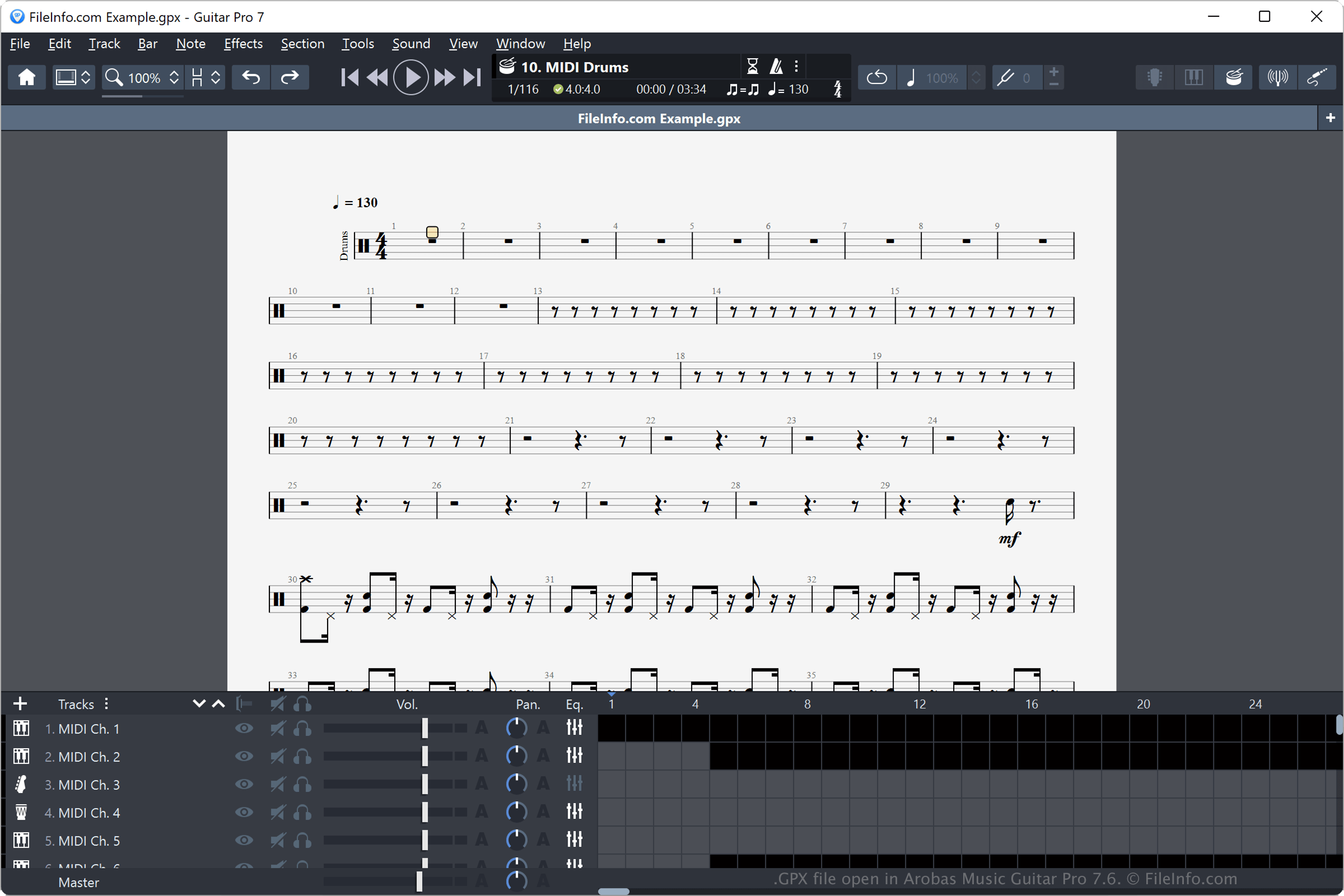
Arobas Music은 원래 Guitar Pro를 타브 악보 편집기로 개발했지만, 수년에 걸쳐 기능을 추가하여 종합적인 악보 편집기로 발전시켰습니다. Guitar Pro 버전 6과 Guitar Pro 6 문서(GPX) 형식은 2010년 4월에 처음 공개되었습니다.
기본적으로 이전 버전의 Guitar Pro는 소프트웨어 버전에 해당하는 다른 독점 Guitar Pro 형식으로 문서를 저장했습니다. 예를 들어 Guitar Pro 5는 문서를 .GP5 파일로 저장하고 Guitar Pro 4는 문서를 .GP4 파일로 저장합니다. Guitar Pro는 새 버전이 나올 때마다 파일 형식을 교체하지만, 소프트웨어는 이전 Guitar Pro 파일 형식도 계속 지원합니다.
Guitar Pro 6에서 GPX 파일을 만들려면 또는 을 선택하고, 악보를 수정한 다음 또는 를 선택합니다.
GPX 파일은 .GP5(Guitar Pro 5), .MIDI, .WAV를 비롯한 여러 파일 형식으로 내보낼 수 있습니다. 또한 악보를 .PNG, MusicXML, .PDF 형식으로 내보낼 수도 있습니다.
참고: GPX 파일에는 파형 오디오 데이터가 포함되어 있지 않습니다. 대신 소프트웨어의 Guitar Pro 엔진이 음악으로 시뮬레이션하는 악기와 음표를 저장합니다.
GPX 파일을 여는 방법
Guitar Pro 6 GPX 파일은 Arobas Music Guitar Pro(멀티플랫폼)로만 열 수 있습니다.