.AIC 파일 확장자

Advanced Image Coding File

개발사 해당 없음
인기도
2.9  |  7 투표
 

AIC 파일이란 무엇인가요?

Bitmap image file encoded with Advanced Image Coding; uses a compression algorithm that combines the JPEG and H.264 standards; similar to the JPEG 2000 (.JP2) format, but offers higher compression efficiency and scalability.

추가 정보

NOTE: AIC may also stand for "Apple Intermediate Codec," a video codec used by Apple software. These files typically have a .MOV extension.

File Viewer Plus(으)로 400개 이상의 파일 형식을 여세요.무료 다운로드

AIC 파일을 여는 프로그램

Windows
AIC software (AICSetup.exe)

Adobe Illustrator Cloud Document

개발사 Adobe
인기도
3.5  |  2 투표
 

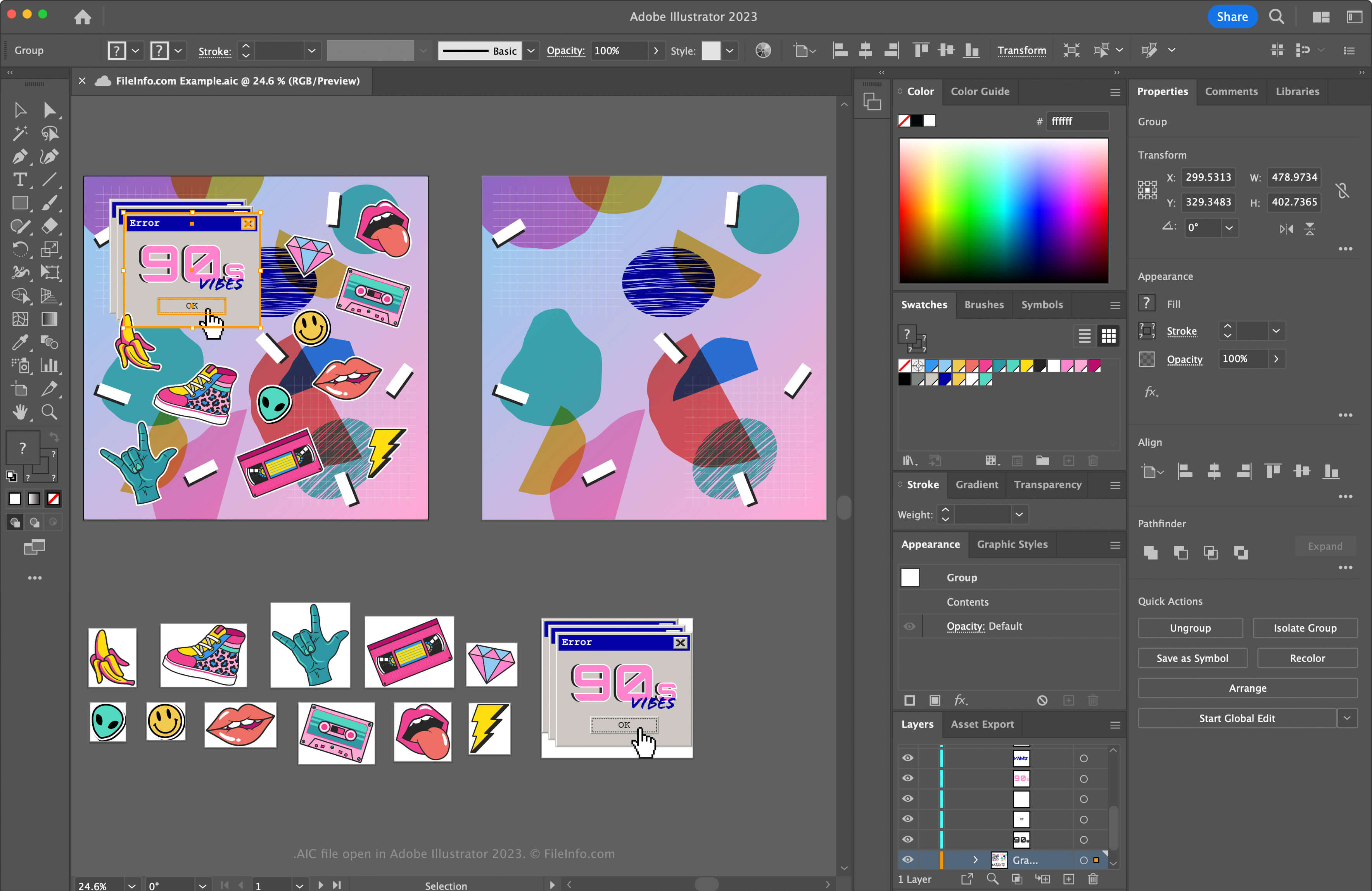
An AIC file is a vector graphic saved in the Adobe Illustrator Cloud (AIC) format, which stores vector data similarly to an .AI Artwork file but in the cloud via Adobe's cloud documents system. Illustrator users can open and modify an AIC file, then save it in the cloud to sync the changes to the same artwork accessed on other devices.

추가 정보

Adobe Illustrator 2025에서 열린 .aic 파일의 스크린샷
Adobe Illustrator 2025에서 열린 AIC 파일

Illustrator is one of the most common vector graphics applications. Many graphic artists and web designers use the software to create vector artwork, such as icons, logos, and web & mobile layouts.

Adobe introduced the AIC format to allow users to work on the same AI artwork on different devices, such as an iPad or laptop, and sync the edits a user makes to keep the file current. The AIC format is the same as the AI format but also supports the caching of edits made to an artwork when a user works on it offline. Then, Illustrator syncs the modifications when the user reconnects to the Internet.

How to create an AIC file

To create an AIC file with Adobe Illustrator:

  1. Create a new artwork file or open an existing file by selecting File → New... or File → Open...
  2. Select File → Save or Save As...
  3. In the "Save to Creative Cloud" window, name the file and click Save

참고: If you are prompted to save the document on your computer instead of in Creative Cloud after selecting File → Save or Save As..., click the Save Cloud Document button, name the AIC file, then click Save.

[s]💡 If you upload an AI file to Creative Cloud, Illustrator automatically saves the AI file as an AIC file. For example, an Illustrator document named artwork.ai is saved as artwork.aic.[/s]

AIC 파일을 여는 방법

You can open an AIC file with Adobe Illustrator in Windows and macOS. To open an AIC file saved in your Adobe Cloud account with Photoshop, select File → Open..., click Open Cloud Document, and choose the AIC file.

The AIC file format supports incremental backup and restore. To view the version history of your Adobe cloud AIC document, select File → Version History (versions expire after 30 days unless you mark them for preservation).

You can also sign in to Adobe Assets Web with your Adobe account, then select Files → Cloud documents, choose an AIC file, and click Timeline.

AIC 파일을 변환하는 방법

Adobe Illustrator can convert AIC files to many file types, including the following formats:

  • .AI - Adobe Illustrator Artwork
  • .EPS - Encapsulated PostScript
  • .SVG - Scalable Vector Graphics
  • .PDF - Portable Document Format
  • .JPG - JPEG Image
  • .PNG - Portable Network Graphic
  • .TIF - Tagged Image File Format
  • .DWG - AutoCAD Drawing
  • .EMF - Enhanced Windows Metafile
  • .WMF - Windows Metafile
  • .BMP - Bitmap Image
  • .PSD - Adobe Photoshop Document

AIC 파일을 여는 프로그램

Windows
무료 체험판
Mac
무료 체험판

검증자 FileInfo.com

FileInfo.com 팀 이 페이지에 나열된 모든 파일 형식과 소프트웨어 프로그램을 독자적으로 조사했습니다. 저희의 목표는 100% 정확성이며, 검증한 파일 유형에 대한 정보만 게시합니다.

이 페이지에 추가하거나 업데이트할 내용을 제안하고 싶으시면 알려 주세요.