.NODES ファイル拡張子

2個のファイルタイプ.nodes拡張子を使用しています。

Stick Nodes 2D Object

開発元 ForTheLoss Games
人気度
3.5  |  4 
 

NODESファイルとは?

A NODES file is a stickfigure, prop, weapon, or other item created by Stick Nodes, a 2D animation program. In Stick Nodes' documentation, all NODES files are referred to as stickfigures, even those that contain props, weapons, or other items. Both Stick Nodes and Stick Nodes Pro use NODES files.

詳細情報

Stick Nodes and Stick Nodes Pro are stickfigure animation programs available for Android and iOS devices. Stick Nodes is a free program, while Stick Nodes Pro is a paid program that includes additional features.

After animators create a stickfigure or another item that can be animated in Stick Nodes, they can save that item as a NODES file. The animator can then reuse the NODES file in future animations or share the file with other Stick Nodes users, so those users can include the item in their animations. Many NODES files are available for download from Stick Nodes' official website.

NODESファイルの開き方

You can open a NODES file in Stick Nodes or Stick Nodes Pro (Android, iOS). For example, to open a NODES file in Android, you can:

  1. Install Stick Nodes.
  2. Tap your NODES file.
  3. Select Open with.
  4. Select Stick Nodes.
File Viewer Plusで400種類以上のファイル形式を開けます。無料ダウンロード

NODESファイルを開くプログラム

iOS
Android

AudioNodes Project

開発元 AudioNodes
人気度
3.3  |  4 
 

A NODES file is a project file created by AudioNodes, a music creation program. It is used to load a project and its included audio files in AudioNodes. NODES files are renamed .ZIP archives that contain the audio files imported into a project and a JSON file that specifies the project's structure and settings.

詳細情報

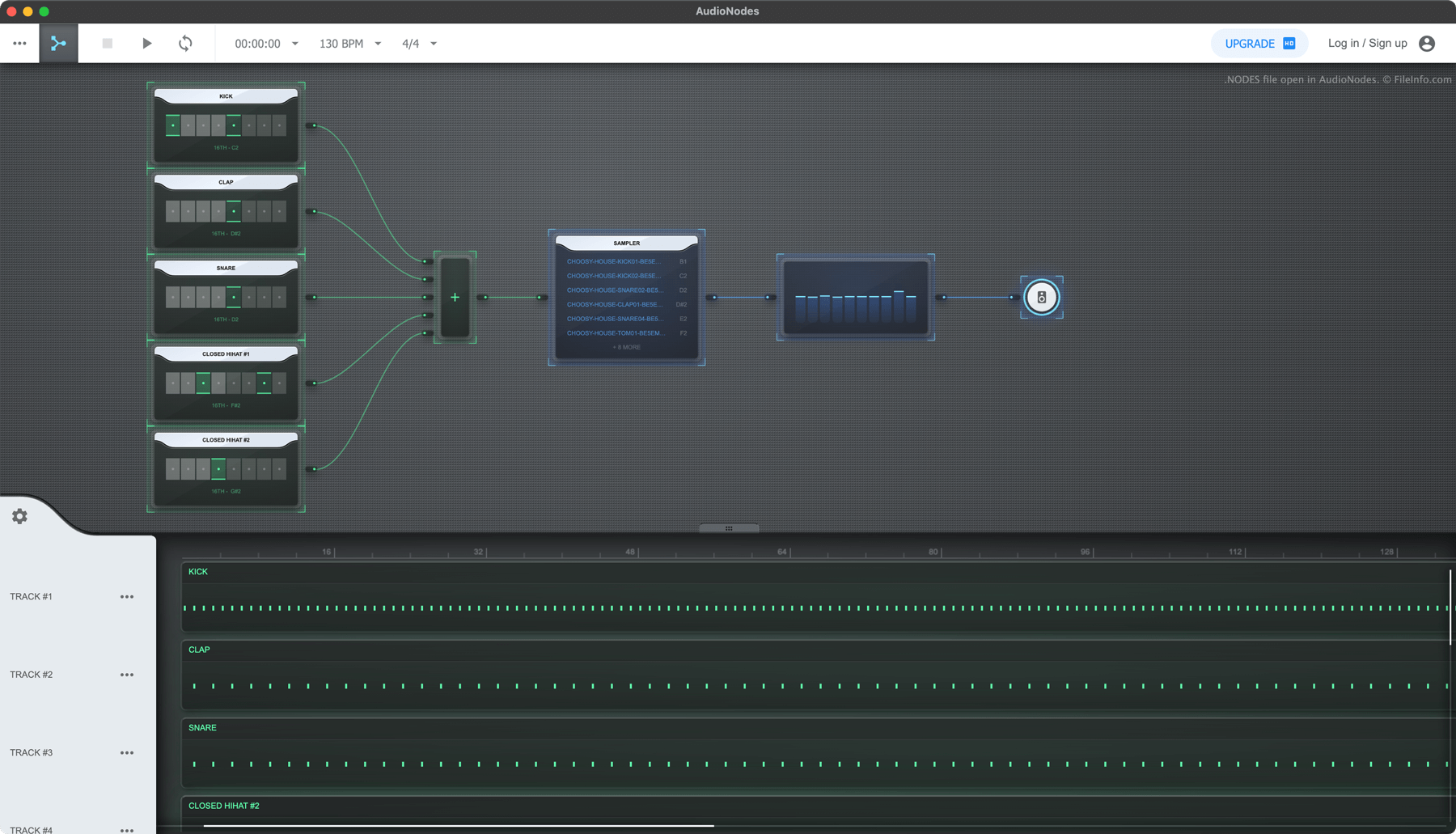
AudioNodesで開いた.nodesファイルのスクリーンショット
AudioNodesで開いたNODESファイル

AudioNodes is a node-based music-making program that allows you to import, create, and edit audio and then export your edited audio as a song. The program is available for Windows, Mac, and Linux, as well as online.

If you want to save an AudioNodes project, so you can continue editing it in the future, you can do so by selecting the three-dots menu icon and clicking Project → Save as. Doing so saves your project as a NODES file. Each NODES file includes all the audio imported into the project, as well as a JSON file named project.nodes. Project.nodes contains plain text data that define the project's settings and edits.

NODESファイルの開き方

You can open a NODES file with AudioNodes (multiplatform):

  1. Click AudioNodes' three-dot menu.
  2. Select Project → Open
  3. Navigate to and open your NODES file.

If you want to view the audio and JSON files a NODES file contains, rename the file to use the .zip extension and open it as you would any ZIP file.

NODESファイルの変換方法

You can use AudioNodes (multiplatform) to export the song a NODES file contains in the .WAV, .MP3, and .OGG formats. (The desktop version of AudioNodes can also export in the .AAC, .FLAC, and .M4A formats.) To do so:

  1. Open your NODES file in AudioNodes.
  2. Click the three-dot menu.
  3. Select Project → Export.

NODESファイルを開くプログラム

All Platforms
無料体験版
Rename to use .zip extension; open with any Zip-decompression utility

検証者 FileInfo.com

FileInfo.comチーム は、このページに掲載されているすべてのファイル形式とソフトウェアについて独自に調査しました。 私たちの目標は100%の正確性であり、検証済みのファイルタイプに関する情報のみを公開しています。

このページへの追加や更新をご提案いただける場合は、お知らせください。