.NODES 파일 확장자

2개의 파일 유형.nodes 확장자를 사용합니다.

Stick Nodes 2D Object

개발사 ForTheLoss Games
인기도
3.5  |  4 투표
 

NODES 파일이란 무엇인가요?

A NODES file is a stickfigure, prop, weapon, or other item created by Stick Nodes, a 2D animation program. In Stick Nodes' documentation, all NODES files are referred to as stickfigures, even those that contain props, weapons, or other items. Both Stick Nodes and Stick Nodes Pro use NODES files.

추가 정보

Stick Nodes and Stick Nodes Pro are stickfigure animation programs available for Android and iOS devices. Stick Nodes is a free program, while Stick Nodes Pro is a paid program that includes additional features.

After animators create a stickfigure or another item that can be animated in Stick Nodes, they can save that item as a NODES file. The animator can then reuse the NODES file in future animations or share the file with other Stick Nodes users, so those users can include the item in their animations. Many NODES files are available for download from Stick Nodes' official website.

NODES 파일을 여는 방법

You can open a NODES file in Stick Nodes or Stick Nodes Pro (Android, iOS). For example, to open a NODES file in Android, you can:

  1. Install Stick Nodes.
  2. Tap your NODES file.
  3. Select Open with.
  4. Select Stick Nodes.
File Viewer Plus(으)로 400개 이상의 파일 형식을 여세요.무료 다운로드

NODES 파일을 여는 프로그램

iOS
Android

AudioNodes Project

개발사 AudioNodes
인기도
3.3  |  4 투표
 

A NODES file is a project file created by AudioNodes, a music creation program. It is used to load a project and its included audio files in AudioNodes. NODES files are renamed .ZIP archives that contain the audio files imported into a project and a JSON file that specifies the project's structure and settings.

추가 정보

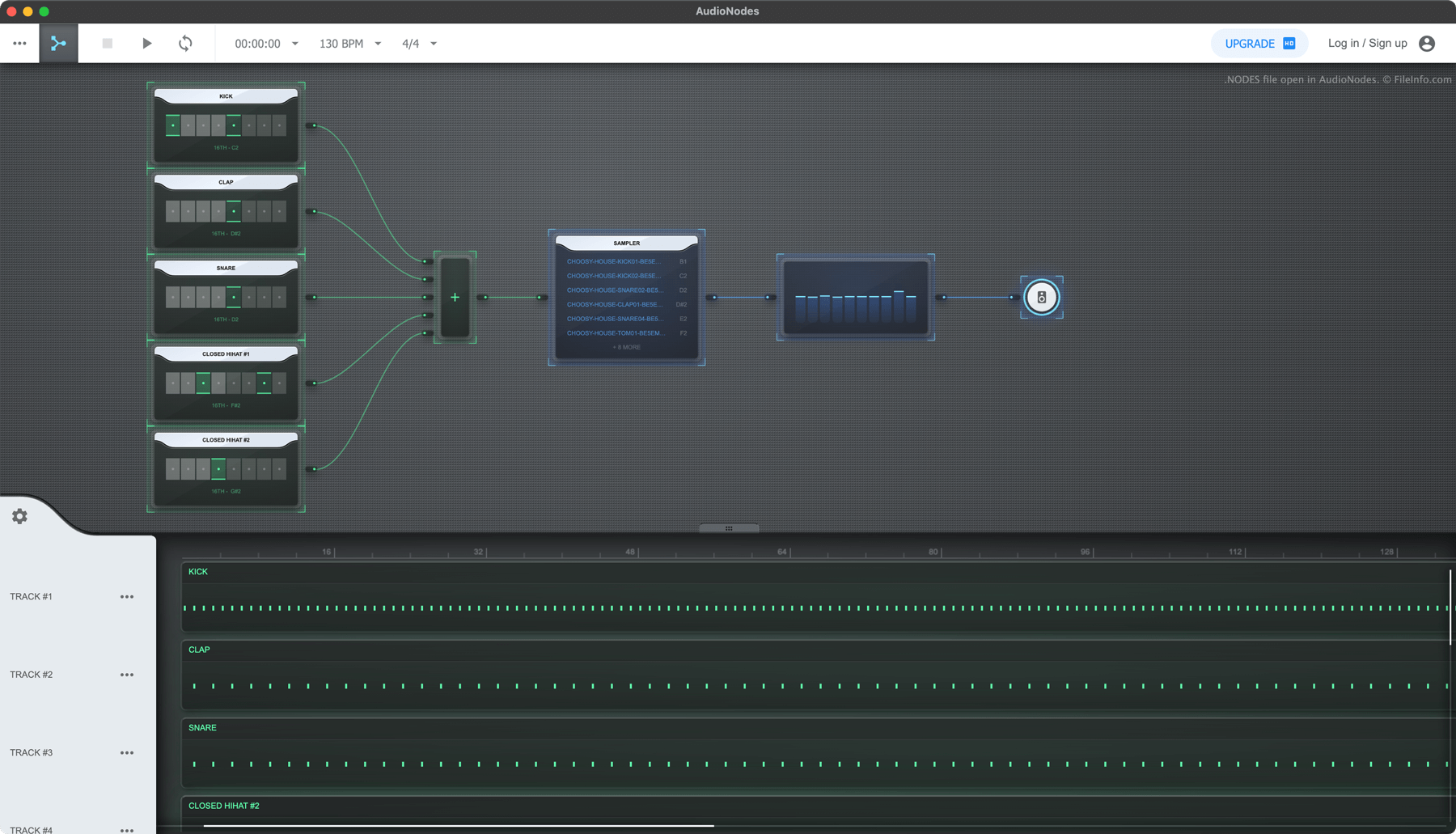
AudioNodes에서 열린 .nodes 파일의 스크린샷
AudioNodes에서 열린 NODES 파일

AudioNodes is a node-based music-making program that allows you to import, create, and edit audio and then export your edited audio as a song. The program is available for Windows, Mac, and Linux, as well as online.

If you want to save an AudioNodes project, so you can continue editing it in the future, you can do so by selecting the three-dots menu icon and clicking Project → Save as. Doing so saves your project as a NODES file. Each NODES file includes all the audio imported into the project, as well as a JSON file named project.nodes. Project.nodes contains plain text data that define the project's settings and edits.

NODES 파일을 여는 방법

You can open a NODES file with AudioNodes (multiplatform):

  1. Click AudioNodes' three-dot menu.
  2. Select Project → Open
  3. Navigate to and open your NODES file.

If you want to view the audio and JSON files a NODES file contains, rename the file to use the .zip extension and open it as you would any ZIP file.

NODES 파일을 변환하는 방법

You can use AudioNodes (multiplatform) to export the song a NODES file contains in the .WAV, .MP3, and .OGG formats. (The desktop version of AudioNodes can also export in the .AAC, .FLAC, and .M4A formats.) To do so:

  1. Open your NODES file in AudioNodes.
  2. Click the three-dot menu.
  3. Select Project → Export.

NODES 파일을 여는 프로그램

All Platforms
무료 체험판
Rename to use .zip extension; open with any Zip-decompression utility
카테고리: 오디오
업데이트: 2022-12-28

검증자 FileInfo.com

FileInfo.com 팀 이 페이지에 나열된 모든 파일 형식과 소프트웨어 프로그램을 독자적으로 조사했습니다. 저희의 목표는 100% 정확성이며, 검증한 파일 유형에 대한 정보만 게시합니다.

이 페이지에 추가하거나 업데이트할 내용을 제안하고 싶으시면 알려 주세요.