

.TTML Estensione file
File di sottotitoli Timed Text Markup Language
| Sviluppatore | W3C |
| Popolarità |
3,9 | 10 Voti |
Che cos'è un file TTML?
Un file TTML è un file di sottotitoli salvato nel formato Timed Text Markup Language (TTML), che è un'estensione del formato .XML. È pensato per essere riprodotto come traccia di sottotitoli insieme a un video associato. Ogni file TTML contiene informazioni in testo semplice che specificano lo stile, la temporizzazione e il testo dei sottotitoli.
Maggiori informazioni
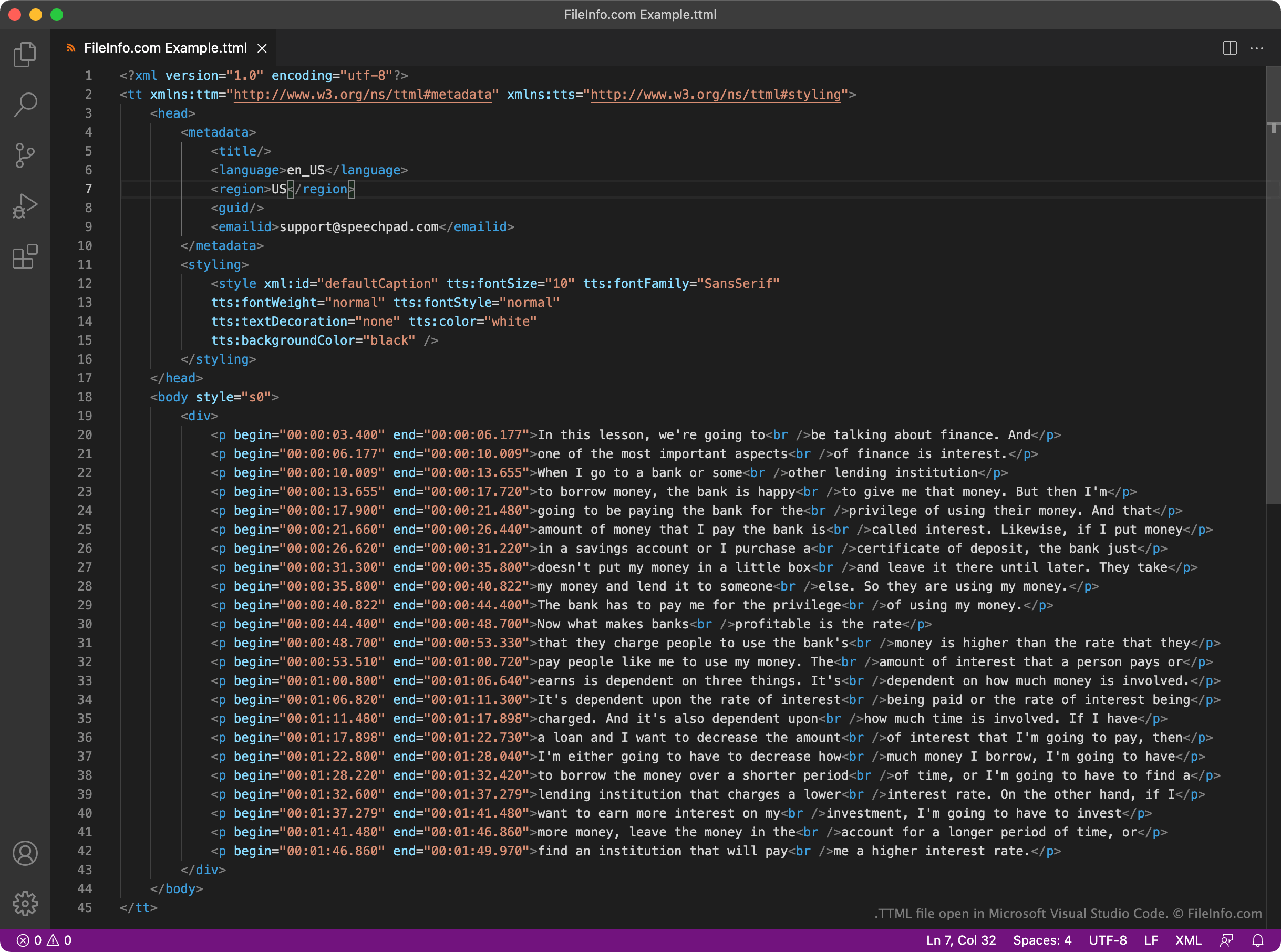
Il World Wide Web Consortium (W3C) ha creato il formato TTML per fungere da standard uniforme per i sottotitoli basati su XML. Ogni file TTML contiene un insieme fisso di elementi di intestazione e del corpo utilizzati per riprodurre i sottotitoli e specificare i metadati relativi a tali sottotitoli. Ad esempio, ogni file TTML include un elemento <styling> che specifica lo stile del testo dei sottotitoli e un elemento <language> che specifica la lingua dei sottotitoli.
I sottotitoli effettivi contenuti in un file TTML si trovano nella relativa sezione <body>. Ogni riga dei sottotitoli del file viene scritta come un paragrafo separato (<p></p>), con un'ora di inizio e di fine nel formato HH:MM:SS:SSS.
Poiché TTML è un formato ampiamente utilizzato, molti lettori video, piattaforme e servizi di streaming supportano i sottotitoli basati su TTML. Ad esempio, gli utenti di YouTube possono caricare sottotitoli TTML insieme ai propri video.
Come aprire un file TTML
Puoi aprire un file TTML e modificare i sottotitoli che contiene in GitHub Atom (multipiattaforma), Microsoft Visual Studio Code (multipiattaforma) o in qualsiasi altro editor di testo o di codice sorgente. Gli editor di codice sorgente, come Atom e Visual Studio Code, includono l'evidenziazione della sintassi e altre funzioni che semplificano la modifica dei file TTML.
Puoi utilizzare un file TTML per aggiungere sottotitoli a un video in VideoLAN VLC media player (multipiattaforma). Per farlo:
- Inizia a riprodurre il video con cui vuoi utilizzare il file TTML.
- Seleziona .
- Individua e apri il file TTML.