

.AVS Extension de fichier
Fichier de préréglage AVS
| Développeur | Nullsoft |
| Popularité |
4,2 | 14 Votes |
Qu'est-ce qu'un fichier AVS ?
Un fichier AVS est un fichier de configuration utilisé par Advanced Visualization Studio (AVS), un visualiseur audio pour le lecteur multimédia Nullsoft Winamp. Il contient des paramètres pour les animations, comme les rythmes et les transitions, qui sont lues en fonction de la musique diffusée dans Winamp.
Plus d'informations

Winamp est un lecteur multimédia gratuit qui prend en charge différents formats vidéo et audio. L’application prend également en charge les modules d’extension pour étendre ses fonctionnalités.
AVS est un module d’extension qui vous permet de visualiser l’audio, comme les chansons ou les morceaux instrumentaux que vous lisez dans Winamp. Les effets prédéfinis sont enregistrés dans des fichiers AVS, que vous pouvez charger, modifier et enregistrer via le module d’extension AVS installé dans Winamp.
Comment modifier et enregistrer un préréglage AVS avec le module d’extension AVS dans Winamp
Pour modifier et enregistrer un préréglage AVS via le module d’extension AVS dans Winamp, suivez les étapes suivantes :
- Sélectionnez
- Choisissez le module d’extension « Advanced Visualization Studio » et cliquez sur
- Sélectionnez un préréglage et modifiez ses paramètres
- Cliquez sur , nommez le fichier et sélectionnez
Emplacement des fichiers de préréglage AVS
Si vous avez installé Winamp et le module d’extension AVS, vous trouverez les fichiers de préréglage AVS dans les dossiers « Community Picks », « UnConeD » et « Winamp 5 Picks » du répertoire suivant :
C:\Program Files (x86)\Winamp\Plugins\AVS
Comment ouvrir un fichier AVS
Vous pouvez ouvrir un fichier AVS avec le module d’extension Advanced Visualization Studio (AVS) installé dans Nullsoft Winamp (Windows). Pour ouvrir un fichier AVS, suivez les étapes suivantes :
- Sélectionnez
- Choisissez le module d’extension « Advanced Visualization Studio » et cliquez sur
- Sélectionnez , choisissez le fichier AVS et sélectionnez
Programmes qui ouvrent les fichiers AVS
Script AviSynth
| Développeur | AviSynth |
| Popularité |
2,2 | 5 Votes |
Un fichier AVS est un script utilisé par AviSynth, un outil de postproduction vidéo. Il contient une référence à un ou plusieurs fichiers vidéo ainsi que des instructions qu'AviSynth utilise pour modifier et traiter ces vidéos. Les utilisateurs d'AviSynth peuvent créer des fichiers AVS avec n'importe quel éditeur de texte et les « lire » avec plusieurs lecteurs .AVI courants.
Plus d'informations
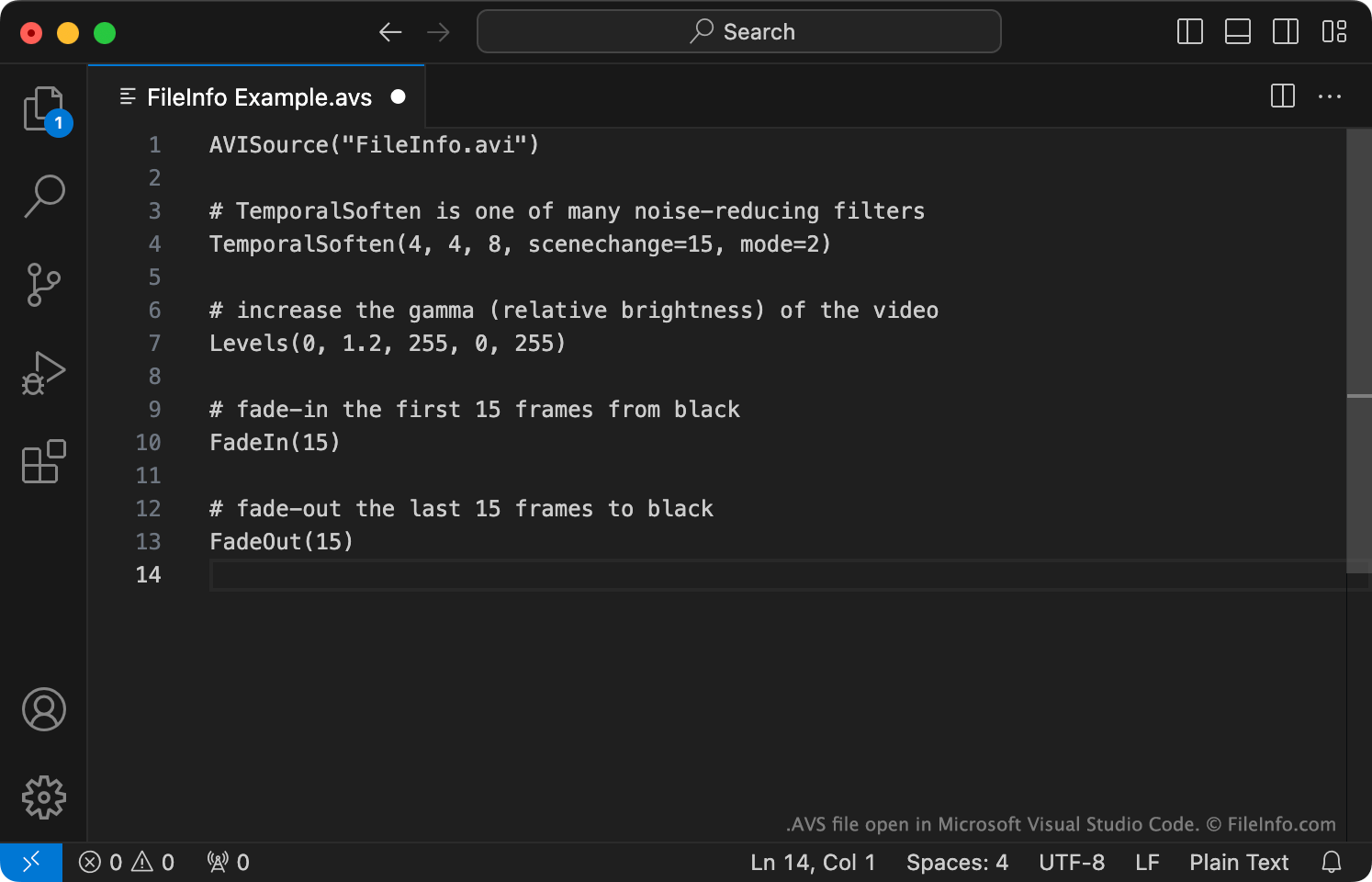
AviSynth est un programme multiplateforme de diffusion d'images utilisé pour créer et lire des versions modifiées de fichiers vidéo (généralement des fichiers AVI). Pour modifier une ou plusieurs vidéos avec AviSynth, les utilisateurs créent un script AviSynth associé. Ce script contient :
- Une ou plusieurs commandes utilisées pour charger les fichiers vidéo ou audio à modifier. Il s'agit généralement de la commande AVISource (utilisée pour charger un fichier AVI).
- Des instructions utilisées pour modifier les fichiers vidéo et audio référencés et/ou leur appliquer des filtres.
Après avoir utilisé un éditeur de texte pour créer un script AVS, les utilisateurs « lisent » le script avec Windows Media Player, MPlayer ou un autre programme prenant en charge les scripts AVS. Lorsqu'un utilisateur lit un script AVS, AviSynth s'exécute, traite le script AVS de l'utilisateur et les fichiers multimédias référencés, puis diffuse la vidéo modifiée vers le lecteur multimédia de l'utilisateur sous forme de fichier AVI.
Comment ouvrir un fichier AVS
Si vous souhaitez modifier un script AVS, vous pouvez l'ouvrir avec Microsoft Notepad, Apple TextEdit ou tout autre éditeur de texte. Toutefois, il est préférable d'ouvrir votre script AVS avec VirtualDubMod, un programme qui vous permet à la fois de modifier et de tester les scripts AVS.
Si vous souhaitez lire la vidéo modifiée décrite par un script AVS, vous devez :
- Vérifier que vous avez accès au(x) fichier(s) multimédia référencé(s) par votre fichier AVS et qu'ils sont stockés au(x) emplacement(s) correct(s).
- Installer AviSynth.
- Ouvrir votre fichier AVS avec Windows Media Player, MPlayer ou un autre programme prenant en charge les fichiers AVS. (D'autres programmes sont répertoriés ci-dessous.)
Programmes qui ouvrent ou référencent les fichiers AVS
Vidéo du groupe de travail AVS de Chine
| Développeur | AVS Workgroup of China |
| Popularité |
2,0 | 2 Votes |
Un fichier AVS est une vidéo enregistrée à l'aide du codec vidéo standard du groupe de travail chinois sur les normes de codage audio et vidéo (AVS). Il contient des contenus multimédias conformes à la norme AVS1 du groupe de travail AVS. Les fichiers AVS ne peuvent pas être lus correctement par la plupart des lecteurs multimédias courants ; ces lecteurs ne lisent que l'audio contenu dans le fichier.
Plus d'informations
En 2002, le ministère chinois de l'Industrie et des Technologies de l'information a créé le groupe de travail national sur les normes de codage audio et vidéo. Ce groupe est chargé de développer et de maintenir les normes techniques pour l'audio et la vidéo numériques, destinées aux entreprises et aux institutions de recherche chinoises.
Dans le cadre de sa mission, le groupe de travail AVS a développé la norme Technologies de l'information, codage audio et vidéo avancé, partie 2 : Vidéo, plus connue sous le nom d'AVS1. Elle décrit le format dans lequel les entreprises et les institutions chinoises doivent enregistrer leurs fichiers vidéo. Les vidéos enregistrées dans ce format sont appelées vidéos AVS et utilisent souvent l'extension .avs. Les vidéos AVS sont rares en dehors de la Chine.
Comment ouvrir un fichier AVS
La plupart des lecteurs multimédias courants, comme VLC media player, Windows Media Player et QuickTime Player, ne peuvent lire que l'audio contenu dans un fichier AVS. Lorsque vous ouvrez un fichier AVS dans ces lecteurs multimédias, vous pouvez écouter l'audio du fichier, mais vous ne pouvez pas regarder sa vidéo.