.PPT 文件扩展名

Microsoft PowerPoint Presentation (Legacy)

开发者 Microsoft
受欢迎程度
3.9  |  692 
 
🔍使用File Helper直接在您的网络浏览器中打开 .PPT 文件在线查看

什么是 PPT 文件?

A PPT file is an editable slide show created by Microsoft PowerPoint or exported by another presentation program, such as OpenOffice Impress or Apple Keynote. It may include formatted text, bullet points, images, movies, sound effects, and music. Users commonly build PPT files from templates with PowerPoint, but they may also create them from scratch.

更多信息

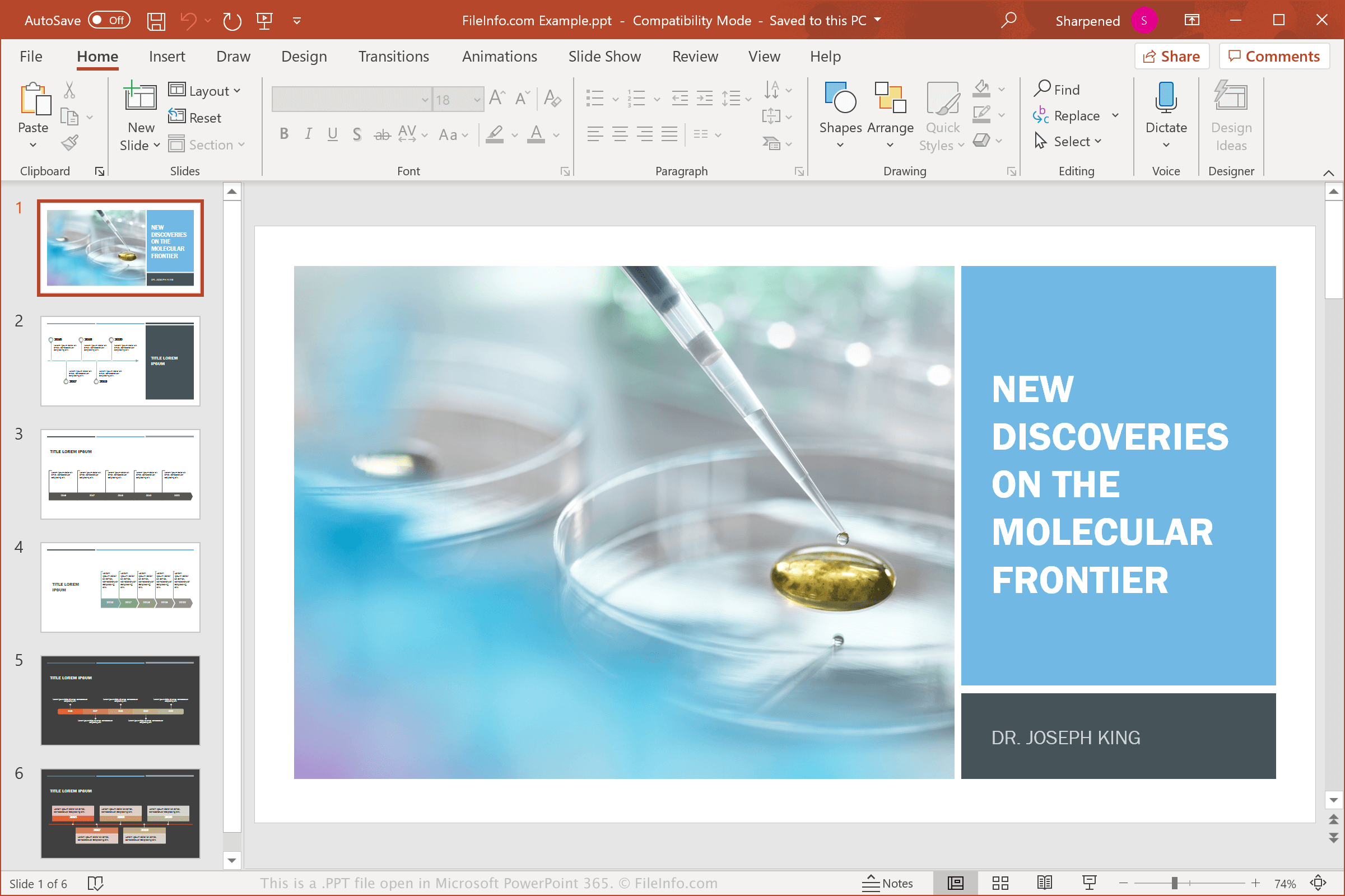
在 Microsoft PowerPoint 365 中打开的 .ppt 文件截图
在 Microsoft PowerPoint 365 中打开的 PPT 文件

When creating, saving, and presenting presentations, you may encounter PPT files in home, school, and business environments. Microsoft introduced the PowerPoint Presentation (PPT) binary format in 1987 when it released PowerPoint. PPT was the primary file type used to save PowerPoint presentations until Microsoft replaced it in PowerPoint 2007 with the Open XML Presentation (.PPTX) file format.

While you will most likely see PPTX files more often than PPT files, some users with older versions of PowerPoint may still save their presentations as PPT files. In addition, you may receive PPT files from friends, family members, or co-workers via email or download them from a website or cloud storage service.

常见 .PPT 文件名

Presentation1.ppt - The default filename Microsoft PowerPoint gives to new presentations prior to PowerPoint 2007, which now uses Presentation1.pptx.

如何打开 PPT 文件

You can open PPT files with Microsoft PowerPoint in Windows and macOS. PowerPoint is the best application for opening PPT files because it fully supports the formatting of the presentations, including the placement of text, slide transitions and effects, and images and shapes in the presentation. PowerPoint is also available for Android and iOS devices.

Many presentation programs can open and edit PPT files, but they may not fully support the formatting of the presentation files. Alternative programs include Corel Presentations (Windows), Apple Keynote (Mac), and Apache OpenOffice Impress (multiplatform). If you are a Mac user simply looking to view a PPT file, you can use Apple Preview, which comes bundled with macOS.

You can also open PPT files with various web programs. For example, Google Slides is a free option you can access with a Google account. The web tool allows you to upload a PPT file and view, edit, save, and convert the presentation.

如何转换 PPT 文件

Many presentation applications, including Microsoft PowerPoint, Corel Presentations, and LibreOffice Impress, can convert PPT files to other formats.

For example, select File → Save As in the Windows and Mac versions of Microsoft PowerPoint to convert PPT files to one of the following formats:

  • .PPTX - Microsoft PowerPoint Presentation
  • .PDF - Portable Document Format
  • .ODP - OpenDocument Presentation
  • .XPS - XML Paper Specification (Windows only)
  • .MP4 - MPEG-4 Video
  • .WMV - Windows Media Video
  • .JPEG - JPEG Image
  • .PNG - Portable Network Graphic
  • .GIF - Graphical Interchange Format (Animated)
  • .TIF - Tagged Image File Format
  • .SVG - Scalable Vector Graphics
  • .RTF - Rich Text Format

可打开 PPT 文件的程序

分类: 数据
更新时间: 2022-06-07

验证者 FileInfo.com

FileInfo.com 团队 独立研究了本页面列出的 Microsoft PowerPoint Presentation (Legacy) 文件格式和 Mac, Windows, Linux, Android, and iOS 应用。 我们的目标是达到 100% 的准确率,并且仅发布我们已验证过的文件类型信息。

如果您想为此页面提出新增或更新建议,请告诉我们