.PPP 文件扩展名

Serif PagePlus Document

开发者 Serif
受欢迎程度
3.0  |  45 
 

什么是 PPP 文件?

A PPP file is a document created by Serif PagePlus, a British desktop publishing program for Windows. It may contain text, images, charts, tables, and multiple pages. The PPP file format was discontinued in 2017, when Serif replaced PagePlus with Affinity Publisher.

更多信息

Serif PagePlus was a long-running desktop publishing program available for Windows. Serif released the first version of PagePlus in 1990.

Throughout its many versions, PagePlus saved users' documents as PPP files. The PPP format changed over time, making some versions of PPP files incompatible with some versions of PagePlus. However, every PPP file contains some sort of document created using a version of PagePlus, such as a report, flyer, or manuscript. PagePlus users can also export PPP files as .PDF files, email messages, and webpages.

Serif released the last version of PagePlus, PagePlus X9, in November 2015. In 2017, Serif replaced PagePlus with a new desktop publishing program, named Affinity Publisher.

How do I transfer my PPP files to Affinity Publisher?

There is no easy way to import PagePlus PPP files into Affinity Publisher. Serif recommends that users either:

  • Copy the contents of their PPP file, create a new Affinity Publisher document, and paste the PPP file's contents into the Affinity Publisher document
  • Export the PPP file from PagePlus as a .PDF file, then import the PDF into Affinity Publisher

如何打开 PPP 文件

You can open a PPP file in Serif PagePlus (Windows). Serif still hosts downloads for PagePlus X9 on its website, which you can access using the link below. However, note that you will need a valid product key to install PagePlus X9.

使用File Viewer Plus打开 400 多种文件格式。免费下载

可打开 PPP 文件的程序

Windows

PhotoPad Project

开发者 NCH Software
受欢迎程度
4.0  |  3 
 

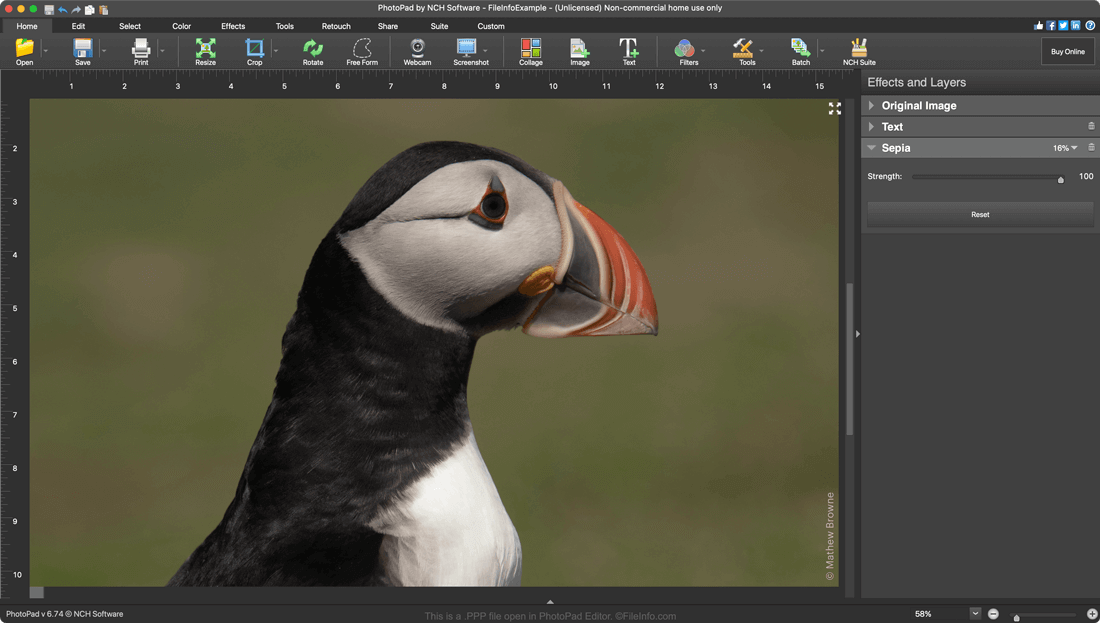
A PPP file is an image file created in NCH Software PhotoPad Editor. It contains an image edited in PhotoPad, as well as a record of the layers, adjustments, and other edits made to that image. PPP files can be used to export images to many common image and image editing project formats, including .JPG, .PNG, .TIFF, .GIF, and .PSD.

更多信息

在 PhotoPad Photo Editor 中打开的 .ppp 文件截图
在 PhotoPad Photo Editor 中打开的 PPP 文件

PhotoPad Editor is a multi-platform image editing program that allows photographers and graphic designers to make non-destructive, layer-based edits to their images. Editors can enhance their images, add graphic design elements, and remove unwanted imperfections before exporting the image in one of many common image formats.

When a PhotoPad user saves an in-progress image editing project, it is saved in a PPP file. PPP files contain not only a user's edited image but a record of the edits that have been made to the image. That way, if a user saves, closes, and re-opens an image, they can continue to adjust their previous edits. For example, if a user adds a text layer to an image before saving the image as a PPP file and closing PhotoPad, they'll still be able to adjust that layer after re-opening their PPP file.

如何打开 PPP 文件

You can open a PPP file (PhotoPad Project) in PhotoPad Photo Editor (Windows, Mac, and Android). To do so, open PhotoPad and select File → Open... from the program's menu bar.

可打开 PPP 文件的程序

验证者 FileInfo.com

FileInfo.com 团队 独立研究了本页面列出的所有文件格式和软件程序。 我们的目标是达到 100% 的准确率,并且仅发布我们已验证过的文件类型信息。

如果您想为此页面提出新增或更新建议,请告诉我们